Getting Started – ADVANCED –
masterpage:Right
specdef v20060111
filename[G:\FM\Sony\0508\3212589121\3212589121DAVIS10\gb05gsa.fm]
model name [DAV-IS10]
[3-212-589-12(1)]
25
US
You can enjoy other components.
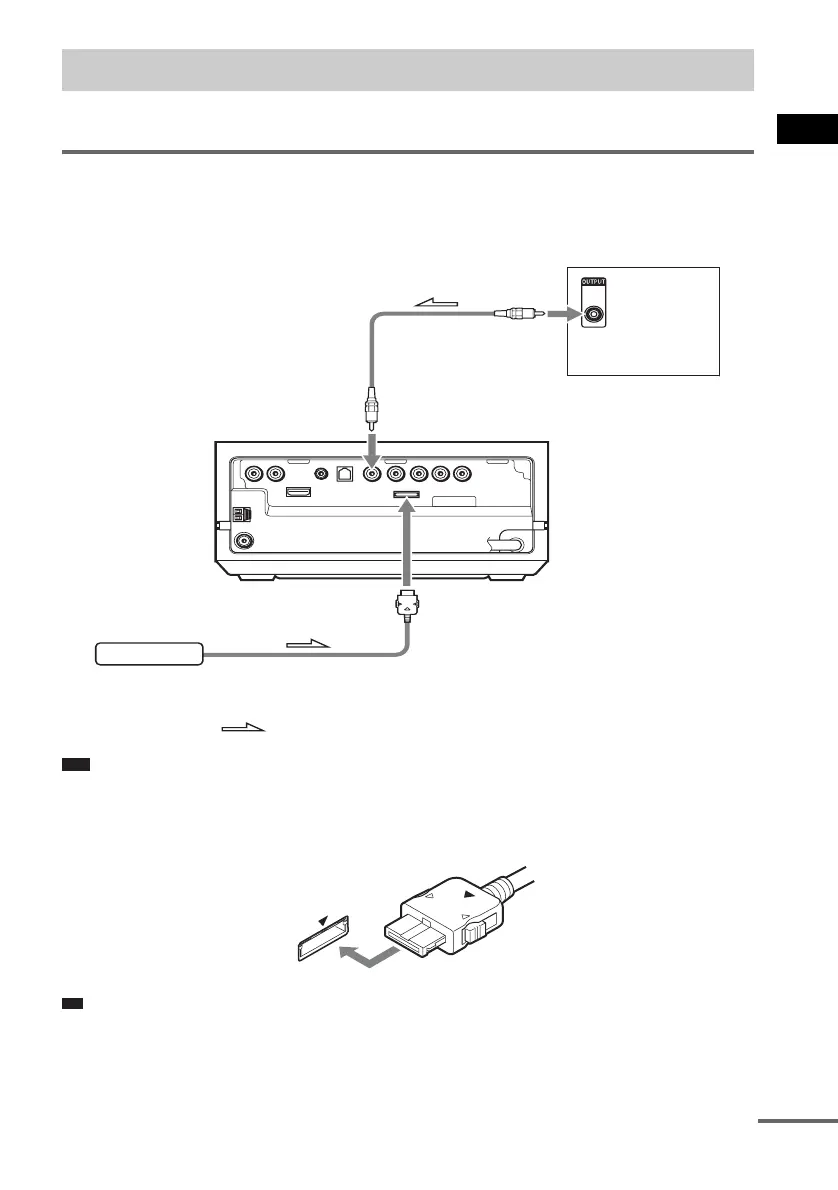
Connecting the system and the other component
Outputs the other component through the speakers of this system.
Note
• Do not connect or disconnect the DIGITAL MEDIA PORT adapter to/from the control unit while the system is
turned on.
• When connecting the DIGITAL MEDIA PORT adapter, be sure to match the V marks.
.
Ti
• You can assign a digital sound input corresponding with the function “TV” and “SAT/CABLE.” For details, see
[DIGITAL IN] (page 91).
Connecting Other Components
COAXIAL
DIGITAL
OUT
DMPORT
DIGITAL MEDIA
PORT adapter
To SAT/CABLE
(DIGITAL IN COAXIAL) jack
: Signal flow
Rear of the
control unit
To DMPORT jack
To the digital
coaxial output jack
VCR, digital satellite
receiver, etc.
cont
nue



 To Next Page