74
DCR-HC32/HC42 2-584-906-11(1)
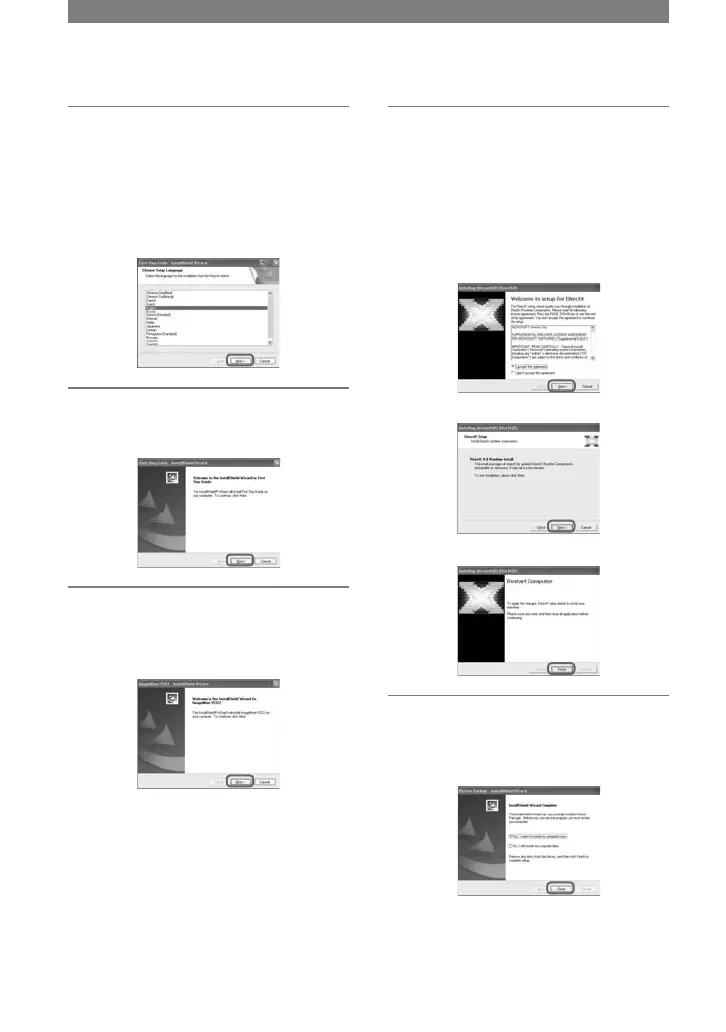
10 Select the language for “First
Step Guide” to be installed, then
click [Next].
Depending on the computer, this screen
may not be displayed. In such a case,
skip to step 12.
11 Click [Next] to install the “First
Step Guide”.
12 Click [Next], then follow the
on-screen instructions to install
ImageMixer VCD2.
13 If the [Installing Microsoft (R)
DirectX(R)] screen is displayed,
follow the steps below to install
DirectX 9.0c. If not, skip to step
14.
Read [License Agreement], then click
[Next].
Click [Next].
Click [Finish].
14 Make sure [Yes, I want to restart
my computer now.] is checked,
then click [Finish].
Installing the software and
“First Step Guide” on a computer
(continued)



 To Next Page