180
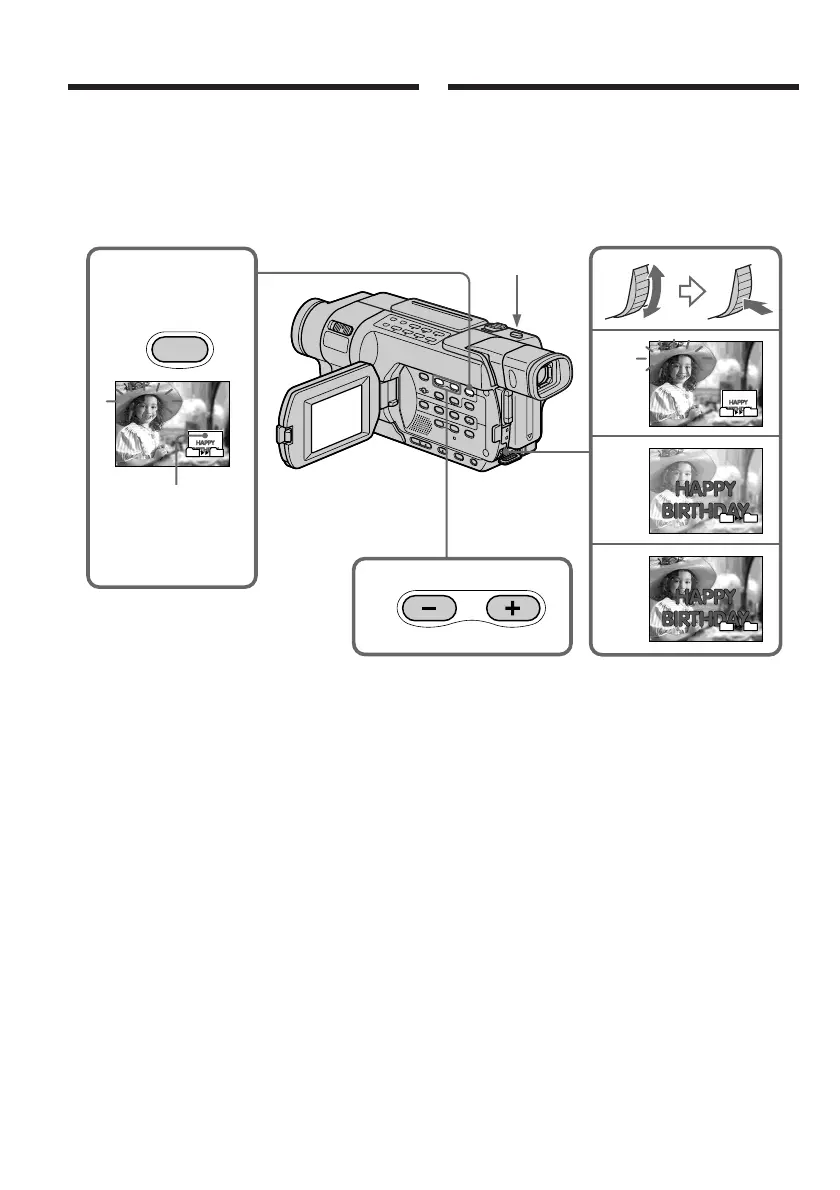
To change the still image to
superimpose
Do either of the following:
– Press MEMORY+/– before step (7).
– Press the SEL/PUSH EXEC dial before step (7),
and repeat the procedure from step (3).
To change the mode setting
Press the SEL/PUSH EXEC dial before step (7),
and repeat the procedure from step (4).
To cancel MEMORY MIX
Press MEMORY MIX.
2
4
5
6
M. CHROM
M. LUMI
M. LUMI
M. LUMI
III••••
I••••••
101–0021
101–0021
3
101–0021
101–0021
MEMORY
MIX
101
101
101
101
101
101
101
101
Still image/
Image fixe
Superimposing a still image in
the “Memory Stick” on an image
– MEMORY MIX
(7) Press PHOTO deeply to start recording.
The image displayed on the screen will be
recorded on a “Memory Stick.” Recording is
complete when the bar scroll indicator
disappears.
PHOTO
(7) Pour lancer l’enregistrement, appuyez à fond
sur PHOTO.
L’image affichée à l’écran est enregistrée sur
le “Memory Stick”. L’enregistrement est
terminé lorsque l’indicateur en forme de barre
disparaît.
Superposition d’une image fixe
d’un “Memory Stick” sur une image
– MEMORY MIX
Pour changer l’image fixe à
superposer
Suivez l’une des procédures suivantes :
– Appuyez sur MEMORY+/– avant l’étape (7).
– Appuyez sur la molette SEL/PUSH EXEC
avant l’étape (7) et répétez la procédure depuis
l’étape (3).
Pour changer le réglage de mode
Appuyez sur la molette SEL/PUSH EXEC avant
l’étape (7) et répétez la procédure depuis l’étape
(4).
Pour annuler MEMORY MIX
Appuyez sur MEMORY MIX.







 To Next Page