83
Advanced Recording Operations Opérations d’enregistrement avancées
You can digitally process pictures to obtain
special effects like those in films or on TV.
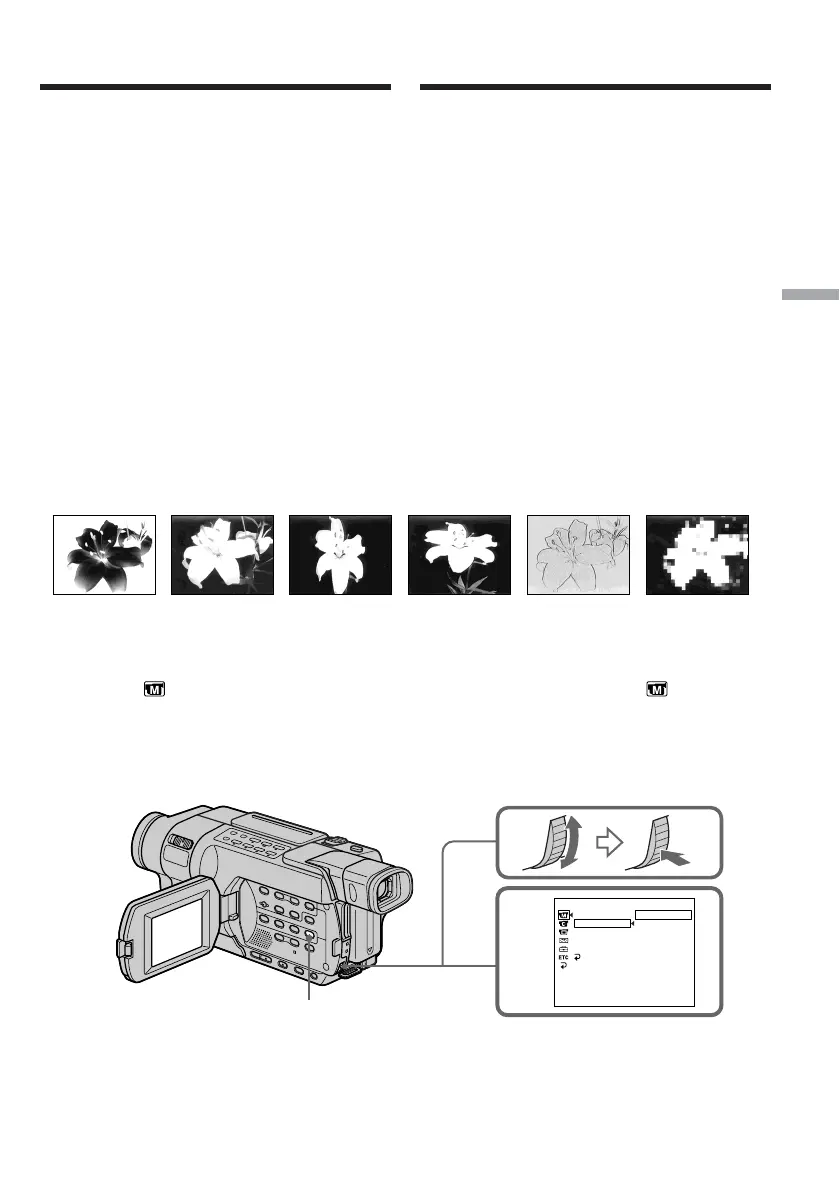
NEG. ART [a] : The colour and brightness of the
picture are reversed.
SEPIA : The picture appears in sepia.
B&W : The picture appears in
monochrome (black-and-white).
SOLARIZE [b] : The picture appears as an
illustration with strong contrast.
SLIM [c] : The picture expands vertically.
STRETCH [d] : The picture expands
horizontally.
PASTEL [e] : The picture appears as a pale
pastel drawing.
MOSAIC [f] : The picture appears mosaic.
(1) In CAMERA mode, press MENU to display
the menu settings.
(2) Turn the SEL/PUSH EXEC dial to select P
EFFECT in , then press the dial (p. 265).
(3) Turn the SEL/PUSH EXEC dial to select the
desired picture effect mode, then press the
dial.
Using special effects
– Picture effect
[a] [b] [c] [d] [e] [f]
2
MANUAL SET
.
TRAGEN
AIPES
W
&
B
EZIRALOS
MILS
HCTERTS
LETSAP
CIASOM
[
MENU
]
:
END
PROGRAM AE
P EFFECT
D EFFECT
FLASH MODE
AUTO SHTR
RETURN
OFF
MENU
Vous pouvez traiter numériquement les images
pour obtenir des effets spéciaux similaires à ceux
des films ou des émissions télévisées.
NEG. ART [a] : La couleur et la luminosité de
l’image sont inversées.
SEPIA : L’image est de couleur sépia.
B&W : L’image devient monochrome
(noir et blanc).
SOLARIZE [b] : Le contraste est plus marqué et
l’image ressemble à une
illustration.
SLIM [c] : L’image est allongée
verticalement.
STRETCH [d] : L’image est allongée
horizontalement.
PASTEL [e] : L’image ressemble à un dessin au
pastel pâle.
MOSAIC [f] : L’image apparaît en mosaïque.
(1) En mode CAMERA, appuyez sur MENU pour
afficher les réglages de menu.
(2) Tournez la molette SEL/PUSH EXEC pour
sélectionner P EFFECT dans , puis
appuyez sur la molette (p. 279).
(3) Tournez la molette SEL/PUSH EXEC pour
sélectionner le mode d’effet d’image souhaité,
puis appuyez sur la molette.
Utilisation d’effets
spéciaux – Effet d’image










 To Next Page