77
Advanced Recording Operations Opérations d’enregistrement avancées
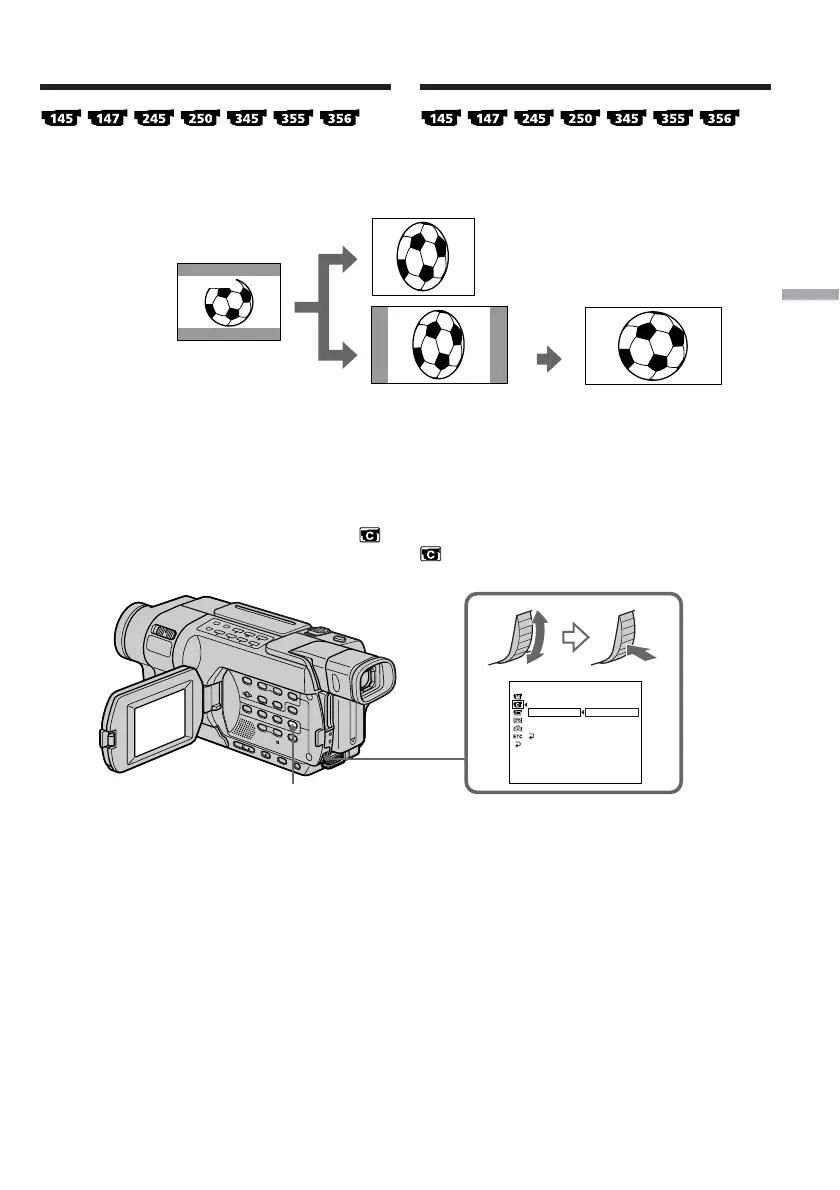
Using the wide mode
You can record a 16:9 wide picture to watch on
the 16:9 wide-screen TV (16:9WIDE).
[a]: Recording in the 16:9WIDE mode
[b]: Playback on a normal TV
[c]:Playback on a wide TV in the normal screen
mode
[d]: Full screen mode on a wide TV
In the standby mode, set 16:9WIDE to ON in
in the menu settings (p. 266).
[a]
[c]
[b]
16:9
WIDE
[d]
16:9WIDE
CAMERA SET
SELFT
I
MER
D ZOOM
16:9W
I
DE
STEADYSHOT
N.S.LIGHT
RETURN
OFF
ON
[
MENU
]
:
END
MENU
Utilisation du mode Grand écran
Vous pouvez faire des prises de vues en format
16:9 que vous pourrez ensuite visionner sur un
téléviseur grand écran 16:9 (16:9WIDE).
[a]:Enregistrement en mode 16:9WIDE
[b]:Lecture sur un téléviseur normal
[c]:Lecture sur un téléviseur grand écran en
mode écran normal
[d]:Mode Grand écran sur un téléviseur grand
écran
En mode d’attente, réglez 16:9WIDE sur ON dans
, dans les réglages de menu (p. 280).












 To Next Page