229
Viewing Images on Your Computer Visionnage d’images sur votre ordinateur
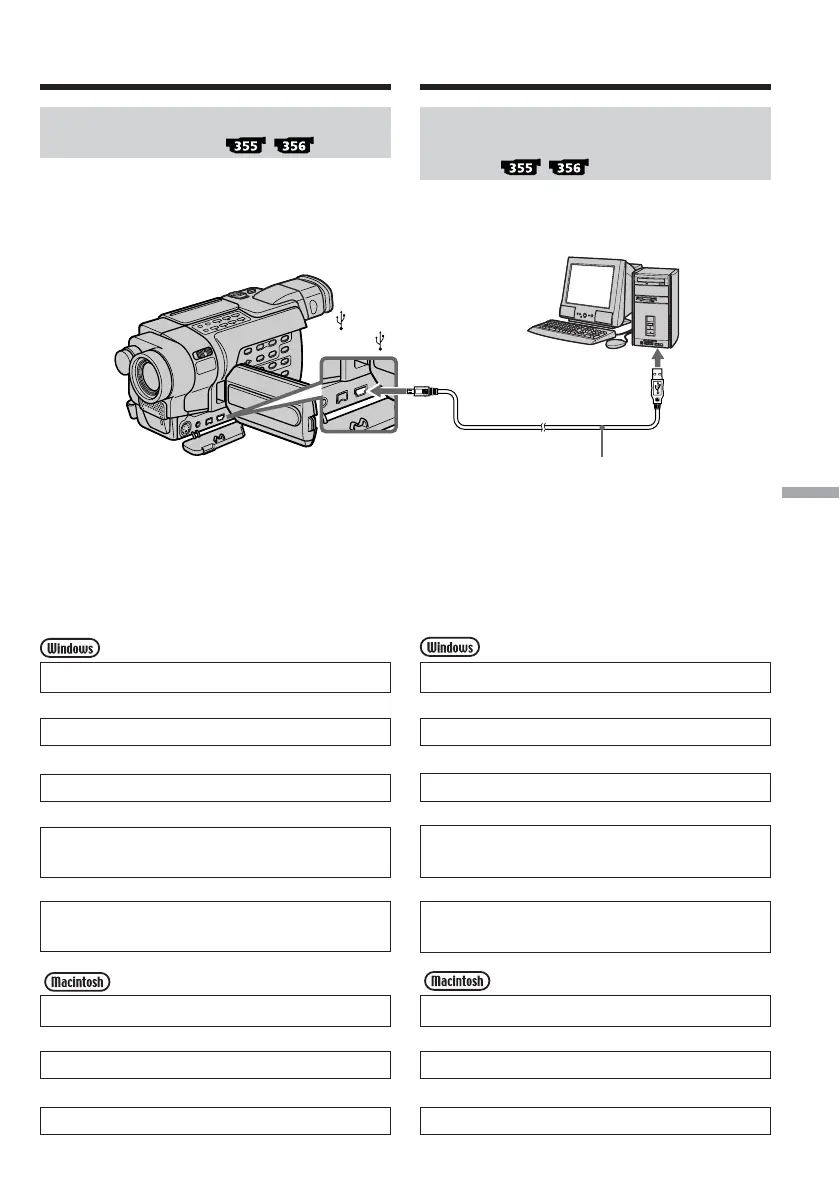
Viewing images on your
computer – Introduction
Viewing images recorded on a
“Memory Stick”
When connecting to a computer
using the USB cable
You can also use a Memory Stick Reader/Writer
(optional).
Follow the instructions in order
described below
System requirements (p. 233)
r
Installing the USB driver (p. 234)
r
Installing Image Transfer (p. 235)
r
Making the computer recognise the camcorder
(p. 238)
r
Viewing images with Image Transfer (p. 251)
Viewing images without Image Transfer (p. 252)
System requirements (p. 256)
r
Installing the USB driver (p. 257)
r
Viewing images (p. 259)
Push into the end/
Insérer jusqu’au bout
(USB) jack/
Prise (USB)
Visionnage d’images
enregistrées sur un “Memory
Stick”
Lors du raccordement à un
ordinateur à l’aide du câble USB
Vous pouvez également utiliser un lecteur/
enregistreur de Memory Stick (en option).
Suivez les instructions dans l’ordre
indiqué ci-dessous
Caractéristiques du système (p. 233)
r
Installation du pilote USB (p. 234)
r
Installation de Image Transfer (p. 235)
r
Détection du caméscope par l’ordinateur
(p. 238)
r
Visionnage d’image avec Image Transfer (p. 251)
Affichage d’images sans Image Transfer (p. 252)
Caractéristiques du système (p. 256)
r
Installation du pilote USB (p. 257)
r
Visionnage d’images (p. 259)
Visionnage d’images sur votre
ordinateur – Introduction
USB connector/
Connecteur USB
USB cable (supplied)/
Câble USB (fourni)



 To Next Page