21
GB
Getting Started
HDMI is the abbreviated name for High-
Definition Multimedia Interface. It is an
interface which transmits video and audio
signals in digital format.
Notes
• Be sure to change the factory setting of the DVD
input button on the remote so that you can use the
button to control your DVD player. For details, see
“Changing button assignments” (page 72).
• You can also rename the DVD input so that it can
be displayed on the receiver’s display. For details,
see “Naming inputs” (page 69).
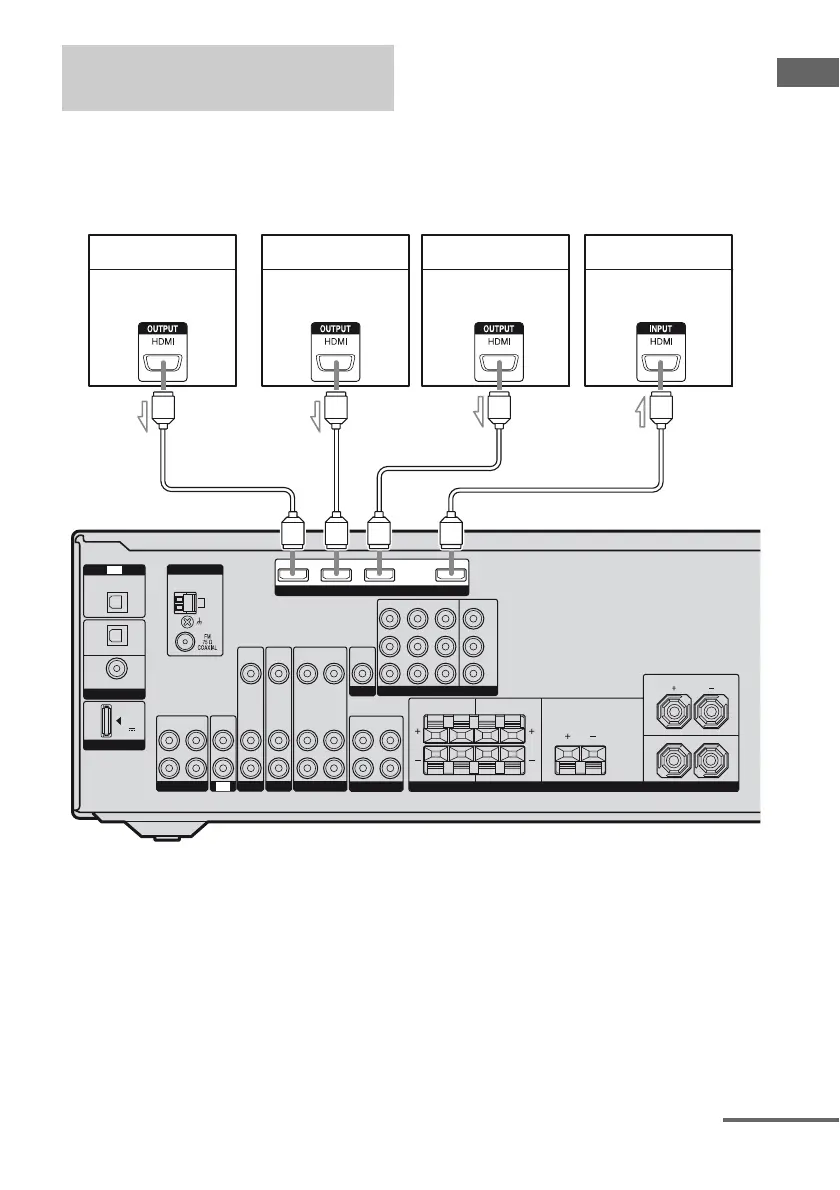
Connecting components with
HDMI jacks
VIDEO
OUT
SAT IN
DVD IN VIDEO 1 IN MONITOR OUT
VIDEO
IN
AUDIO
OUT
AUDIO
IN
VIDEO
IN
AUDIO
IN
VIDEO
IN
AUDIO
IN
AUDIO
OUT
SUBWOOFER
Y
P
B
/
C
B
P
R
/
C
R
SURROUND
FRONT: ONLY FOR SS-MSP5000
CENTER: ONLY FOR SS-CNP5000
SURROUND: ONLY FOR SS-SRP5000
SURROUND BACK CENTER
LRLR
FRONT
L
R
SPEAKERS
AM
ANTENNA
L
R
L
R
SA-CD
/
CD
/
CD-R
ININOUT
SAT DVD VIDEO 1
VIDEO
OUT
MONITOR
COMPONENT VIDEO
DIGITAL
(ASSIGNABLE)
OPTICAL
OPTICAL
SAT
IN
DVD
IN
COAXIAL
IN
TV
DMPORT
DC5V
0.7A MAX
HDMI
TV
SAT IN DVD IN BD IN OUT
DVD player Blu-ray disc player TV, projector, etc.
Audio/video
signals
Audio/video
signals
Audio/video
signals
AAAA
A HDMI cable (not supplied)
We recommend that you use a Sony HDMI cable.
Satellite tuner
Audio/video
signals
continued



 To Next Page