24
GB
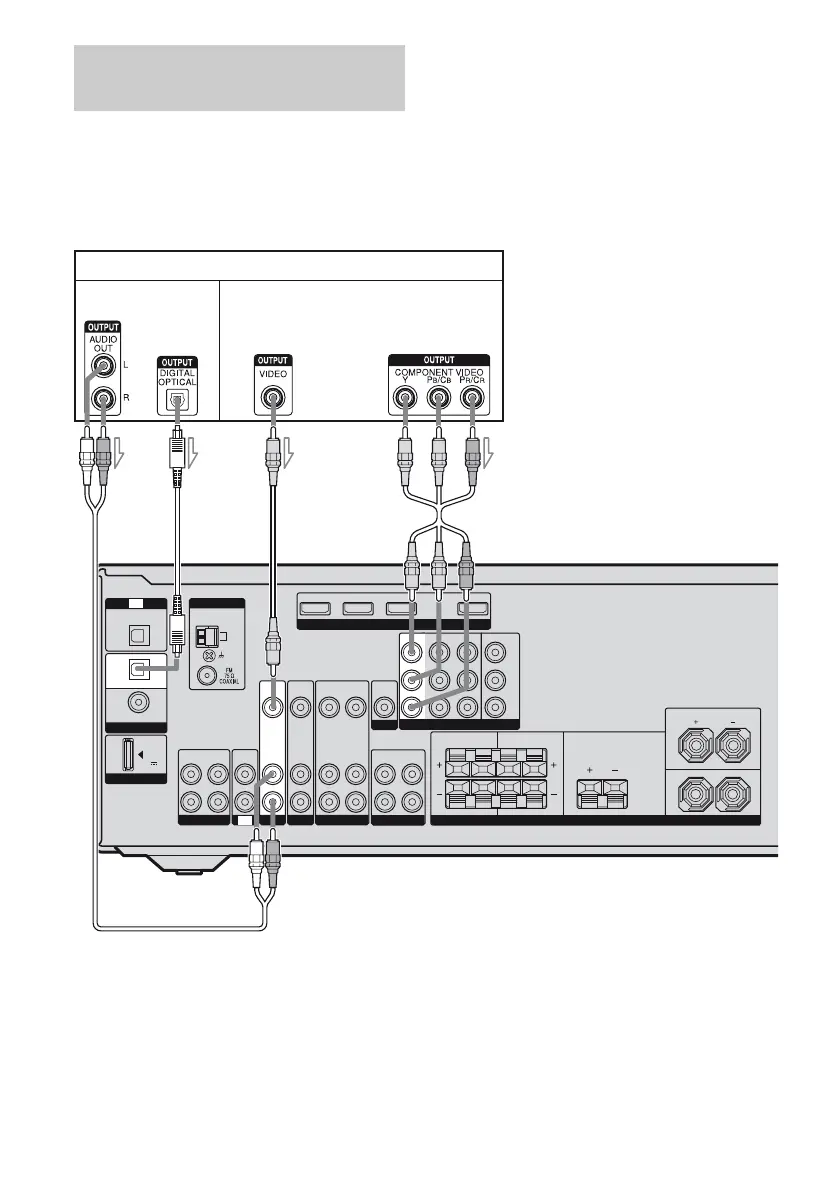
The following illustration shows how to
connect a satellite tuner or set-top box.
It is not necessary to connect all the cords.
Connect audio and video cords according to
the jacks of your components.
Notes
• When connecting optical digital cords, insert the
plugs straight in until they click into place.
• Do not bend or tie optical digital cords.
Tip
All the digital audio jacks are compatible with
32 kHz, 44.1 kHz, 48 kHz, and 96 kHz sampling
frequencies.
Connecting a satellite tuner/
Set-top box
VIDEO
OUT
MONITOR OUT
VIDEO
IN
AUDIO
OUT
AUDIO
IN
AUDIO
IN
AUDIO
OUT
SUBWOOFER
Y
P
B
/
C
B
P
R
/
C
R
SURROUND
FRONT: ONLY FOR SS-MSP5000
CENTER: ONLY FOR SS-CNP5000
SURROUND: ONLY FOR SS-SRP5000
SURROUND BACK CENTER
LRLR
FRONT
L
R
SPEAKERS
AM
ANTENNA
L
R
L
R
SA-CD
/
CD
/
CD-R
ININOUT
DVD VIDEO 1
VIDEO
OUT
MONITOR
COMPONENT VIDEO
DIGITAL
(ASSIGNABLE)
OPTICAL
OPTICAL
SAT
IN
DVD
IN
COAXIAL
IN
TV
DMPORT
DC5V
0.7A MAX
HDMI
TV
VIDEO
IN
SAT IN DVD IN BD IN OUT
AUDIO
IN
COMPONENT VIDEO
SAT IN VIDEO 1 INDVD IN
SAT
VIDEO
IN
BA
Audio signals
Video signals
C
Satellite tuner/Set-top box
D
A Audio cord (not supplied)
B Optical digital cord (not supplied)
C Video cord (not supplied)
D Component video cord (not supplied)



 To Next Page