5
GB
Getting Started
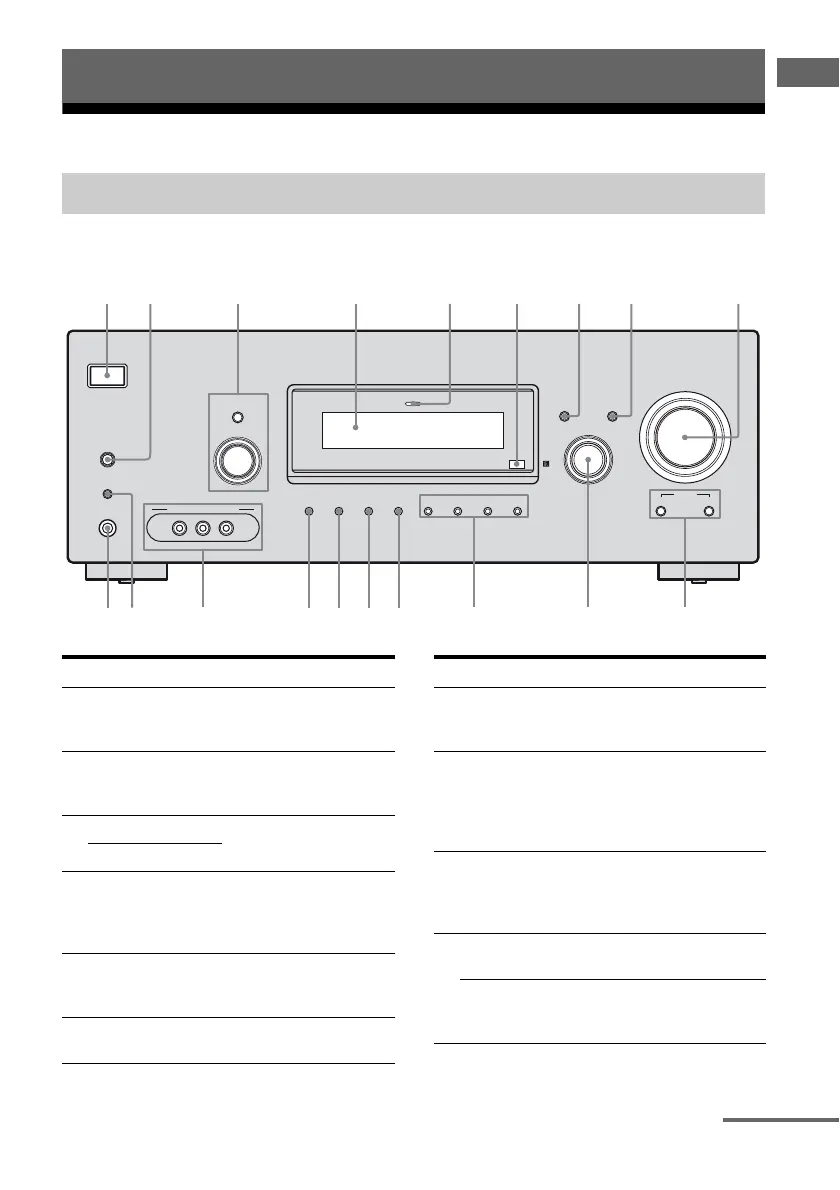
Description and location of parts
Front panel
Getting Started
Receiver
?/1
AUTO CAL MIC
AUTO CAL
TUNING MODE
TUNING
– +
PHONES
MEMORY/
ENTER SLEEPDIMMER
MULTI CHANNEL DECODING
SUR BACK
DECODING
2CH A.F.D. MOVIE MUSIC
MODE SPEED
X-ROUND
DISPLAY INPUT MODE
INPUT SELECTOR
MASTER VOLUME
VIDEO 2 IN/PORTABLE AV IN
VIDEO L AUDIO R
q;
l
qaqsqjqk
2
qdqfqgqh
Name Function
A ?/1
(on/standby)
Press to turn the receiver
on or off (page 29, 37, 38,
55, 72).
B AUTO CAL Press to activate the Auto
Calibration function (page
31).
C TUNING MODE Press or turn to operate the
tuner (FM/AM) (page 55).
TUNING +/–
D Display The current status of the
selected component or a
list of selectable items
appears here (page 7).
E MULTI CHANNEL
DECODING
lamp
Lights up when multi
channel audio signals are
decoded (page 38).
F Remote sensor Receives signals from
remote commander.
Name Function
G DISPLAY Press to select information
displayed on the display
(page 69, 70).
H INPUT MODE Press to select the input
mode when the same
components are connected
to both digital and analog
jacks (page 65).
I MASTER
VOLUME
Turn to adjust the volume
level of all speakers at the
same time (page 34, 35,
37, 38).
J X-ROUND MODE Press to select the X-
ROUND mode (page 68).
X-ROUND
SPEED
Press to adjust the speed of
the X-ROUND effect
(page 69).
continued



 To Next Page