67
GB
Other Operations
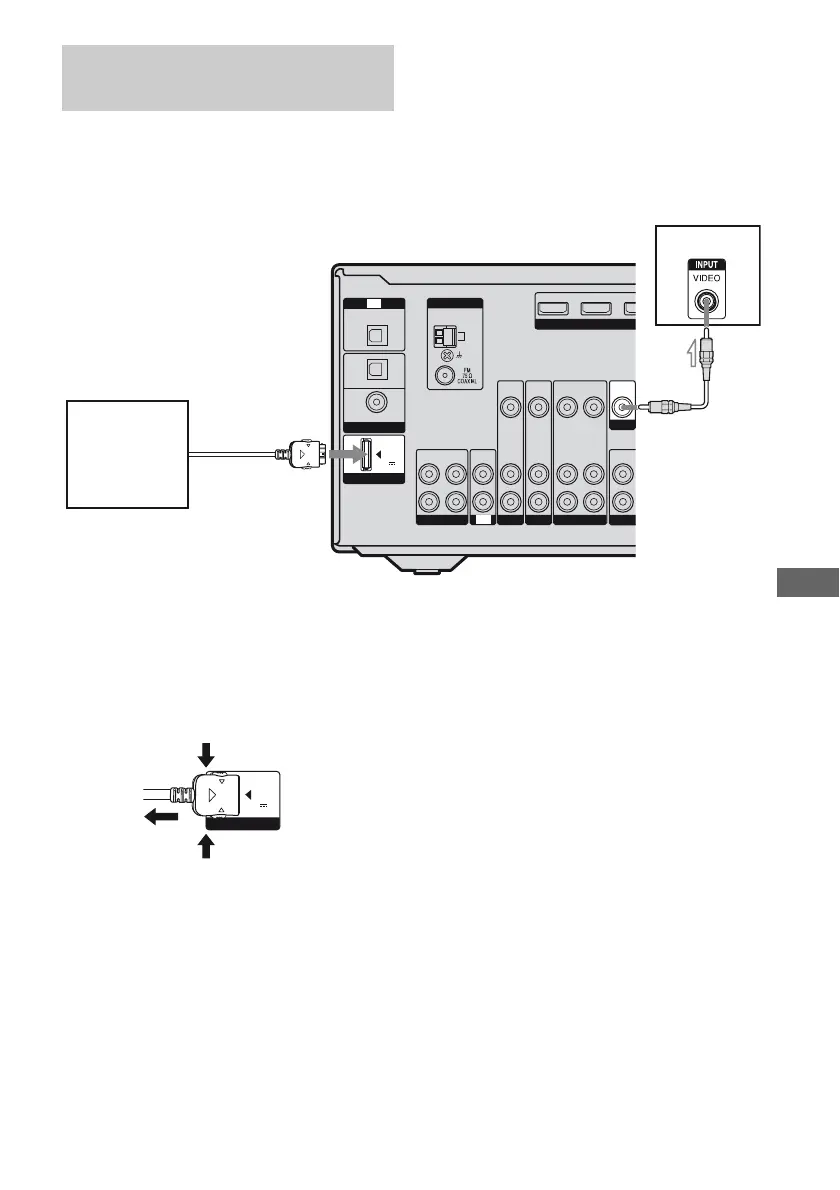
You can listen to the sound and view the
images from the component connected
through the DIGITAL MEDIA PORT adapter
to the DMPORT jack on the receiver.
To detach the DIGITAL MEDIA
PORT adapter from DMPORT
jack
Press and hold both sides of the connector and
then pull out the connector.
Notes
• When connecting the DIGITAL MEDIA PORT
adapter, be sure the connector is inserted with the
arrow mark facing toward the arrow mark on the
DMPORT jack.
• Be sure to make DMPORT connections firmly,
insert the connector straight in.
• As the connector of the DIGITAL MEDIA PORT
adapter is fragile, be sure to handle with care when
placing or moving the receiver.
Connecting the DIGITAL MEDIA
PORT adapter
VIDEO
OUT
VIDEO
IN
AUDIO
OUT
AUDIO
IN
VIDEO
IN
AUDIO
IN
VIDEO
IN
AUDIO
IN
AU
O
SUBW
AM
ANTENNA
L
R
SA-CD
/
CD
/
CD-R
ININOUT
SAT DVD VIDEO 1
DIGITAL
(ASSIGNABLE)
OPTICAL
OPTICAL
SAT
IN
DVD
IN
COAXIAL
IN
TV
DC5V
0.7A MAX
HD
SAT IN DVD IN
DMPORT
TV
VIDEO
OUT
MONITOR
A
TV
DIGITAL MEDIA
PORT adapter
A Video cord (not supplied)
DMPORT
DC5V
0.7A MAX
2
1



 To Next Page