29
GB
Getting Started
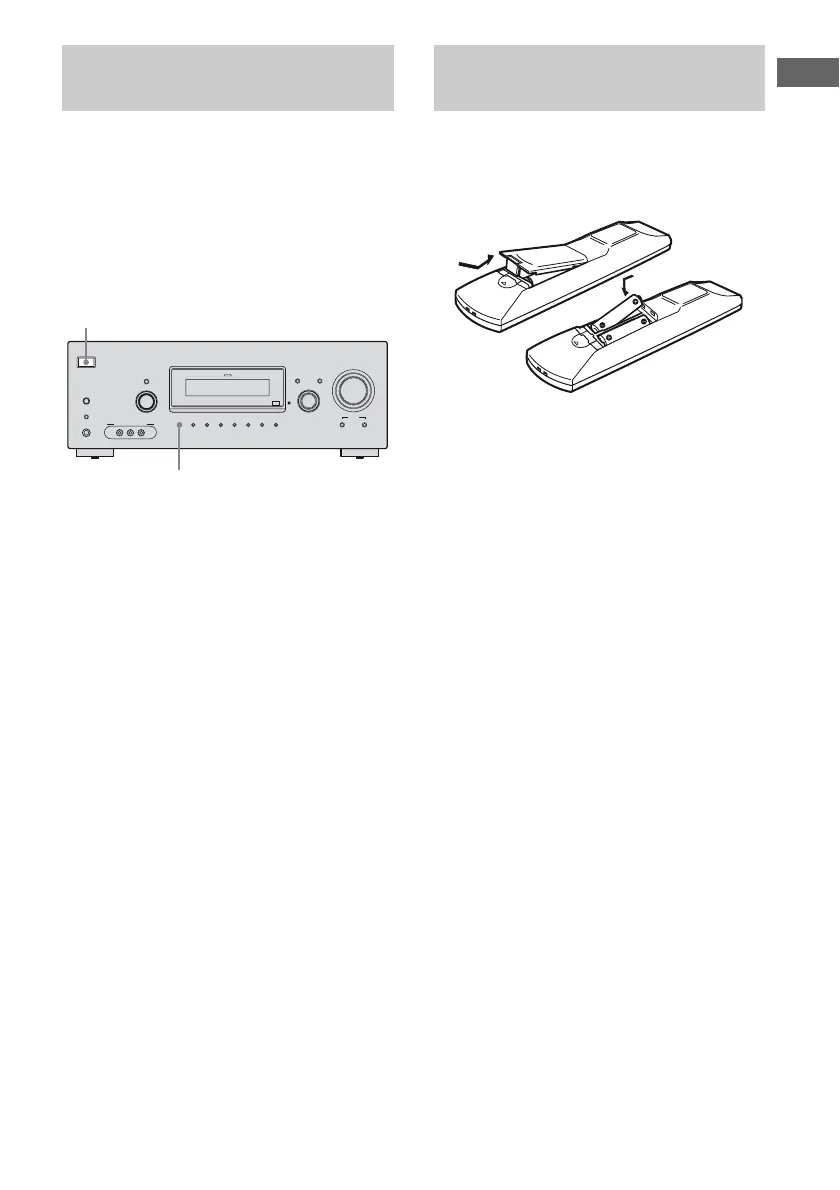
Before using the receiver for the first time,
initialize the receiver by performing the
following procedure. This procedure can also
be used to return settings you have made to
their factory defaults.
Be sure to use the buttons on the receiver for
this operation.
1 Press ?/1 to turn off the
receiver.
2 Hold down ?/1 for 5 seconds.
“PUSH” and “ENTER” appears on the
display alternately.
3 Press MEMORY/ENTER.
After “CLEARING” appears on the
display for a while, “CLEARED”
appears.
All the settings you have changed or
adjusted are reset to the initial settings.
Insert two R6 (size-AA) batteries in the
RM-AAU023 Remote Commander.
Observe the correct polarity when installing
batteries.
Notes
• Do not leave the remote in an extremely hot or
humid place.
• Do not use a new battery with old ones.
• Do not mix manganese batteries and other kinds of
batteries.
• Do not expose the remote sensor to direct sunlight
or lighting apparatuses. Doing so may cause a
malfunction.
• If you do not intend to use the remote for an
extended period of time, remove the batteries to
avoid possible damage from battery leakage and
corrosion.
• When you replace the batteries, the remote buttons
may be reset to their factory settings. If this
happens, reassign the buttons again (page 72).
Tip
Under normal conditions, the batteries should last
for about 3 months. When the remote no longer
operates the receiver, replace all the batteries with
new ones.
Performing initial setup
operations
?/1
AUTO CAL MIC
AUTO CAL
TUNING MODE
TUNING
– +
PHONES
MEMORY/
ENTER
SLEEPDIMMER
MULTI CHANNEL DECODING
SUR BACK
DECODING
2CH A.F.D. MOVIE MUSIC
MODE SPEED
X-ROUND
DISPLAY INPUT MODE
INPUT SELECTOR
MASTER VOLUME
VIDEO 2 IN/PORTABLE AV IN
VIDEO L AUDIO R
1,2
3
Inserting batteries into the
remote



 To Next Page