[] Connecting the printer
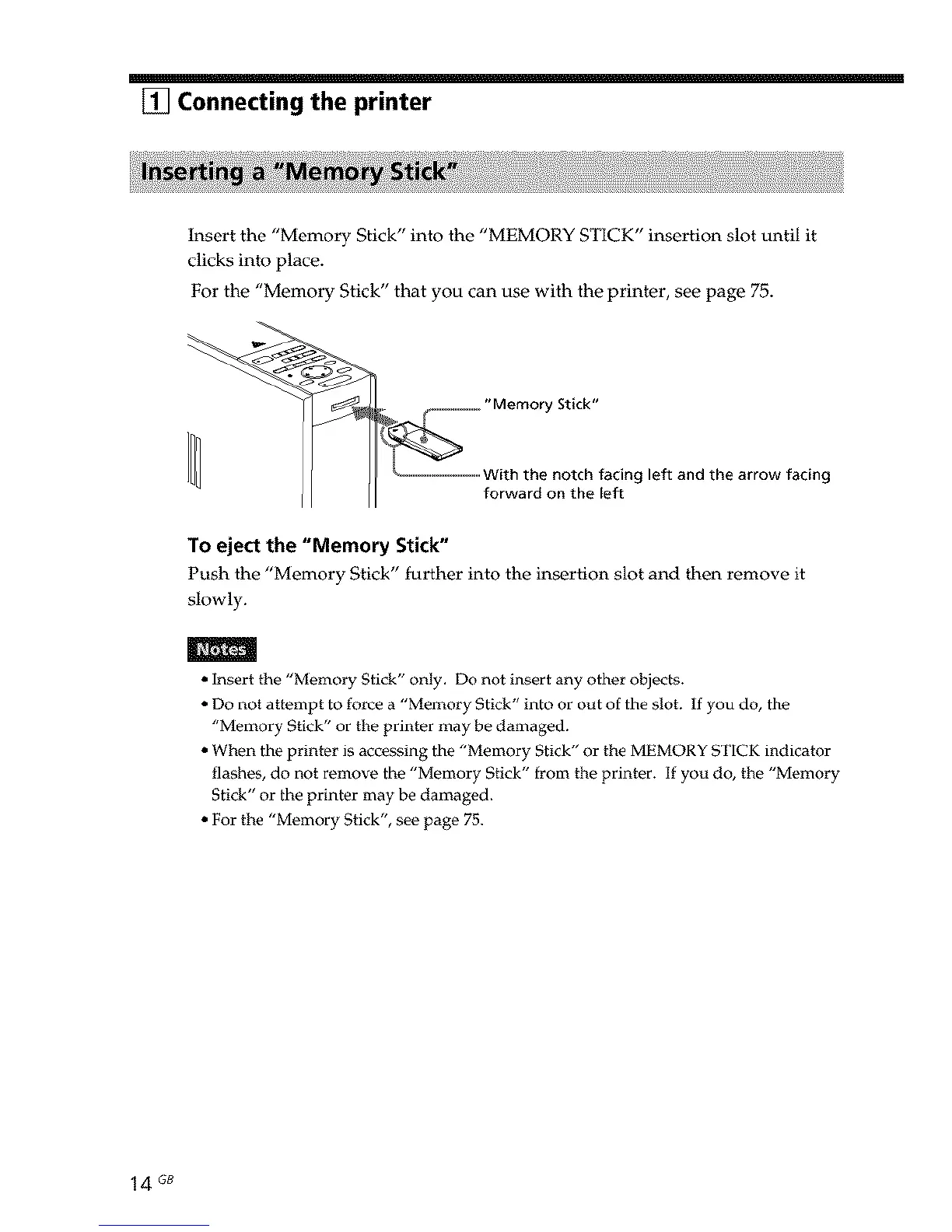
Insert the "Memory Stick" into the "MEMORY STICK" insertion slot until it
clicks into place.
For the "Memory Stick" that you can use with the printer, see page 75.
_.......... "Memory Stick"
................. With the notch facing left and the arrow facing
forward on the [eft
To eject the "Memory Stick"
Push the "Memory Stick" further into the insertion slot and then remove it
slowly.
m
• Insert the "Memory Stick" only. Do not insert any other objects.
• Do not attempt to force a "Memory Stick" into or out of the slot. If you do, the
"Memory Stick" or the printer may be damaged.
• When the printer is accessing the "Memory Stick" or the MEMORY STICK indicator
flashes, do not remove the "Memory Stick" from the printer. If you do, the "Memory
Stick" or the printer may be damaged.
• For the "Memory Stick", see page 75.
14 GB



 To Next Page