Identifying the parts
For details, see the pages indicated in
the parentheses.
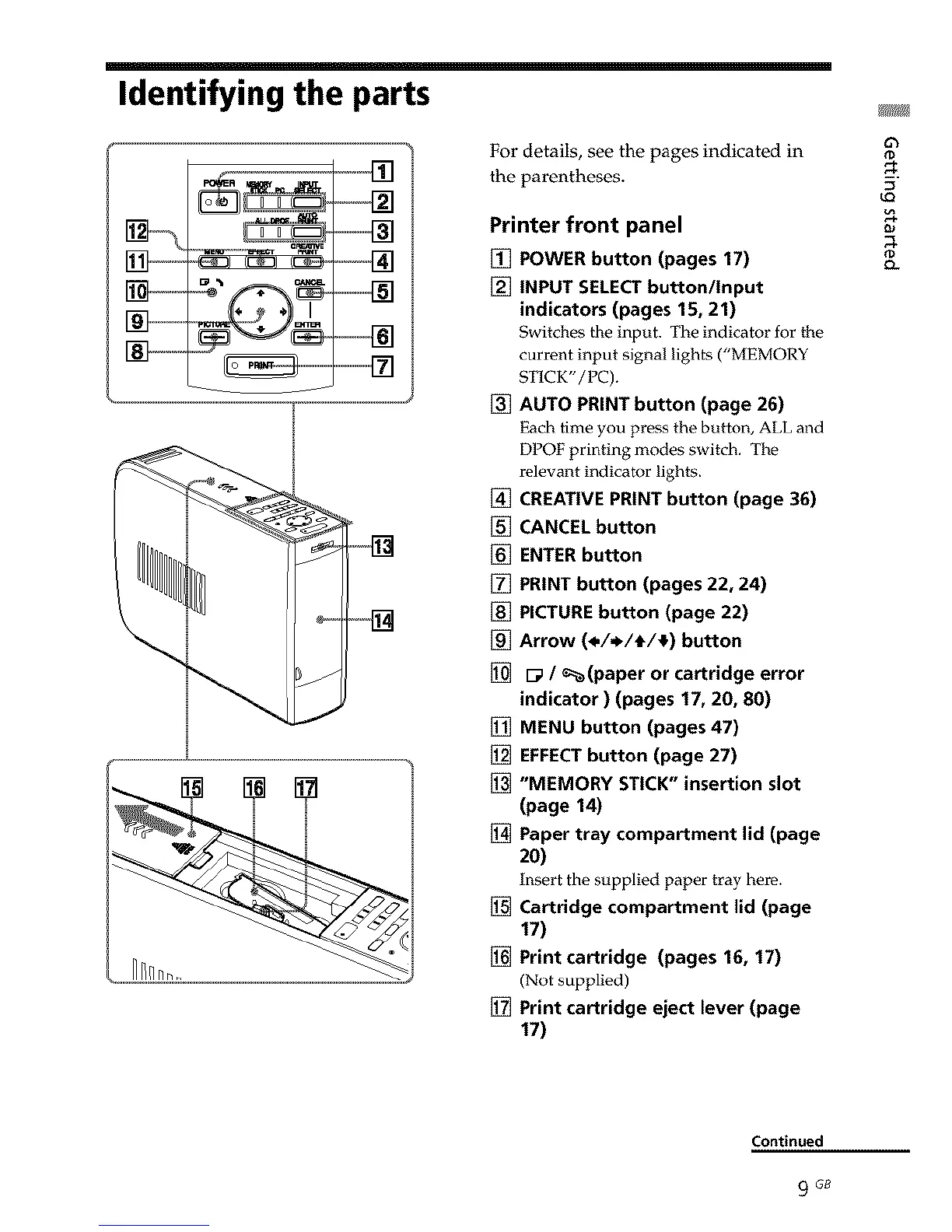
Printer front panel
[] POWER button (pages 17)
[] INPUT SELECTbutton/Input
indicators (pages 15, 21)
Switches the input. The indicator for the
current input signal lights ("MEMORY
STICK"/PC).
[] AUTO PRINT button (page 26)
Each time you pros the button, ALL and
DPOF printing modes switch. The
relevant indicator lights.
[] CREATIVE PRINT button (page 36)
[] CANCEL button
[] ENTER button
[] PRINT button (pages 22, 24)
[] PICTURE button (page 22)
[] Arrow (*/,_/t/_) button
[] [_ / _(paper or cartridge error
indicator ) (pages 17, 20, 80)
[] MENU button (pages 47)
[] EFFECTbutton (page 27)
[] "MEMORY STICK" insertion slot
(page 14)
[] Paper tray compartment lid (page
2O)
Insert the supplied paper tray bore.
[] Cartridge compartment lid (page
17)
[] Print cartridge (pages 16, 17)
(Not supplied)
[] Print cartridge eject lever (page
17)
(0
u_
(0
Continued
9 G8



 To Next Page