15
GB
Direct printing
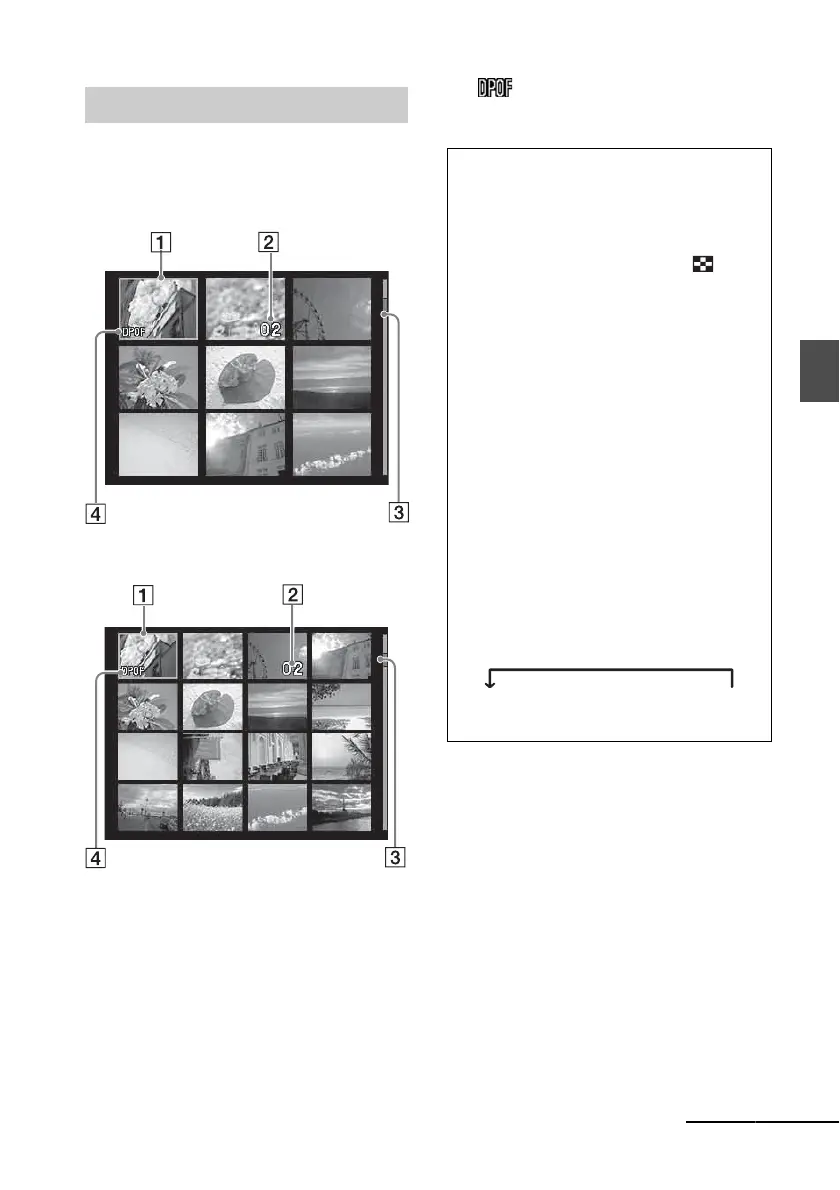
Displays a list of the images stored in the
selected media.
DPP-FP67
DPP-FP77
A Cursor (orange frame)
You can move the cursor (selection) by
pressing g/G/f/F.
B Print quantity setting
Appears only when the print quantity is being
set.
C Scroll bar
Indicates the position of the image among the
total number of images.
D DPOF print preset indication
Image list
Switching an image preview
and image list
You can switch the display as follows:
• To display the image list
In an image preview, press the
(Index View) button.
When there are multiple pages, you can
switch pages by pressing f/F.
• To display an image preview
In the image list, press g/G/f/F to move
the cursor to the desired image and press
ENTER.
In an image preview, you can change the
displayed image by pressing g/G .
• To enlarge an image
In the image preview window, press
ENTER. Each time you press the button,
the image is enlarged up to 5 times the
original scale: x1.5, x2, x3, x4, and then
x5. In an enlarged image preview, you
can change the portion to be displayed by
pressing g/G/f/F.
x1 c x1.5 c x2 c x3 c x4 c x5
Continued



 To Next Page