• Superimposing a stamp
(DPress <J/r>/b.f\l to select
~
(Stamp)
and then press ENTER.
The window used for selecting a stamp
is displayed.
@Press
<J/r>/b.f\l to select the desired
stamp and then press ENTER.
The selected stamp is displayed in the
center
of
the preview screen.
®Press
<J/r>/D./V to adjust the position
of
the stamp.
@Press
E{/~
on the printer to adjust the
size
of
the stamp.
@Press ENTER.
The stamp
is
superimposed.
@Press CANCEL.
0Press
<J/r>
to select
m:3
and then press
ENTER.
• To superimpose the same stamp
repeatedly
After step @, press ENTER again; the
same stamp is superimposed. Repeat
steps ® and @ to adjust the position
and size.
• To flip or rotate a stamp
After step @, press CANCEL. Then
press
<J/r>
to select A (Flip) or
11
(Rotate 90 Clockwise), and press
ENTER.
To move the stamp, press
<I/r>
to
select
,.
and press ENTER. To enlarge or
reduce the size
of
the stamp, press <I/r>
to
select
&lj
or
~j
and press ENTER.
When the adjustments are complete,
press
<I/r>
to
select
~
(Stamp) and
press ENTER. Then perform steps @
through
0.
The stamp is superimposed.
28 GB
• Superimposing characters
(DPress <J/r>/D./V
to
select T (Text) and
then press ENTER.
@Press
b./V to select [Keyboard], and
then press ENTER.
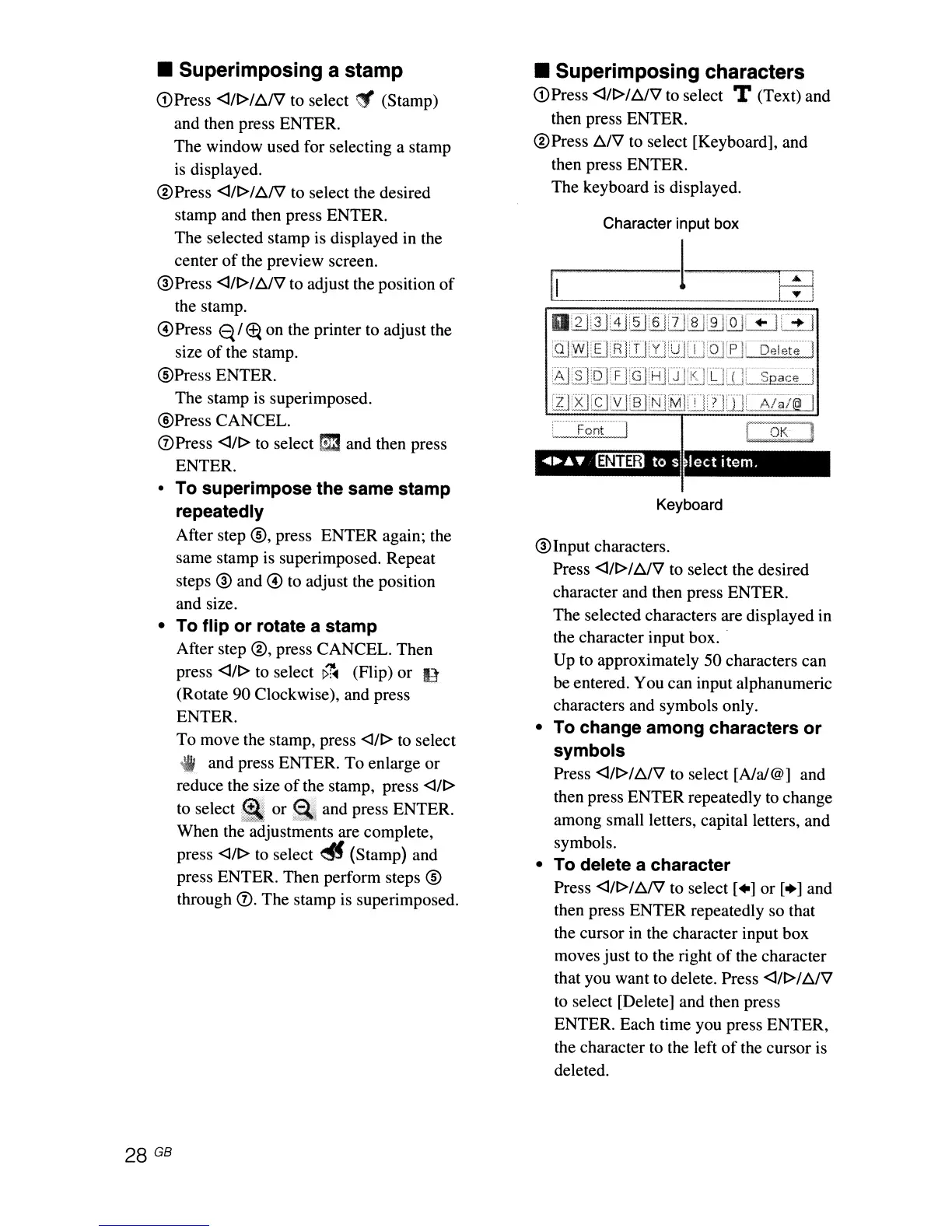
The keyboard is displayed.
Character input box
fi
~
EE
o
~
W
cfJ
1i]@][fJ@J
[[J
[QJ~'
+:11':+
J
QJ
~
:E]
[B]
[J
[i]
LQJ
iT]
,Q]
LPJ'b~l~t~l
lJ
[8J
if]
,.'LJ
[13].tlJ
[0
UJ
iIJ
LiJ[.H~U
[,::9£:]
leet
item.
Keyboard
®Input
characters.
Press
<J/r>/D./V to select the desired
character and then press ENTER.
The selected characters are displayed in
the character input box
..
Up to approximately 50 characters can
be entered. You can input alphanumeric
characters and symbols only.
• To change among characters
or
symbols
Press <J/r>/b./V to select [Ala/@] and
then press ENTER repeatedly to change
among small letters, capital letters, and
symbols.
• To delete a character
Press
<J/r>
/D.f\l to select
[.]
or
[.]
and
then press ENTER repeatedly so that
the cursor in the character input box
moves
just
to the right
of
the character
that you want to delete. Press
<J/r>/D./V
to
select [Delete] and then press
ENTER. Each time you press ENTER,
the character to the left
of
the cursor is
deleted.



 To Next Page