Error
messages
If
an
error
message
appears
If
an
error occurs, the following error messages may appear on the LCD screen.
Follow the procedures provided
in
the solutions an error message shows.
If
the same message
appears frequently even after taking the recommended measures, consult your Sony dealer.
Memory cards and external device
·~Ir(
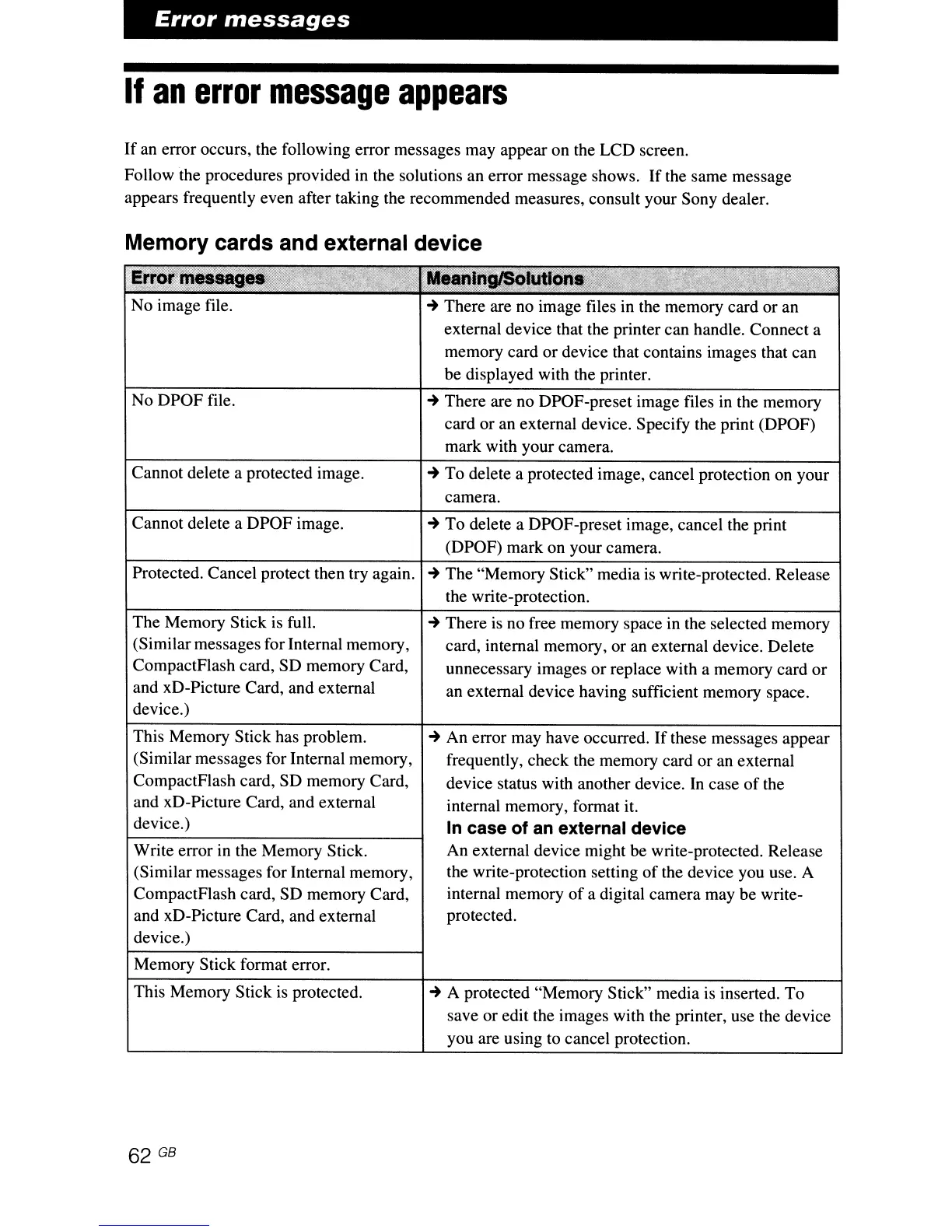
No image file.
~
There are
no
image files
in
the memory card or an
external device that the printer can handle. Connect a
memory card or device that contains images that can
be displayed with the printer.
No DPOF file.
~
There are no DPOF-preset image files
in
the memory
card or
an
external device. Specify the print (DPOF)
mark with your camera.
Cannot delete a protected image.
~
To delete a protected image, cancel protection on your
camera.
Cannot delete a DPOF image.
Protected. Cancel protect then try again.
The Memory Stick
is
full.
(Similar messages for Internal memory,
CompactFlash card, SD memory Card,
and xD-Picture Card, and external
device.)
This Memory Stick has problem.
(Similar messages for Internal memory,
CompactFlash card, SD memory Card,
and xD-Picture Card, and external
device.)
Write error in the Memory Stick.
(Similar messages for Internal memory,
CompactFlash card, SD memory Card,
and xD-Picture Card, and external
device.)
Memory Stick format error.
This Memory Stick
is
protected.
~
To delete a DPOF-preset image, cancel the print
(DPOF) mark on your camera.
~
The "Memory Stick" media
is
write-protected. Release
the write-protection.
~
There
is
no free memory space in the selected memory
card, internal memory, or
an
external device. Delete
unnecessary images or replace with a memory card or
an
external device having sufficient memory space.
~
An error may have occurred.
If
these messages appear
frequently, check the memory card or
an
external
device status with another device.
In
case
of
the
internal memory, format it.
In case of
an
external device
An
external device might be write-protected. Release
the write-protection setting
of
the device you use. A
internal memory
of
a digital camera may be write-
protected.
~
A protected "Memory Stick" media
is
inserted. To
save or edit the images with the printer, use the device
you are using to cancel protection.



 To Next Page