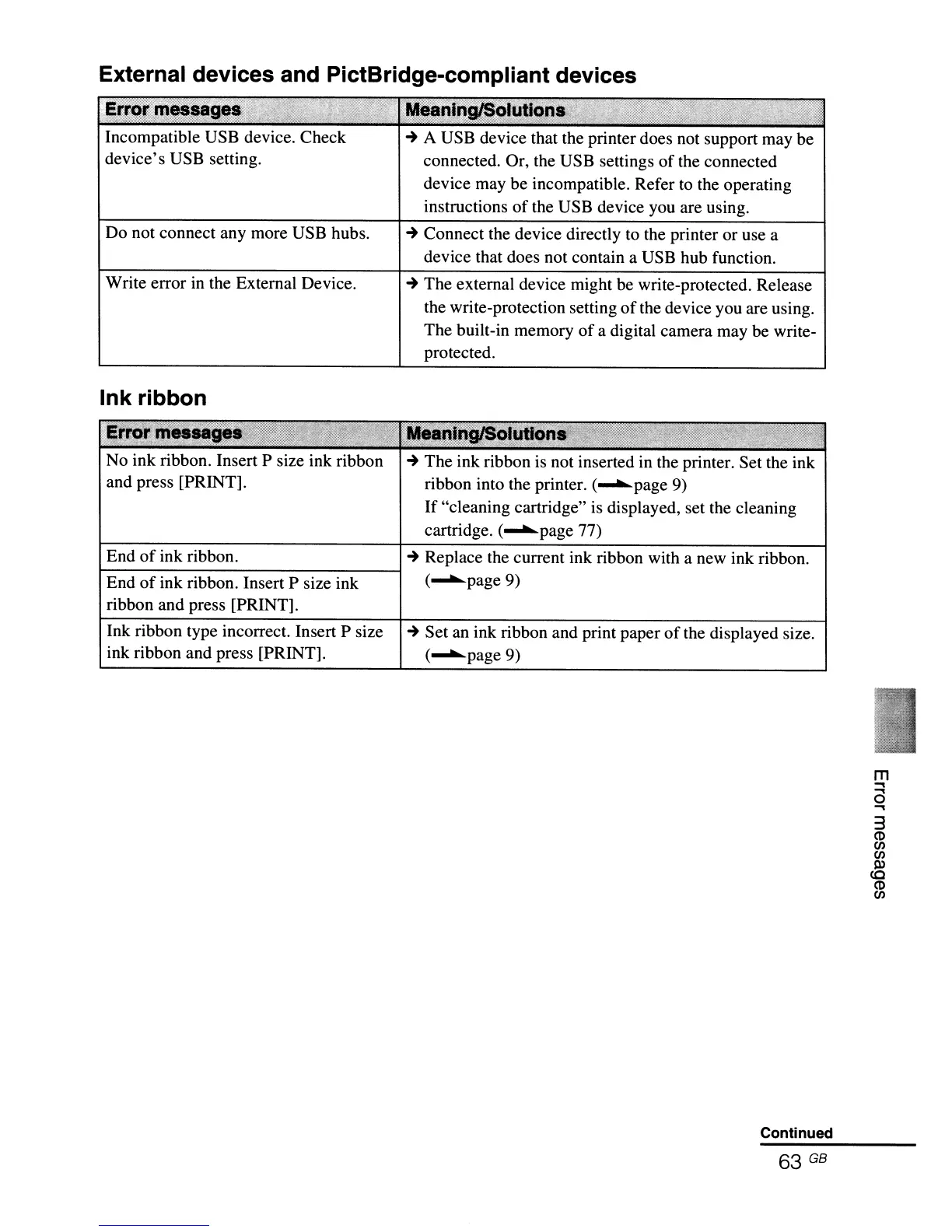
External devices and PictBridge-compliant devices
"Error
~messa
T
.'
: Meallljid§olutia.
J.iRi··
';.-~"-
,..-,>,,~'=*-·;:V1·'
"'-' . - -
:,,:,..'
·-S·,
.,'
>,.--,.
-
~
.... ,
Incompatible USB device. Check
~
A USB device that the printer does not support may be
device's USB setting. connected. Or, the USB settings
of
the connected
device may be incompatible. Refer to the operating
instructions
of
the USB device you are using.
Do not connect any more USB hubs.
~
Connect the device directly to the printer or use a
device that does not contain a USB hub function.
Write error in the External Device.
Ink ribbon
~
The external device might be write-protected. Release
the write-protection setting
of
the device you are using.
The built-in memory
of
a digital camera may be write-
protected.
No ink ribbon. Insert P size ink ribbon
and press [PRINT].
~
The ink ribbon is not inserted in the printer. Set the ink
ribbon into the printer. (
......
page 9)
If
"cleaning cartridge" is displayed, set the cleaning
cartridge. (
......
page 77)
End
of
ink ribbon.
~
Replace the current ink ribbon with a new ink ribbon.
t-E-nd-o-f-in-k-ri-b-b-o-n-.
I-n-s-e-rt-P-sI-'
z-e-i-nk--"""i (
......
page 9)
ribbon and press [PRINT].
Ink ribbon type incorrect. Insert P size
ink ribbon and press [PRINT].
~
Set an ink ribbon and print paper
of
the displayed size.
(
......
page9)
Continued
63 GB
m
....
....
o
....
3
CD
(f)
(f)
l1)
<0
CD
(f)



 To Next Page