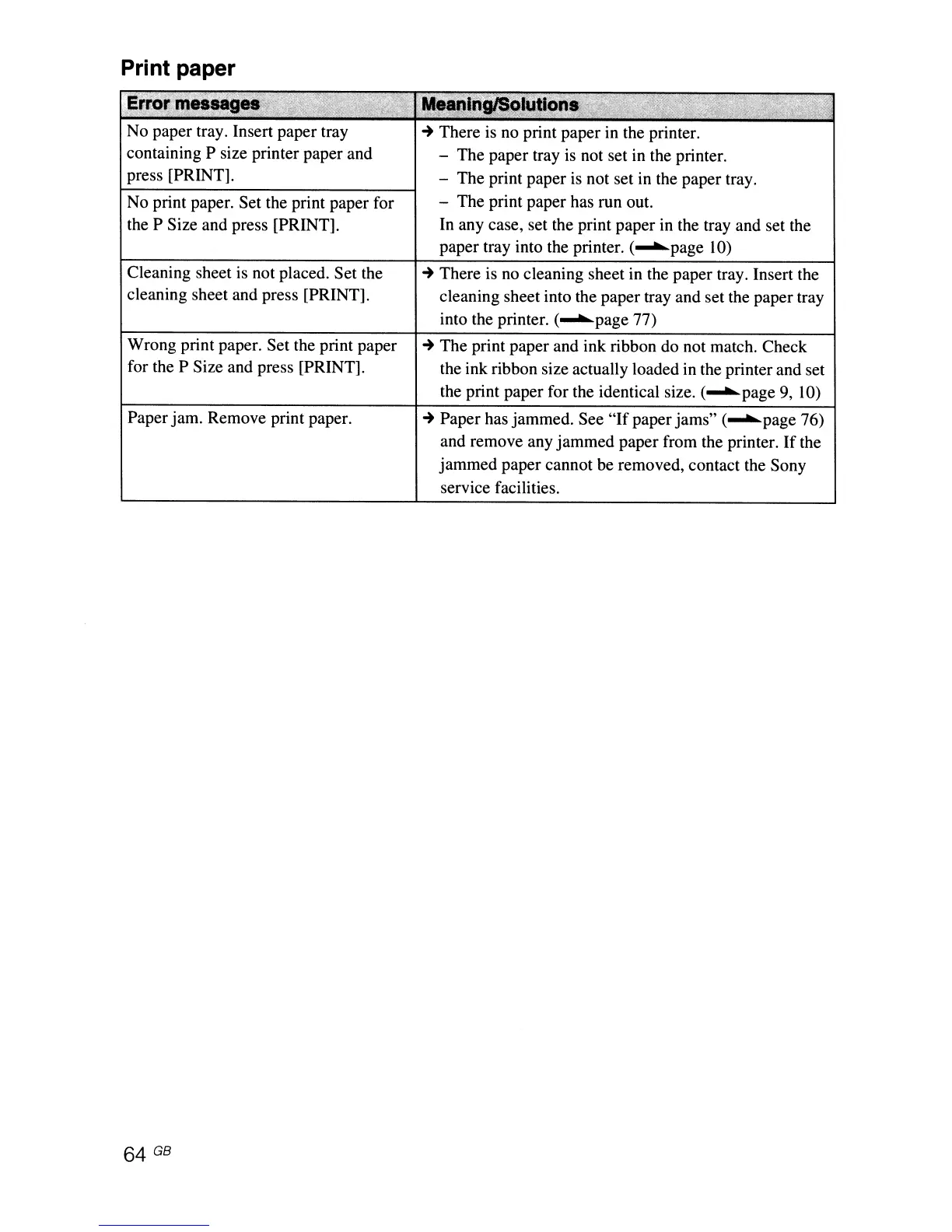
Print paper
E"
"y".,,,-.,,
C'.
""
"r;r~Jt>,.mk'!'"
No paper tray. Insert paper tray
containing P size printer paper and
press [PRINT].
No print paper. Set the print paper for
the P Size and press [PRINT].
Cleaning sheet is not placed. Set the
cleaning sheet and press [PRINT].
Wrong print paper. Set the print paper
for the P Size and press [PRINT].
Paper jam. Remove print paper.
64 GB
~
There is no print paper in the printer.
- The paper tray is not set in the printer.
- The print paper is not set in the paper tray.
- The print paper has run out.
In any case, set the print paper in the tray and set the
paper tray into the printer.
(~page
10)
~
There is
no
cleaning sheet in the paper tray. Insert the
cleaning sheet into the paper tray and set the paper tray
into the printer.
(~page
77)
~
The print paper and ink ribbon do not match. Check
the ink ribbon size actually loaded in the printer and set
the print paper for the identical size.
(~page
9, 10)
~
Paper has jammed. See
"If
paper jams"
(~page
76)
and remove any jammed paper from the printer.
If
the
jammed paper cannot be removed, contact the Sony
service facilities.



 To Next Page