Connecting with a computer
S"rri
;e
i
Y
,
"':';""'='P~
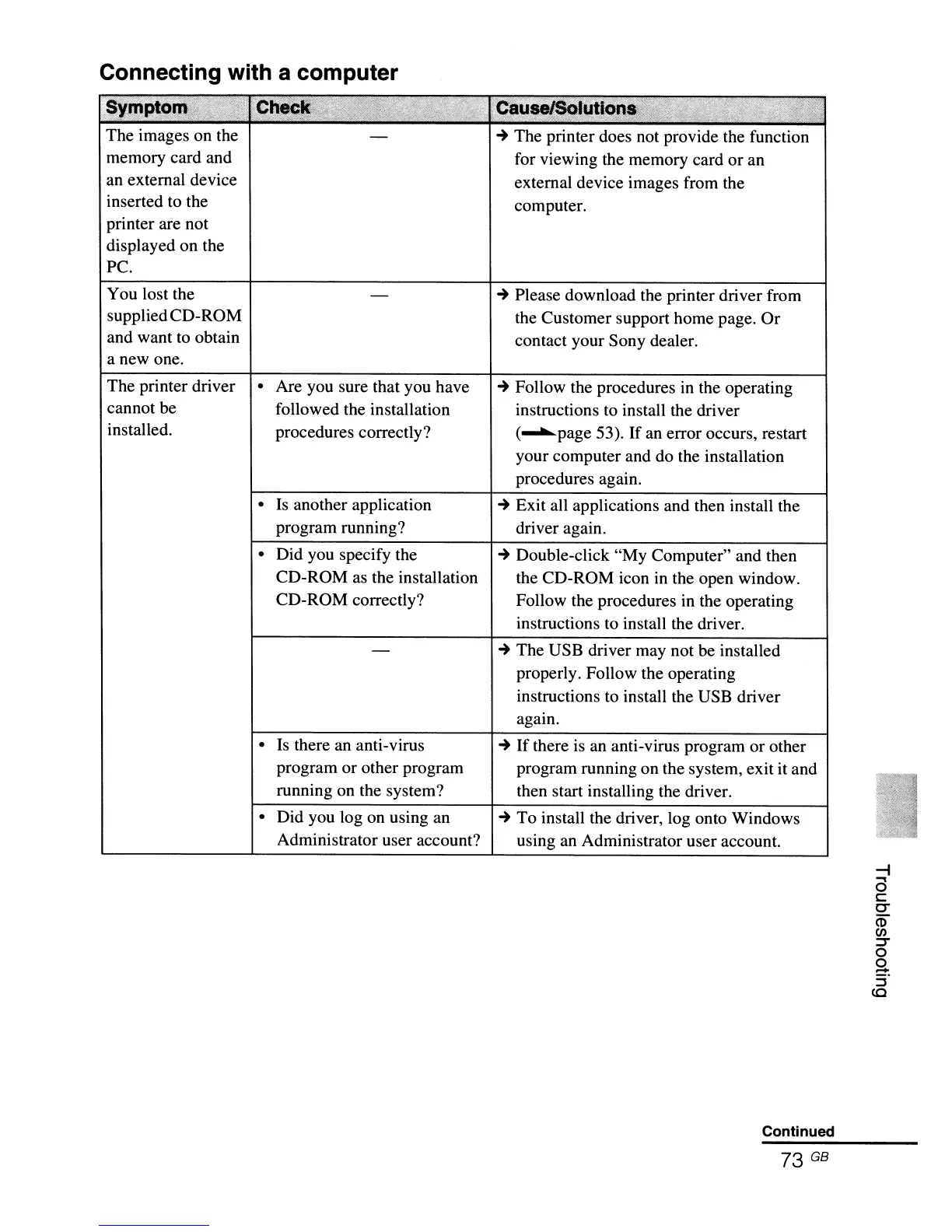
The images on the
memory card and
an external device
inserted to the
printer are not
displayed on the
Pc.
You lost the
suppliedCD-ROM
and want to obtain
a new one.
~
The printer does not provide the function
for viewing the memory card
or
an
external device images from the
computer.
~
Please download the printer driver from
the Customer support home page. Or
contact your Sony dealer.
The printer driver
cannot be
installed.
• Are you sure that you have
followed the installation
procedures correctly?
•
Is
another application
program running?
• Did you specify the
CD-ROM as the installation
CD-ROM correctly?
•
Is
there an anti-virus
program or other program
running on the system?
• Did you log on using an
Administrator user account?
~
Follow the procedures
in
the operating
instructions to install the driver
(........page 53). If an error occurs, restart
your computer and do the installation
procedures again.
~
Exit all applications and then install the
driver again.
~
Double-click "My Computer" and then
the CD-ROM icon in the open window.
Follow the procedures in the operating
instructions
to
install the driver.
~
The USB driver may not be installed
properly. Follow the operating
instructions to install the USB driver
again.
~
If
there
is
an anti-virus program or other
program running on the system, exit it and
then start installing the driver.
~
To install the driver, log onto Windows
using an Administrator user account.
Continued



 To Next Page