...
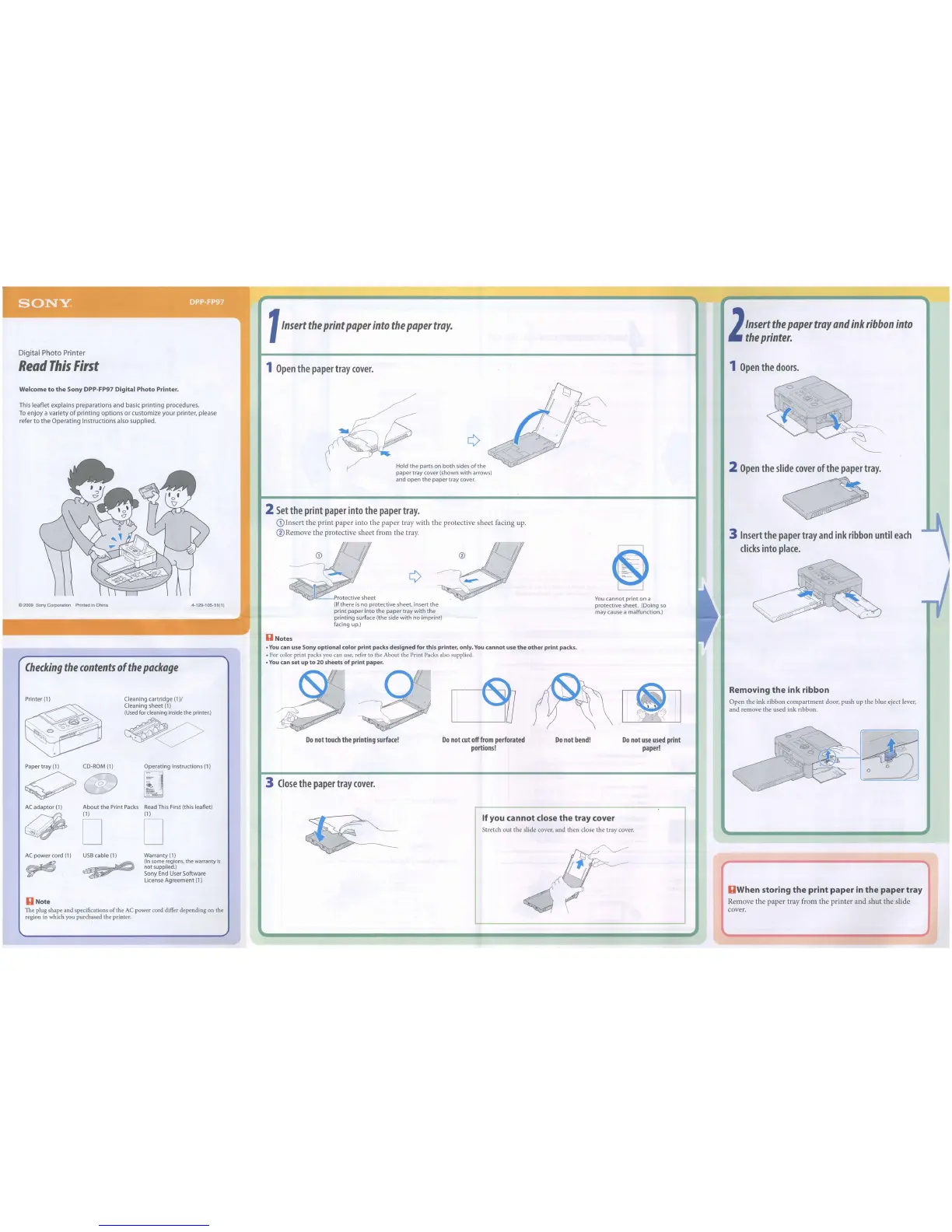
1
Insert
the
print
paper
into
the
paper
tray.
2
Insert
the
paper
tray
and
ink
ribbon
into
the
printer.
Digital Photo Printer
Read
This
First
1
Open
the
paper
tray
cover.
1
Open
the
doors.
Removing
the
ink
ribbon
Open the ink ribbon compartment door. push up the blue eject lever,
and remove the used ink ribbon.
2
Open
the
slide
cover
of
the
paper
tray.
~
_.o,
~
; , .
I
".,.
~"
:
3
Insert
the
paper
tray
and
ink
ribbon
until
each
clicks
into
place.
Do
not
use
used
print
paper!
You
cannot
print
on a
protective sheet. (Doing
so
may
cause
a malfunction.)
Do
not
bend!
Do
not
cut
off
from
perforated
portions!
~
2
r
/;;
¢
~,
rotective sheet
.'
:,,'
(Ifthere
is
no protective sheet, insert the
print paper into the paper tray with the
printing surface (the side with no imprint)
facing up.)
Do
not
touch
the
printing
surface!
Hold the parts on both sides
of
the
paper tray cover (shown with arrows)
and open the paper tray cover.
2
Set
the
print
paper
into
the
paper
tray.
(DInsert the print paper into the paper tray with the protective sheet facing
up.
®Remove the protective sheet from the
tray.
U
Notes
•
You
can use Sony optional color print packs designedfor this printer, only.
You
cannot
use
the
other
print packs.
• For color print packs you can use, refer
to
the About the Print Packs also supplied.
•
You
can
set
up
to
20 sheets of print paper.
3
Close
the
paper
tray
cover.
4-129-105-11(1)
Operating Instructions (1)
Cleaning cartridge
(1)1
Cleaning sheet
(1)
(Used
for
cleaning
inside
the
printer.)
~o
Checking
the
contents
of
the
package
Printer
(1)
~
o~~
~
~
I
Welcome
to
the
Sony
DPP-FP97 Digital
Photo
Printer.
This
leaflet
explains
preparations
and
basic
printing
procedures.
To
enjoy
a
variety
of
printing
options
or
customize
your
printer, please
refer
to
the
Operating
Instructions
also
supplied.
Paper
tray
(1)
CD-ROM
(1)
9G
C 2009 Sony Corporation Printed
In
China
DWhen
storing
the
print
paper
in
the
paper
tray
Remove the paper tray from the printer and shut the slide
cover.
If
you
cannot
close
the
tray
cover
Stretch out the slide cover, and then close the tray cover.
Warranty
(1)
(In
some
regions,
the
warranty
is
not
supplied.)
Sony
End
User
Software
License Agreement
(1)
USB
cable
(1)
About the Print
Packs
Read
This
First (this leaflet)
(1) (1)
D D
AC
adaptor
(1)
DNote
The plug shape and specifications
of
the
AC
power cord differ depending
on
the
region in which you purchased the printer.



 To Next Page