Installing the Printer Driver
4
Windows 2000
Installing the Printer
Driver
1
Connect the DPP-MP1 to the computer.
2
Switch the DPP-MP1 on.
3
Switch on the computer, and then log in as the
system administrator.
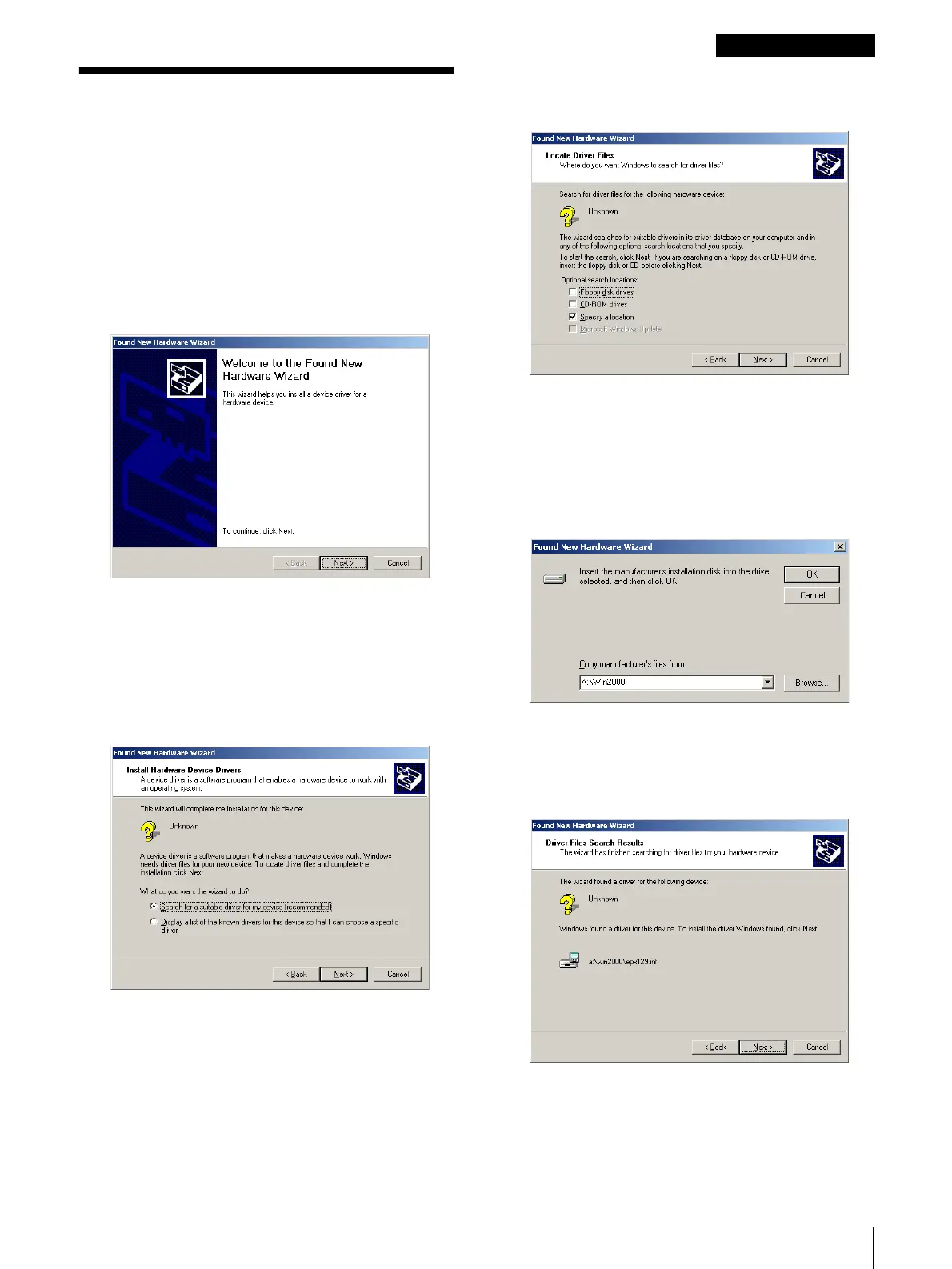
After Windows 2000 starts up, the [Found New
Hardware Wizard] opens.
If the [Found New Hardware Wizard] does not
open, open the [Printers] folder in the [Control
Panel], double-click [Add Printer], and then follow
the instructions to install the printer driver.
4
Click the [Next] button.
The next screen opens.
5
Make sure that the [Search for a suitable driver ...]
option is selected, and then click the [Next] button.
The next screen opens.
6
Insert the provided “digital photo printer for DPP-
MP1” CD-ROM into the CD-ROM drive.
7
Click the [Specify a location] check box on, and
then click the [Next] button.
The following dialog box opens.
8
Click the [Browse] button, click the [Win2000]
folder on the CD-ROM, and then click the [OK]
button.
The next screen opens.


 To Next Page
 Loading...






