EasyManua.ls Logo

Sony DXC-637 - Switch Settings Before Alignment; Notes on Alignment Procedures

Sony DXC-637
63 pages
Print Icon
To Next Page IconTo Next Page
To Previous Page IconTo Previous Page
Loading...
nn
3-1-3.
Switch
Setting
Before
Adjustment
Switch
setting
for
camera
side
GAIN
switch
:
OdB
OUTPUT
switch
:
CAM/DCC
OFF
WHITE
BAL
switch
:
PRESET
FILTER
control
4
SHUTTER
switch
=:
OFF
ZEBRA
switch
:
OFF
MARKER
switch
:
OFF
HYPER
GAIN
switch
:
OFF
MATRIX
switch
:
STD
EZ
MODE
switch
:
OFF
IRIS
(Lens)
:
Manual
ZOOM
(Lens)
:
Manual
EN-122
board
S1
(V
BLKG
19H/20H/21H):
20H
(NTSC
model
only)
PR-209
board
$602
(MATRIX
ON/OFF)
:
OFF
IE-47
board
S1
(DTL
ON/OFF)
:
OFF
SW-724
board
S7
(ATW)
:
OFF
$14
(ADJ)
:
ON
$16
(FLD/FRM)
:
FLD
Note:
After
adjustment,
set
S14
(ADJ)/SW-724
board
to
OFF.
3-1-4.
Notes
on
Adjustment
Note:
(1)
As
the
following
adjusting
control
has
no
turning
stopper,
take
care
not
to
over-turn
it.
Potentiometer
Mechanical
center
condition
(TOP
VIEW)
(2)
Before
adjustment,
be
sure
to
allow
for
10-minute
warm-
up
time.
(3)
Ifthe
amplitude
level
of
the
measured
waveform
is
blurred
on
the
waveform
monitor
screen,
set
the
RESPONSE
switch
on
the
waveform
monitor
to
“LUM”
mode.
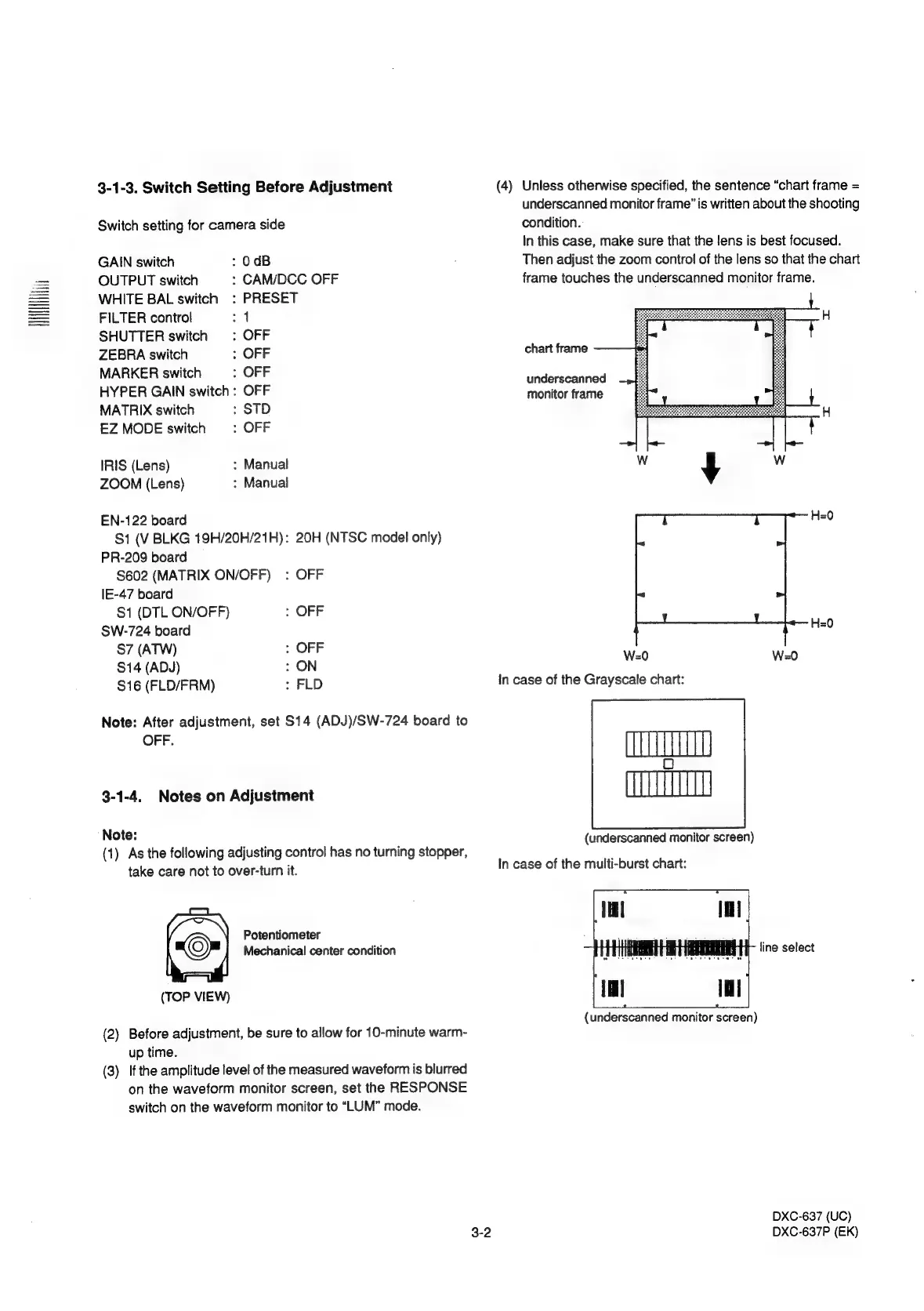
(4)
Unless
otherwise
specified,
the
sentence
“chart
frame
=
underscanned
monitor
frame”
is
written
about
the
shooting
condition.
In
this
case,
make
sure
that
the
lens
is
best
focused.
Then
adjust
the
zoom
control
of
the
lens
so
that
the
chart
frame
touches
the
underscanned
monitor
frame.
chart
frame
underscanned
monitor
frame
H=0
W=0
W=0
In
case
of
the
Grayscale
chart:
(underscanned
monitor
screen)
In
case
of
the
multi-burst
chart:
(underscanned
monitor
screen)
DXC-637
(UC)
DXC-637P
(EK)

Related product manuals