EasyManua.ls Logo

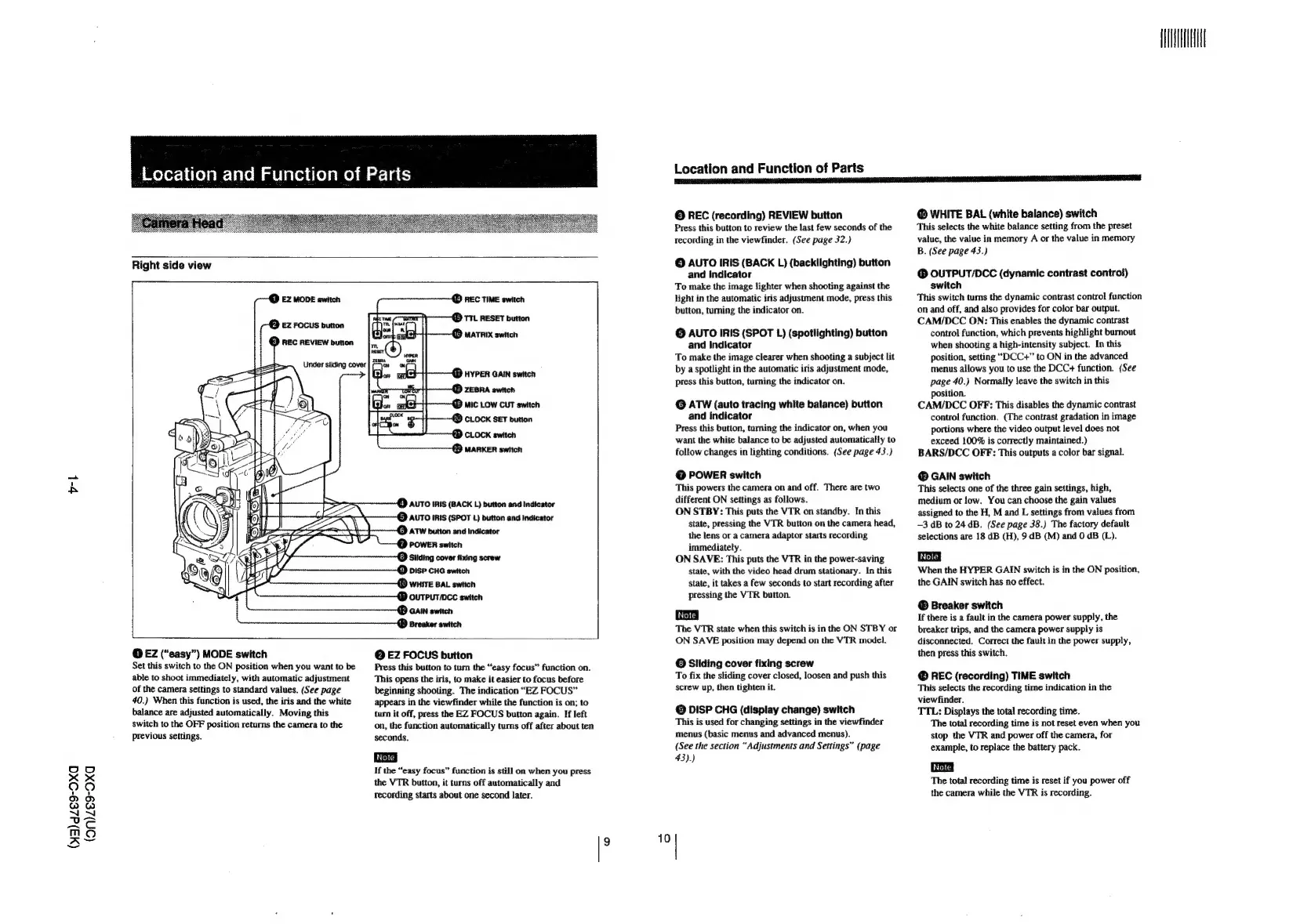
Sony DXC-637 - Camera and Lens Parts Identification; Camera Head Components

Sony DXC-637
63 pages
Print Icon
To Next Page IconTo Next Page
To Previous Page IconTo Previous Page
Loading...
vl
(W3)dZe9-Oxa
(on)ze9-OXxa
|
Melorchelelem-lacem
a
elaceiieleme)
@
of-]
60)
Under
sliding
cover
|
-—yow
i)
REC
TIME
switch
i
TTL
RESET
button
Sor
ox
AUTO
IRIS
(BACK
L)
button
and
Indicator
AUTO
IRIS
(SPOT
1)
button
and
Indicator
ATW
button
and
indicator
POWER
switch
»
Silding
cover
fixing
screw
DISP
CHG
switch
Location
and
Function
of
Parts
©
REC
(recording)
REVIEW
button
Press
this
button
to
review
the
last
few
seconds
of
the
recording
in
the
viewfinder.
(See
page
32.)
©
AUTO
IRIS
(BACK
L)
(backlighting)
button
and
indicator
To
make
the
image
lighter
when
shooting
against
the
light
in
the
automatic
iris
adjustment
mode,
press
this
button,
turing
the
indicator
on.
©
AUTO
IRIS
(SPOT
L)
(spotlighting)
button
and
Indicator
To
make
the
image
clearer
when
shooting
a
subject
lit
by
a
spotlight
in
the
automatic
iris
adjustment
mode,
press
this
button,
turning
the
indicator
on.
©
ATW
(auto
tracing
white
balance)
button
and
indicator
Press
this
button,
turning
the
indicator
on,
when
you
want
the
white
balance
to
be
adjusted
automatically
to
follow
changes
in
lighting
conditions.
(See
page
43.)
@
POWER
switch
This
powers
the
camera
on
and
off.
There
are
two
different
ON
settings
as
follows.
ON
STBY:
This
puts
the
VTR
on
standby.
In
this
state,
pressing
the
VTR
button
on
the
camera
head,
the
lens
or
a
camera
adaptor
starts
recording
immediately.
ON
SAVE:
This
puts
the
VTR
in
the
power-saving
state,
with
the
video
head
drum
stationary.
In
this
state,
it
takes
a
few
seconds
to
start
recording
after
pressing
the
VTR
button.
The
VTR
state
when
this
switch
is
in
the
ON
STBY
or
@
EZ
(“easy”)
MODE
switch
Set
this
switch
to
the
ON
position
when
you
want
to
be
able
to
shoot
immediately,
with
automatic
adjustment
of
the
camera
settings
to
standard
values.
(See
page
40.)
When
this
function
is
used,
the
iris
and
the
white
balance
are
adjusted
automatically.
Moving
this
switch
to
the
OFF
position
returns
the
camera
to
the
previous
settings.
@
EZ
FOCUS
button
Press
this
button
to
tum
the
“easy
focus”
function
on.
This
opens
the
iris,
to
make
it
easier
to
focus
before
beginning
shooting.
The
indication
“EZ
FOCUS”
appears
in
the
viewfinder
while
the
function
is
on;
to
turn
it
off,
press
the
EZ
FOCUS
button
again.
If
left
on,
the
function
automatically
turns
off
after
about
ten
seconds.
If
the
“easy
focus”
function
is
still
on
when
you
press
the
VTR
button,
it
turns
off
automatically
and
Tecording
starts
about
one
second
later.
ON
SAVE
position
may
depend
on
the
VTR
model.
@
Sliding
cover
fixing
screw
To
fix
the
sliding
cover
closed,
loosen
and
push
this
screw
up,
then
tighten
it.
©
DISP
CHG
(display
change)
switch
This
is
used
for
changing
settings
in
the
viewfinder
menus
(basic
menus
and
advanced
menus).
(See
the
section
“Adjustments
and
Settings”
(page
43).)
I?
10)
A
@
WHITE
BAL
(white
balance)
switch
This
selects
the
white
balance
setting
from
the
preset
value,
the
value
in
memory
A
or
the
value
in
memory
B.
(See
page
43.)
@
OUTPUT/DCC
(dynamic
contrast
control)
switch
This
switch
turns
the
dynamic
contrast
control
function
on
and
off,
and
also
provides
for
color
bar
output.
CAM/DCC
ON:
This
enables
the
dynamic
contrast
control
function,
which
prevents
highlight
burnout
when
shooting
a
high-intensity
subject.
In
this
position,
setting
“DCC+”
to
ON
in
the
advanced
menus
allows
you
to
use
the
DCC+
function.
(See
page
40.)
Normally
leave
the
switch
in
this
position.
CAM/DCC
OFF:
This
disables
the
dynamic
contrast
control
function.
(The
contrast
gradation
in
image
portions
where
the
video
output
level
does
not
exceed
100%
is
correctly
maintained.)
BARS/DCC
OFF:
This
outputs
a
color
bar
signal.
@
GAIN
switch
This
selects
one
of
the
three
gain
settings,
high,
medium
or
low,
You
can
choose
the
gain
values
assigned
to
the
H,
M
and
L
settings
from
values
from
—3
dB
to
24.dB.
(See
page
38.)
The
factory
default
selections
are
18
dB
(H),
9
dB
(M)
and
0
dB
(L).
When
the
HYPER
GAIN
switch
is
in
the
ON
position,
the
GAIN
switch
has no
effect.
Breaker
switch
If
there
is
a
fault
in
the
camera
power
supply,
the
breaker
trips,
and
the
camera
power
supply
is
disconnected.
Correct
the
fault
in
the
power
supply,
then
press
this
switch.
@
REC
(recording)
TIME
switch
This
selects
the
recording
time
indication
in
the
viewfinder.
TTL:
Displays
the
total
recording
time.
The
total
recording
time
is
not
reset
even
when
you
stop
the
VTR
and
power
off
the
camera,
for
example,
to
replace
the
battery
pack.
The
total
recording
time
is
reset
if
you
power
off
the
camera
while
the
VTR
is
recording.

Related product manuals