EasyManua.ls Logo

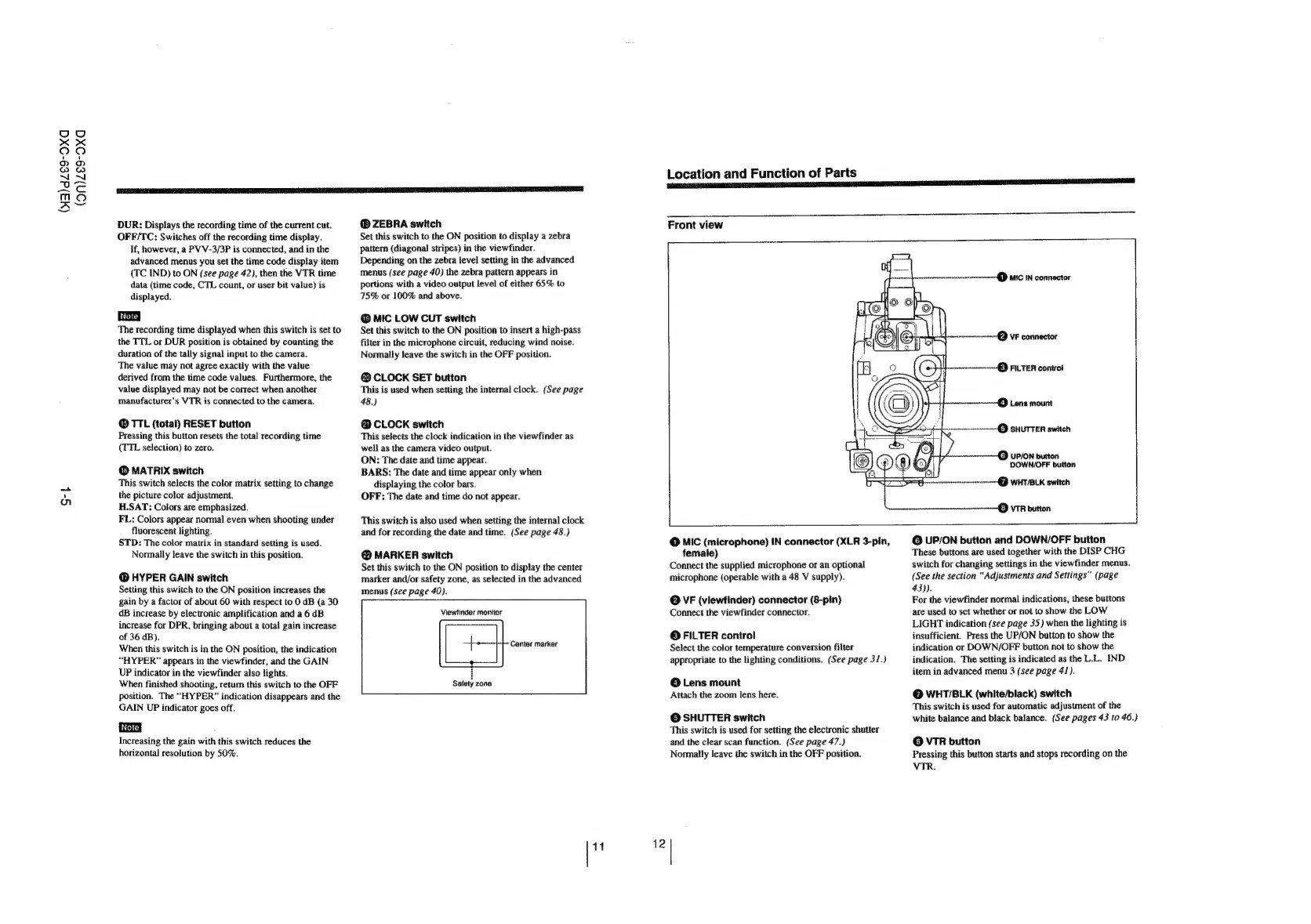
Sony DXC-637 - Page 8

Sony DXC-637
63 pages
Print Icon
To Next Page IconTo Next Page
To Previous Page IconTo Previous Page
Loading...
(3)dZ69-Oxa
(on)ze9-Oxa
St
‘SESE
EPEIEN
ISE
NE
E
R
O
SS
SE
DUR:
Displays
the
recording
time
of
the
current
cut.
OFF/TC:
Switches
off the
recording
time
display.
If,
however,
a
PV
V-3/3P
is
connected,
and
in
the
advanced
menus
you
set
the
time
code
display
item
(TC
IND)
to
ON
(see
page
42),
then
the
VTR
time
data
(time
code,
CTL
count,
or
user
bit
value)
is
displayed.
The
recording
time
displayed
when
this
switch
is
set
to
the
TTL
or
DUR
position
is
obtained
by
counting
the
duration
of
the
tally
signal
input
to
the
camera.
The
value
may
not
agree
exactly
with
the
value
derived
from
the
time
code
values.
Furthermore,
the
value
displayed
may
not
be
correct
when
another
manufacturer’s
VTR
is
connected
to
the
camera.
®
TTL
(total)
RESET
button
Pressing
this
button
resets
the
total
recording
time
(TTL
selection)
to
zero.
@
MATRIX
switch
This
switch
selects
the
color
matrix
setting
to
change
the
picture
color
adjustment.
H.SAT:
Colors
are
emphasized.
FL:
Colors
appear
normal
even
when
shooting
under
fluorescent
lighting.
STD:
The
color
matrix
in
standard
setting
is
used.
Normally
leave
the
switch
in
this
position.
@
HYPER
GAIN
switch
Setting
this
switch
to
the
ON
position
increases
the
gain
by
a
factor
of
about
60
with
respect
to
0
dB
(a
30
dB
increase
by
electronic
amplification
and
a
6
dB
increase
for
DPR,
bringing
about
a
total
gain
increase
of
36
dB).
When
this
switch
is
in
the
ON
position,
the
indication
“HYPER”
appears
in
the
viewfinder,
and
the
GAIN
UP
indicator
in
the
viewfinder
also
lights.
When
finished
shooting,
return
this
switch
to
the
OFF
position.
The
“HYPER”
indication
disappears
and
the
GAIN
UP
indicator
goes
off.
Increasing
the
gain
with
this
switch
reduces
the
horizontal
resolution
by
50%.
@
ZEBRA
switch
Set
this
switch
to
the
ON
position
to
display
a
zebra
pattern
(diagonal
stripes)
in
the
viewfinder.
Depending
on
the
zebra
level
setting
in
the
advanced
menus
(see
page
40)
the
zebra
pattern
appears
in
portions
with
a
video
output
level
of
either
65%
to
75%
or
100%
and
above.
@
MIC
LOW
CUT
switch
Set
this
switch
to
the
ON
position
to
insert
a
high-pass
filter
in
the
microphone
circuit,
reducing
wind
noise.
Normally
leave
the
switch
in
the
OFF
position.
®
CLOCK
SET
button
This
is
used
when
setting
the
internal
clock.
(See
page
48.)
@
CLOCK
switch
This
selects
the
clock
indication
in
the
viewfinder
as
well
as
the
camera
video
output.
ON:
The
date
and
time
appear.
BARS:
The
date
and
time
appear
only
when
displaying
the
color
bars.
OFF:
The
date
and
time
do
not
appear.
This
switch
is
also
used
when
setting
the
internal
clock
and
for
recording
the
date
and
time.
(See
page
48.)
@
MARKER
switch
Set
this
switch
to
the
ON
position
to
display
the
center
marker
and/or
safety
zone,
as
selected
in
the
advanced
menus
(see
page
40).
Viewtinder
monitor
Center
marker
i
Satety
zone
1
Location
and
Function
of
Parts
Front
view
@
MIC
(microphone)
IN
connector
(XLR
3-pin,
female)
Connect
the
supplied
microphone
or
an
optional
microphone
(operable
with
a
48
V
supply).
©
VF
(viewfinder)
connector
(8-pin)
Connect
the
viewfinder
connector.
©
FILTER
control
Select
the
color
temperature
conversion
filter
appropriate
to
the
lighting
conditions.
(See
page
31.)
©
Lens
mount
Attach
the
zoom
lens
here.
©
SHUTTER
switch
This
switch
is
used
for
setting
the
electronic
shutter
and
the
clear
scan
function.
(See
page
47.)
Normally
leave
the
switch
in
the
OFF
position.
---@
VF
connector
eter
©
FILTER
controt
Is
©
UP/ON
button
and
DOWN/OFF
button
These
buttons
are
used
together
with
the
DISP
CHG
switch
for
changing
settings
in
the
viewfinder
menus.
(See
the
section
“Adjustments
and
Settings”
(page
43)).
For
the
viewfinder
normal
indications,
these
buttons
are
used
to
set
whether
or
not
to
show
the
LOW
LIGHT
indication
(see
page
35)
when
the
lighting
is
insufficient.
Press
the
UP/ON
button
to
show
the
indication
or
DOWN/OFF
button
not
to
show
the
indication.
The
setting
is
indicated
as
the
L.L.
IND
item
in
advanced
menu
3
(see
page
41).
@
WHT/BLK
(white/black)
switch
This
switch
is
used
for
automatic
adjustment
of
the
white
balance
and
black
balance.
(See
pages
43
to
46.)
©
VTR
button
Pressing
this
button
starts
and
stops
recording
on
the
VTR.

Related product manuals