EasyManua.ls Logo

Sony DXC-637 - Service Information: Part Replacement; Replacement of CCD Unit

Sony DXC-637
63 pages
Print Icon
To Next Page IconTo Next Page
To Previous Page IconTo Previous Page
Loading...
UIMUIAHIH
2-3.
REPLACEMENT
OF
MAIN
PARTS
2-3-1.
Replacement
of
CCD
Unit
Note:
To
replace
the
CCD
unit,
the
CCD
unit
and
NR-47
board
should
be
replaced
at
the
same.
1.
Remove
the
lens
and
viewfinder
referring
to
the
instruc-
tion
manual.
Note:
Attach
a
mount
cap
to
the
lens
mount
to
protect
the
prism
block.
2.
Remove
the
left
side
plate
referring
to
Section
2-2
“RE-
MOVAL
OF
CABINET”.
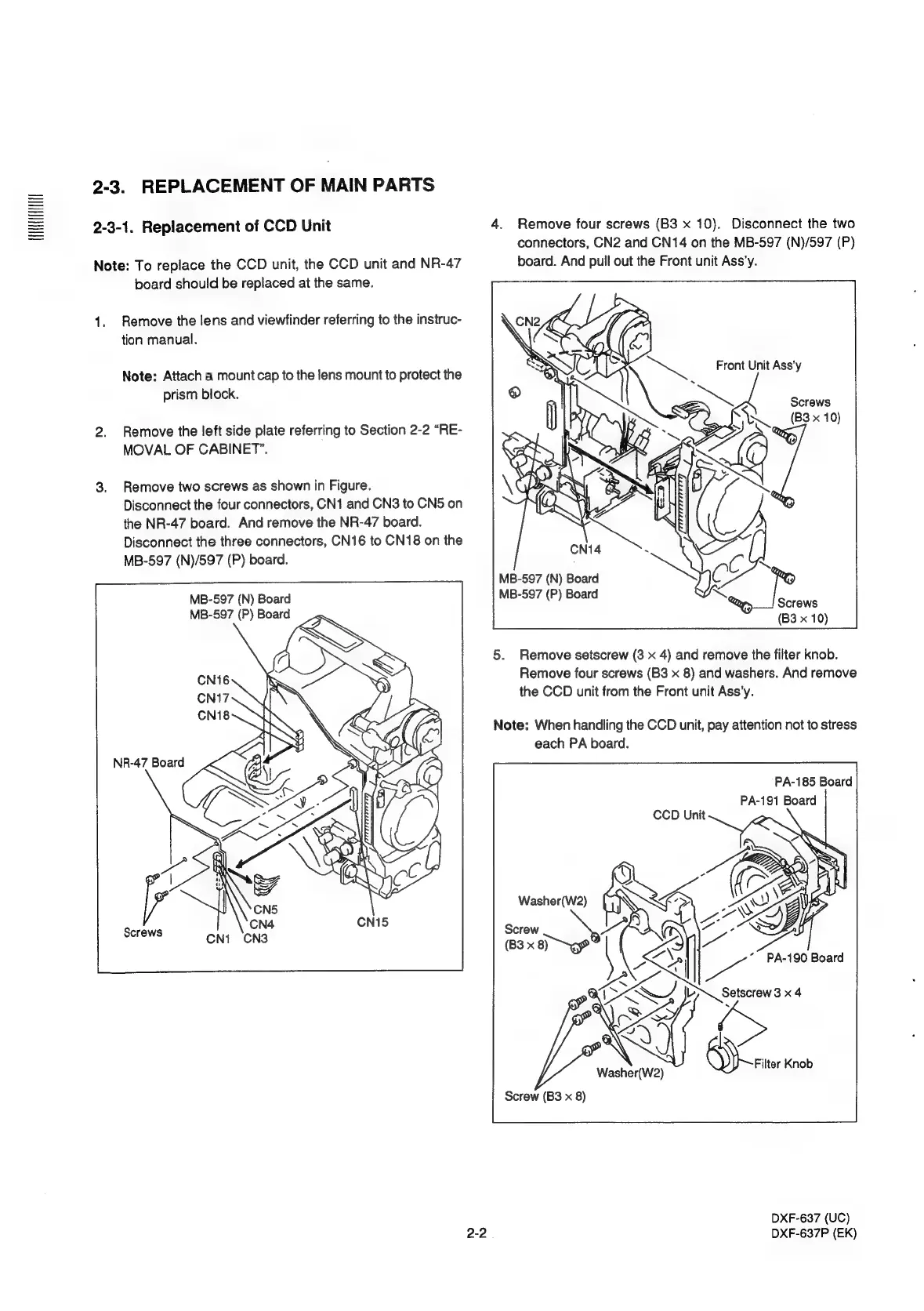
3.
Remove
two
screws
as
shown
in
Figure.
Disconnect
the
four
connectors,
CN1
and
CN3
to
CN5
on
the
NR-47
board.
And
remove
the
NR-47
board.
Disconnect
the
three
connectors,
CN16
to
CN18
on
the
MB-597
(N)/597
(P)
board.
MB-597
(N)
Board
MB-597
(P)
Board
NR-47
Board
2-2
4.
Remove
four
screws
(B3
x
10).
Disconnect
the
two
connectors,
CN2
and
CN14
on
the
MB-597
(N)/597
(P)
board.
And
pull
out
the
Front
unit
Ass’y.
Screws
(B3
x
10)
Ny
MB-597
(N)
Board
C
MB-597
(P)
Board
Screws
(B3
x
10)
5.
Remove
setscrew
(3
x
4)
and
remove
the
filter
knob.
Remove
four
screws
(B3
x
8)
and
washers.
And
remove
the
CCD
unit
from
the
Front
unit
Ass’y.
Note:
When
handling
the
CCD
unit,
pay
attention
not
to
stress
each
PA
board.
PA-185
Board
PA-191
Board
Washer(W2)
Screw
(B3
x
ms
Washer(W2)
Filter
Knob
Screw
(B3
x
8)
DXF-637
(UC)
DXF-637P
(EK)

Related product manuals