EasyManua.ls Logo

Sony DXC-637 - Character Size Adjustment; Alignment: Audio System Adjustments; Tone Level Adjustment

Sony DXC-637
63 pages
Print Icon
To Previous Page IconTo Previous Page
Loading...
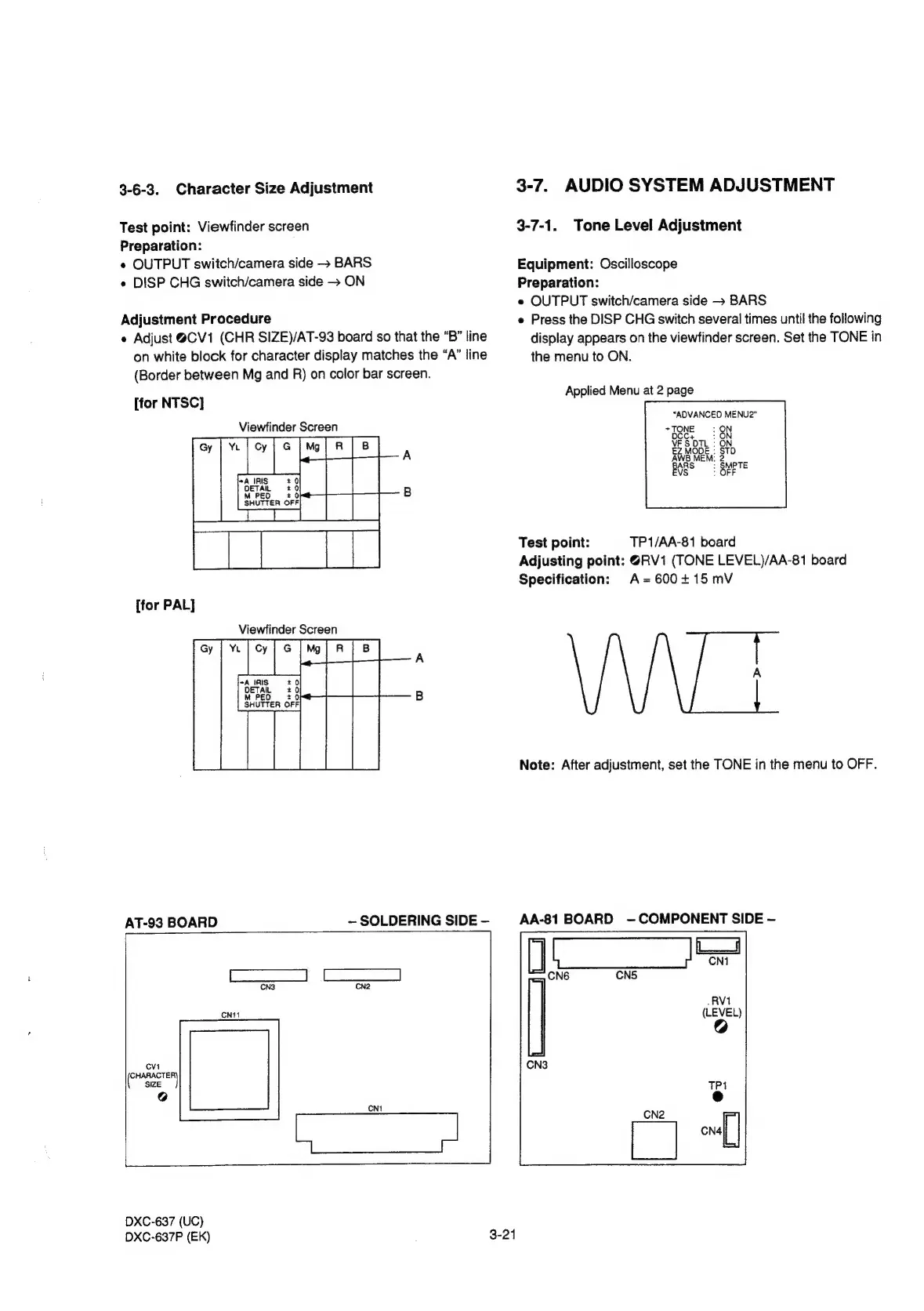
3-6-3.
Character
Size
Adjustment
Test
point:
Viewfinder
screen
Preparation:
¢
OUTPUT
switch/camera
side
-
BARS
e
DISP
CHG
switch/camera
side
>
ON
Adjustment
Procedure
«
Adjust
@CV1
(CHR
SIZE)/AT-93
board
so
that
the
“B”
line
on
white
block
for
character
display
matches
the
“A”
line
(Border
between
Mg
and
R)
on
color
bar
screen.
[for
NTSC]
Viewfinder
ere
ae
PA
aS:
[for
PAL]
Viewfinder
Screen
AT-93
BOARD
~
SOLDERING
SIDE
eS,
(Af
De
ec
|
CNS CN2
CNt1
owshacren
SIZE
@
DXC-637
(UC)
DXC-637P
(EK)
3-24
3-7.
AUDIO
SYSTEM
ADJUSTMENT
3-7-1.
Tone
Level
Adjustment
Equipment:
Oscilloscope
Preparation:
e
OUTPUT
switch/camera
side
BARS
e
Press
the
DISP
CHG
switch
several
times
until
the
following
display
appears
on
the
viewfinder
screen.
Set
the
TONE
in
the
menu
to
ON.
Applied
Menu
at
2
page
“ADVANCED
MENU2"
+
TONE
Test
point:
TP1/AA-81
board
Adjusting
point:
@RV1
(TONE
LEVEL)/AA-81
board
Specification:
A=600115
mV
Note:
After
adjustment,
set
the
TONE
in
the
menu
to
OFF.
AA-81
BOARD
-—
COMPONENT
SIDE

Related product manuals