EasyManua.ls Logo

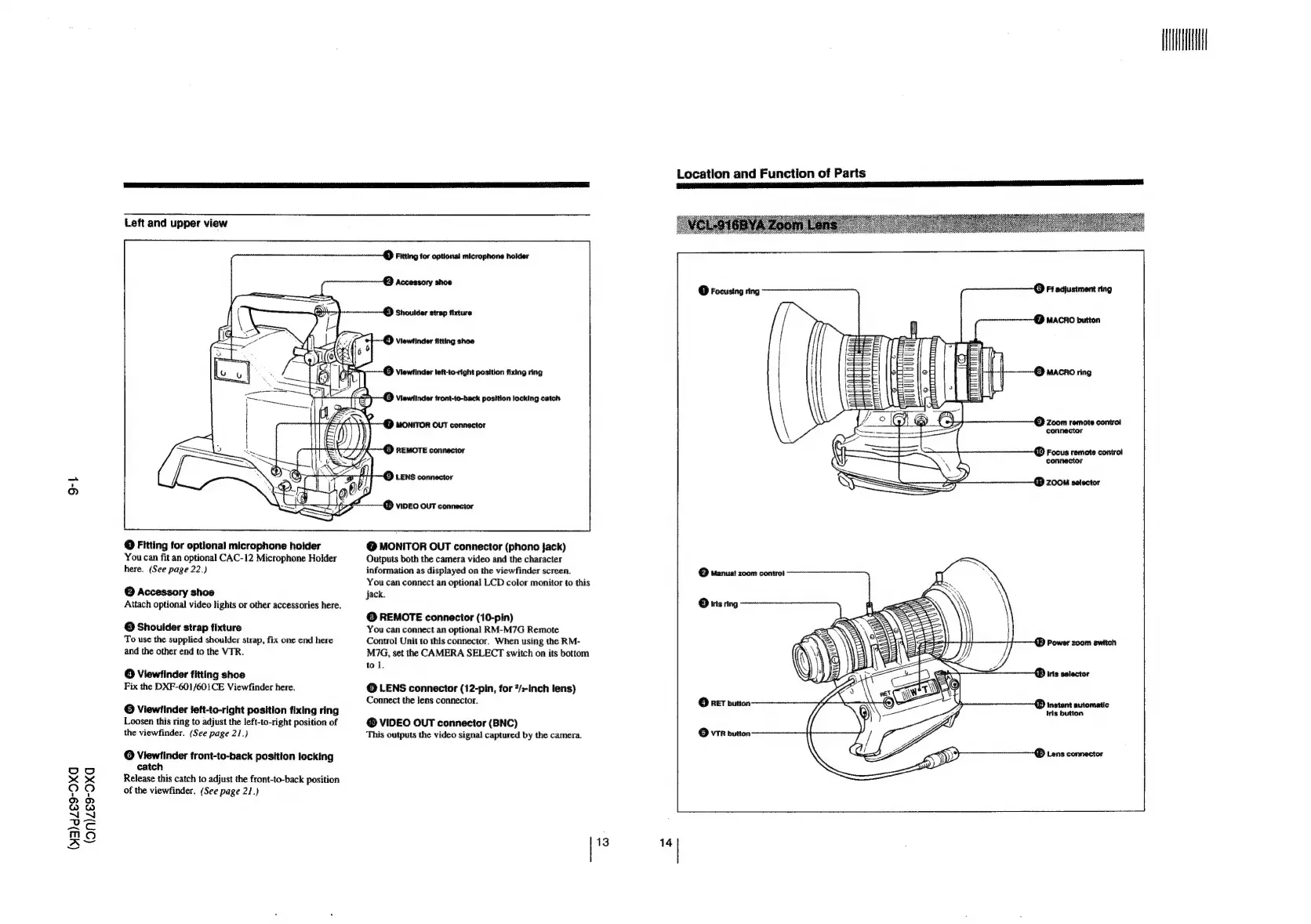
Sony DXC-637 - Zoom Lens Components

Sony DXC-637
63 pages
Print Icon
To Next Page IconTo Next Page
To Previous Page IconTo Previous Page
Loading...
9-4}
(43)dZ69-OXG
(on)ze9-Oxa
Left
and
upper
view
@
Fitting
for
optional
microphone
holder
You
can
fit
an
optional
CAC-12
Microphone
Holder
here.
(See
page
22.)
©
Accessory
shoe
Attach
optional
video
lights
or
other
accessories
here.
©
Shoulder
strap
fixture
To
use
the
supplied
shoulder
strap,
fix
one
end
here
and
the
other
end
to
the
VTR.
@
Viewfinder
fitting
shoe
Fix
the
DXF-601/601CE
Viewfinder
here.
©
Viewfinder
iett-to-right
position
fixing
ring
Loosen
this
ring
to
adjust
the
left-to-right
position
of
the
viewfinder.
(See
page
21.)
©
Viewfinder
front-to-back
position
locking
catch
Release
this
catch
to
adjust
the
front-to-back
position
of
the
viewfinder.
(See
page
21.)
UP
Fitting
for
optional
microphone
holder
E}
Accessory
shoe
Viewfinder
left-to-right
position
fixing
ring
(}
Viewfinder
tront-to-back
position
locking
catch
()
MONITOR
OUT
connector
()
REMOTE
connector
&)
LENS
connector
UY
VIDEO
OUT
connector
@
MONITOR
OUT
connector
(phono
jack)
Outputs
both
the
camera
video
and
the
character
information
as
displayed
on
the
viewfinder
screen.
You
can
connect
an
optional
LCD
color
monitor
to
this
jack.
©
REMOTE
connector
(10-pin)
You
can
connect
an
optional
RM-M7G
Remote
Control
Unit
to
this
connector.
When
using
the
RM-
M7G,
set
the
CAMERA
SELECT
switch
on
its
bottom
tol.
©
LENS
connector
(12-pin,
for
?/s-Inch
lens)
Connect
the
lens
connector.
@
VIDEO
OUT
connector
(BNC)
This
outputs
the
video
signal
captured
by
the
camera.
13
14
Location
and
Function
of
Parts
(}
Ff
adjustment
ring
C1)
Focusing
ring
emntrinmevnmnmn—@)
MACRO
button
3}
Zoom
remote
contro!
connector
U)
Focus
remote
contro!
connector
i)
ZOOM
selector
©
Manuat
zoom
contro!
©
ins
ring
W
Power
zoom
switch
UD)
iris
selector
U)
instant
automatic
Iris
button

Related product manuals