73
Connections
Installation and Connection
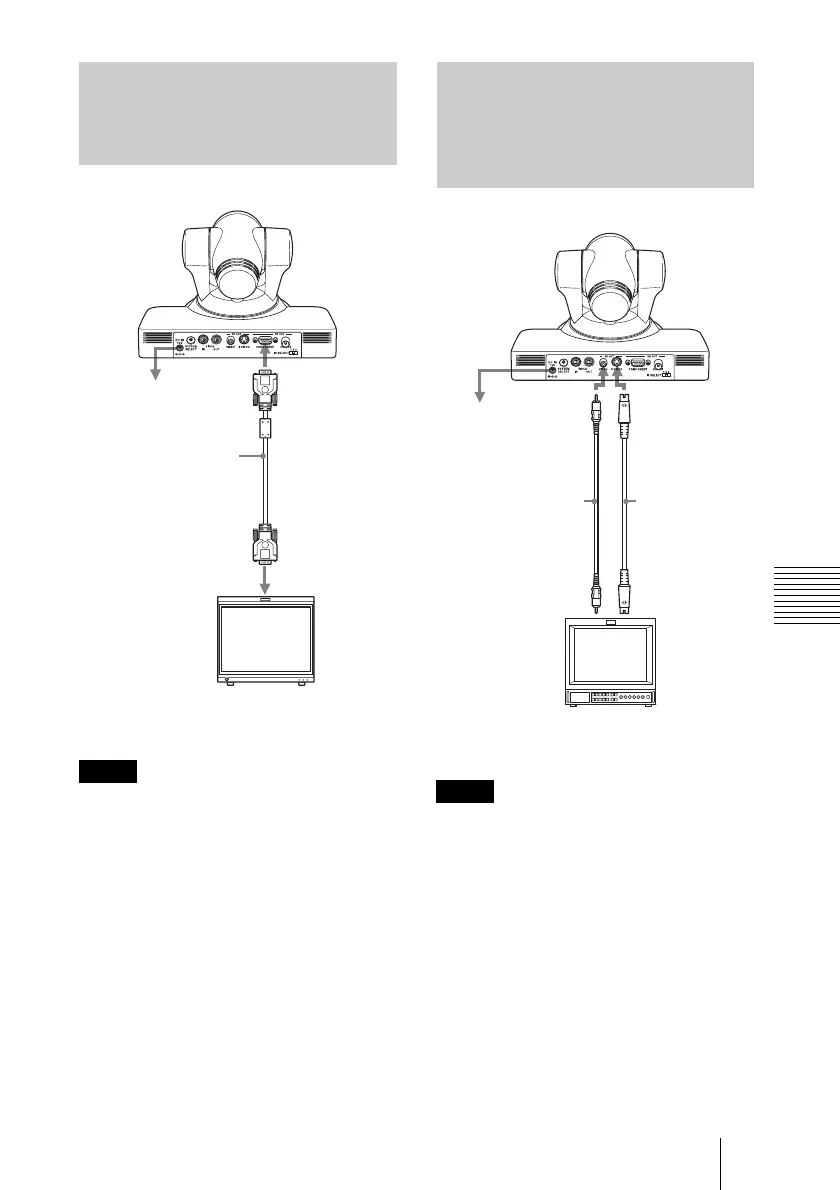
Set the SYSTEM SELECT switch to the
position where the corresponding HD signal
is output.
For details, see “Setting of the SYSTEM
SELECT switch” (page 53).
Set the SYSTEM SELECT switch to the
position where the corresponding SD signal
is output.
For details, see “Setting of the SYSTEM
SELECT switch” (page 53).
Connecting a Video Monitor,
etc., Equipped with an Analog
Component (YPbPr) Input
Connector
Note
to AC outlet
Connecting cable
with D-sub 15-pin
connectors
(not supplied)
to component
video input
HD video monitor, etc.
HD OUT
COMPONENT
Connecting a Video Monitor,
VTR, etc., Equipped with a
Composite Video Input
Connector or an S Video
Connector
Note
to AC outlet
SD OUT
VIDEO
S video cable
(not supplied)
Video
connecting cable
(not supplied)
to composite
video input
SD OUT
S VIDEO
to S video
input
Video monitor, VTR, etc.











 To Next Page