EasyManua.ls Logo

Sony FH-B500 - Page 12

Sony FH-B500
23 pages
Print Icon
To Next Page IconTo Next Page
To Previous Page IconTo Previous Page
Loading...
CD
Playing
(Continued)
(continued)
To
erase
a
selection
1
Press
CHECK
so
that
the
number
of
the
selection
you
wish
to
erase
appears
in
the
music
calendar.
You
cannot
erase
the
selection
being
played.
2
Press
CLEAR.
To
erase
the
entire
program
Press
@
once
in
stop
mode;
twice
during
play.
The
program
is
also
erased
when
you
turn
off
the
system.
If
“m-.--
"
le
displayed
instead
of
the
total
playing
time
during
programming
or
during
pla:
¢
You
have
programed
a
selection
the
number
of
which
is
over
20.
¢
The
total
time
has
exceeded
100
minutes.
To
check
the
remaining
time
during
piay
Press
TIME
once
to
see
the
remaining
time
of
the
Selection
being
played;
twice
to
see the
total
remaining
time
of
the
whole
program;
once
more
to
fretum
to
the
initial
display.
If
you
have
inserted
a
pause,
the
display
shows
the
remaining
time
until
the
pause
Designating
the
Playing
Order
of
Up
to
6
Discs
Muliti-disc
Program
You
can
make
a
program
by
designating
up
to
24
selections
from
a
maximum
of
6
discs
in
the
order
you
want
them
to
be
played.
At
the
same
time,
you
can
adjust
the
total
playing
time
of
the
program.
This
function
is
convenient
for
editing
tapes
from
different
discs.
This
operation
is
not
possible
with
the
remote
commander.
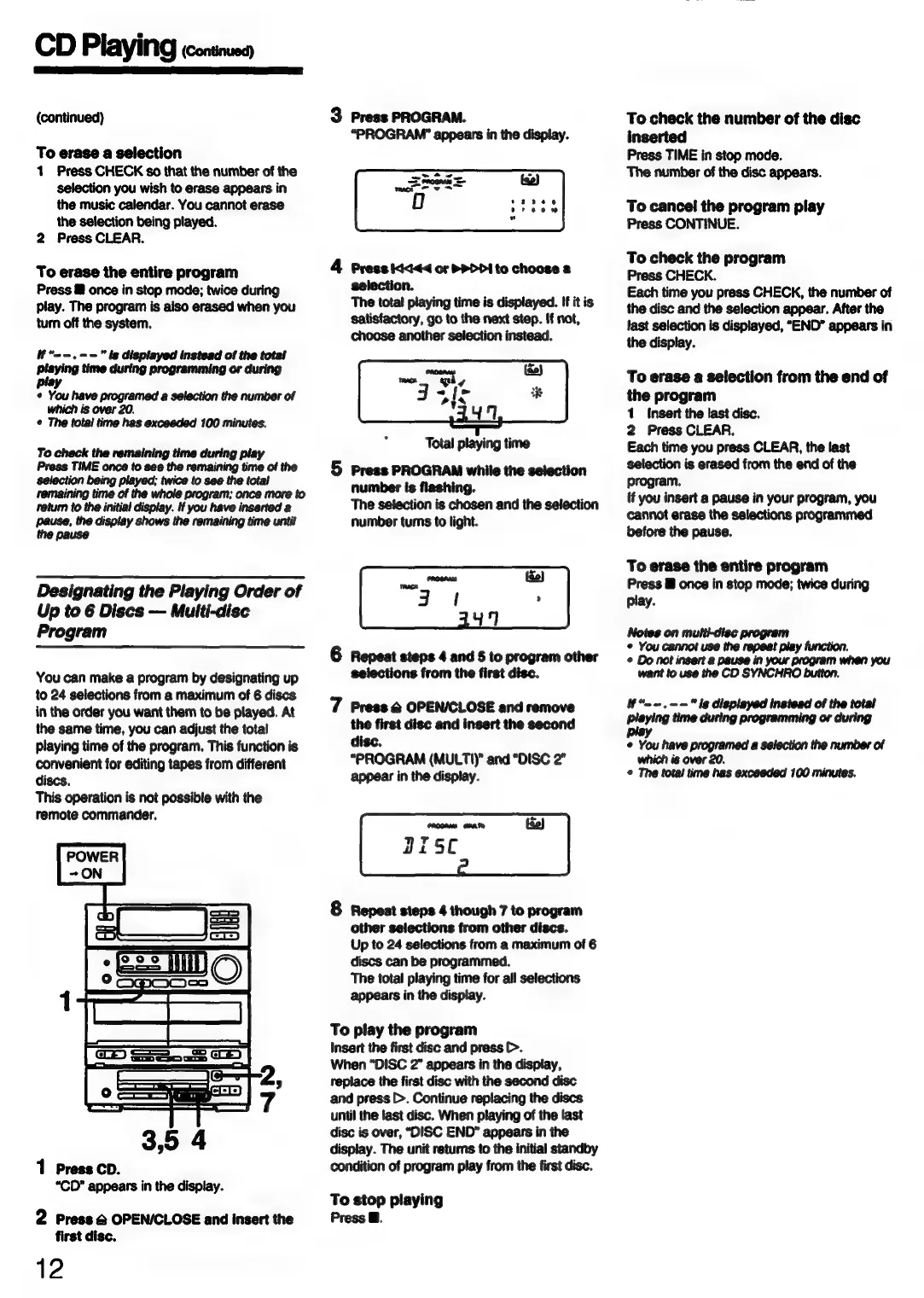
1
Press
co.
“CD”
appears
in
the
display.
2
Press
&
OPEN/CLOSE
and
insert
the
first
disc.
12
3
Press
PROGRAM.
“PROGRAM”
appears
in
the
display.
4
Press
id<<<
or
PPDDI
to
choose
a
selection.
The
total
playing
time
is
displayed.
If
it
is
satisfactory,
go
to
the
next
step.
[f
not,
choose
another
selection
instead.
*
Total
playing
time
5
Press
PROGRAM
while
the
selection
number
is
flashing.
The
selection
is
chosen
and
the
selection
number
tums
to
light.
6
Repeat
steps
4
and
5
to
program
other
selections
from
the
first
disc.
7
Press
@
OPEN/CLOSE
and
remove
the
first
disc
and
insert
the
second
disc.
“PROGRAM
(MULTI)”
and
“DISC
2”
appear
in
the
display.
enocane
aKATH
(S5)
ZISC
8
Repeat
steps
4
though
7
to
program
other
selections
from
other
discs.
Up
to
24
selections
from
a
maximum
of
6
discs
can
be
programmed.
The
total
playing
time
for
all
selections
appears
in
the
display.
To
play
the
program
Insert
the
first
disc
and
press
>.
When
“DISC
2”
appears
in
the
display,
replace
the
first
disc with
the
second
disc
and
press
>.
Continue
replacing
the
discs
until
the
last
disc.
When
playing
of
the
last
disc
is
over,
“DISC
END”
appears
in
the
display.
The
unit
returns
to
the
initial
standby
condition
of
program
play
from
the
first
disc.
To
stop
playing
Press
@.
To
check
the
number
of
the
disc
inserted
Press
TIME
in
stop
mode.
The
number
of
the
disc
appears.
To
cance
the
program
play
Press
CONTINUE.
To
check
the
program
Press
CHECK.
Each
time
you
press
CHECK,
the
number
of
the
disc
and
the
selection
appear.
After
the
last
selection
is
displayed,
“END”
appears
in
the
display.
To
erase
a
selection
from
the
end
of
the
program
1
Insert
the
last
disc.
2
Press
CLEAR.
Each
time
you
press
CLEAR,
the
last
selection
is
erased
from
the
end
of
the
program.
if
you
insert
a
pause
in
your
program,
you
cannot
erase
the
selections
programmed
before
the
pause.
To
erase
the
entire
program
Press
&
once
in
stop
mode;
twice
during
play.
Notes
on
multi-disc
program
©
You
cannot
use the
repeat
play
function.
¢
Do
not
insert
a
pause
in
your
program
when
you
want
to
use
the
CD
SYNCHRO
button.
If
tne,
--
je
displayed
instead
of
the
total
Fe
ere
eee
ee
¢
You
have
programed
a
selection
the
number
of
which
is
over
20.
©
The
total
time
has
exceeded
100
minutes.