EasyManua.ls Logo

Sony FH-B500 - Troubleshooting Guide; Radio Reception; CD Player Operation

Sony FH-B500
23 pages
Print Icon
To Previous Page IconTo Previous Page
Loading...
En
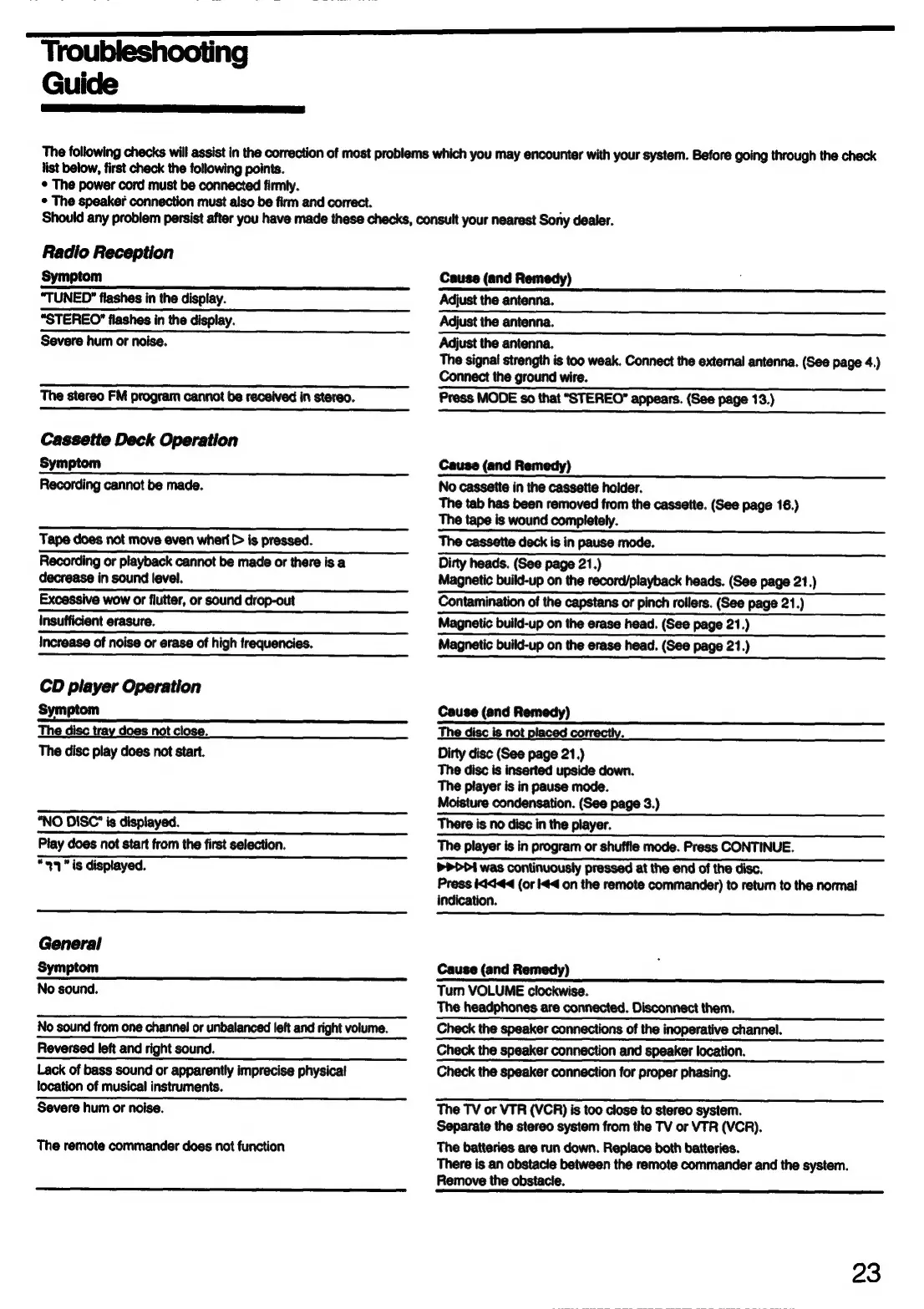
Troubleshooting
Guide
The
following
checks
will
assist
in
the
correction
of
most
problems
which
you
may
encounter
with
your
system.
Before
going
through
the
check
list
below,
first
check
the
following
points.
¢
The
power
cord
must
be
connected
firmly.
¢
The
speaker
connection
must
also
be
firm
and
correct.
Should
any
problem
persist
after
you
have
made
these
checks,
consult
your
nearest
Sony
dealer.
Radio
Reception
Symptom
“TUNED”
flashes
in
the
display.
“STEREO”
flashes
in
the
display.
Tape
does
not
move
even
whert
>
is
pressed.
Recording
or
playback
cannot
be
made
or
there
is
a
decrease
in
sound
level.
Excessive
wow
or
flutter,
or
sound
drop-out
insufficient
erasure.
Increase
of
noise
or
erase
of
high
frequencies.
CD
player
Operation
Symptom
The
disc
tray
does
not
close.
The
disc
play
does
not
start.
“NO
DISC’
is
displayed.
Play
does
not
start
from
the
first
selection.
“99
"
is
displayed.
General
Symptom
No
sound.
No
sound
from
one
channel
or
unbalanced
left
and
right
volume.
Reversed
left
and
right
sound.
Lack
of
bass
sound
or
apparently
imprecise
physical
location
of
musical
instruments.
Severe
hum
or
noise.
The
remote
commander
does
not
function
Cause
(and
Remedy)
Adjust
the
antenna.
Adjust
the
antenna.
Adjust
the
antenna.
The
signal
strength
is
too
weak.
Connect
the
external
antenna.
(See
page
4.)
Connect
the
ground
wire.
Press
MODE
so
that
“STEREO”
appears.
(See
page
13.)
Cause
(and
Remedy)
No
cassette
in
the
cassette
holder.
The
tab
has
been
removed
from
the
cassette.
(See
page
16.)
The
tape
is
wound
completely.
The
cassette
deck
is
in
pause
mode.
Dirty
heads.
(See
page
21.)
Magnetic
build-up
on
the
record/playback
heads.
(See
page
21.)
Contamination
of
the
capstans
or
pinch
rollers.
(See
page
21.)
Magnetic
build-up
on
the
erase
head.
(See
page
21.)
build-up
on
the
erase
head.
(See
page
21.)
Cause
(and
Remedy)
The
disc
is
not
placed
co!
B
Dirty
disc
(See
page
21.)
The
disc
is
inserted
upside
down.
The
player
is
in
pause
mode.
Moisture
condensation.
(See
page
3.)
There
is
no
disc
in
the
player.
The
player
is
in
program
or
shuffle
mode.
Press
CONTINUE.
PDI
was
continuously
pressed
at
the
end
of
the
disc.
Press
Kid44
(or
4
on
the
remote
commander)
to
return
to
the
normal
indication.
Cause
(and
Remedy)
Turn
VOLUME
clockwise.
The
headphones
are
connected.
Disconnect
them.
Check
the
speaker
connections
of
the
inoperative
channel.
Check
the
speaker
connection
and
speaker
location.
Check
the
speaker
connection
for
proper
phasing.
The
TV
or
VTR
(VCR)
is
too
close
to
stereo
system.
Separate
the
stereo
system
from
the
TV
or
VTR
(VCR).
The
batteries are
run
down.
Replace
both
batteries.
There
is
an
obstacle
between
the
remote
commander
and
the
system.
Remove
the
obstacle.
23