EasyManua.ls Logo

Sony FH-B500 - Timer-Activated Operation; Setting the Timer

Sony FH-B500
23 pages
Print Icon
To Next Page IconTo Next Page
To Previous Page IconTo Previous Page
Loading...
2
Program
desired
selections
for
side
A.
(See
pages
11
and
12,
“Playing
in
a
Desired
Order
—
Program
Play.”)
Note:
Make
sure
that
“A”
is
lit
in
the
display.
3
Press
it
on
the
CD
player
“P"
appears
in
the
display
and
the
total
playing
time
is
reset
to
0.
“8”
lights
up.
4
Program
desired
selections
for
side
B.
(See
pages
11
and
12,
“Playing
in
a
Desired
Order
—
Program
Play.”)
5
Press
CD
SYNCHRO.
The
recording
starts
and
then
the
CD
playing
starts.
To
record
on
the
reverse
side
When
the
CD
player
enters
pause,
reverse
the
the
tape
and
press
CD
SYNCHRO.
To
stop
recording
Press
&
on
the
deck
B
and
i
on
the
CD
player.
Note:
Be
sure
to
program
the
selections
so
that
the
total
playing
time
of
each side does
not
exceed
the
tape
length
of
one
side.
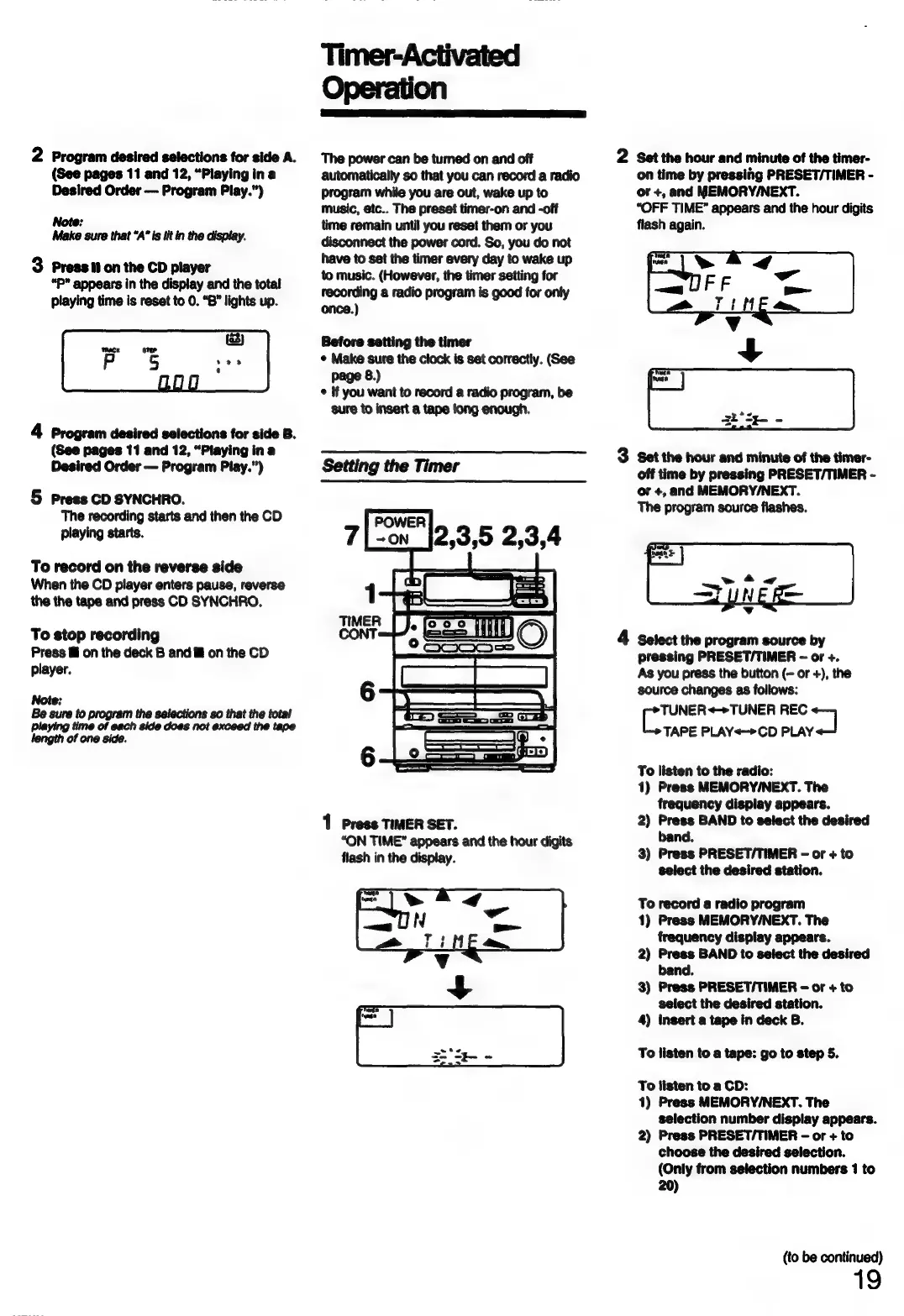
Timer-Activated
Operation
The
power
can
be
turned
on
and
off
automatically
so
that
you
can
record
a
radio
Program
while
you
are
out,
wake
up
to
music,
etc..
The
preset
timer-on
and
-off
time
remain
until
you
reset
them
or
you
disconnect
the
power
cord.
So,
you
do
not
have
to
set the
timer every
day
to
wake
up
to
music.
(However,
the
timer
setting
for
recording
a
radio
program
is
good
for
only
once.)
Before
setting
the
timer
¢
Make
sure
the
clock
is
set
correctly.
(See
page
8.)
©
if
you
want
to
record
a
radio
program,
be
sure
to
insert
a
tape
long
enough.
Setting
the
Timer
POWER
~ON
7
2,3,5
2,3,4
1
Press
TIMER
SET.
“ON
TIME”
appears
and
the
hour
digits
flash
in
the
display.
2
Set
the
hour
and
minute
of
the
timer-
on
time
by
pressing
PRESET/TIMER
-
or
+,
and
MEMORY/NEXT.
“OFF
TIME”
appears
and
the
hour
digits
flash
again.
Set
the
hour
and
minute
of
the
timer-
off
time
by
pressing
PRESET/TIMER
-
or
+,
and
MEMORY/NEXT.
The
program
source
flashes.
Select
the
program
source
by
pressing
PRESET/TIMER
-
or
+.
As
you
press
the
button
(-
or
+),
the
source
changes
as
follows:
TUNER
<>TUNER
REC
7
TAPE
PLAY<->CD
PLAY
To
listen
to
the
radio:
1)
Press
MEMORY/NEXT.
The
frequency
display
appears.
2)
Press
BAND
to
select
the
desired
band.
3)
Press
PRESET/TIMER
-
or
+
to
select
the
desired
station.
To
record
a
radio
program
1)
Press
MEMORY/NEXT.
The
frequency
display
appears.
2)
Press
BAND
to
select
the
desired
band.
3)
Press
PRESET/TIMER
-
or
+
to
select
the
desired
station.
4)
Insert
a
tape
in
deck
B.
To
listen
to
a
tape:
go
to
step
5.
To
listen
to
a
CD:
1)
Press
MEMORY/NEXT.
The
selection
number
display
appears.
2)
Press
PRESET/TIMER
-
or
+
to
choose
the
desired
selection.
(Only
from
selection
numbers
1
to
20)
(to
be
continued)
19