EasyManua.ls Logo

Sony FH-B500 - Automatic Tuning

Sony FH-B500
23 pages
Print Icon
To Next Page IconTo Next Page
To Previous Page IconTo Previous Page
Loading...
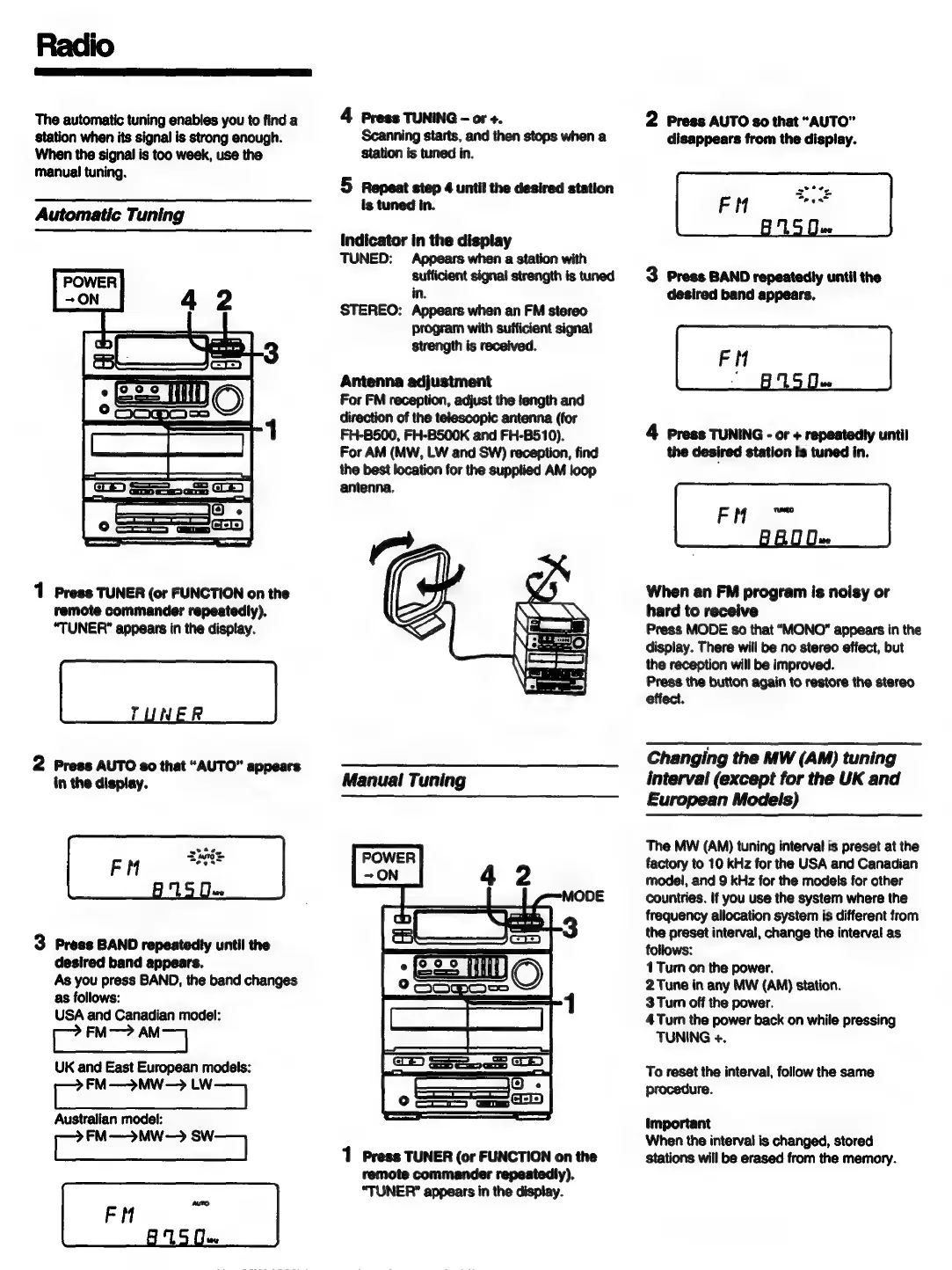
Radio
The
automatic
tuning
enables
you
to
find
a
station
when
its
signal
is
strong
enough.
When
the
signal
is
too
week,
use
the
manual
tuning.
Automatic
Tuning
1
Press
TUNER
(or
FUNCTION
on
the
remote
commander
repeatedly).
“TUNER”
appears
in
the
display.
TUNER
2
Press
AUTO
£0
that
“AUTO”
appears
in
the
display.
3
Press
BAND
repeatedty
until
the
desired
band
appears.
As
you
press
BAND,
the
band
changes
as
follows:
USA
and
Canadian
model:
i
FM—>
|
UK
and
East
European
models:
FM—>MW-—>
LW
Australian
model:
es
FM—>MW—>
orl
4
Press
TUNING
-
or
+.
Scanning
starts,
and
then
stops
when
a
station
is
tuned
in.
5
Repeat
step
4
until
the
desired
station
is
tuned
in.
indicator
in
the
display
TUNED:
Appears
when
a
station
with
sufficient
signal
strength
is
tuned
in.
STEREO:
Appears
when
an
FM
stereo
program
with
sufficient
signal
strength
is
received.
Antenna
adjustment
For
FM
reception,
adjust
the
length
and
direction
of
the
telescopic
antenna
(for
FH-BS500,
FH-BS00K
and
FH-B510).
For
AM
(MW,
LW
and
SW)
reception,
find
the
best
location
for
the
supplied
AM
loop
antenna.
Manual
Tuning
1
Press
TUNER
(or
FUNCTION
on
the
remote
commander
repeatedly).
“TUNER?”
appears
in
the
display.
2
Press
AUTO
80
that
“AUTO”
disappears
from
the
display.
3
Press
BAND
repeatedly
until
the
desired
band
appears.
4
Press
TUNING
-
or
+
repeatedty
until
the
desired
station
is
tuned
in.
When
an
FM
program
is
noisy
or
hard
to
receive
Press
MODE
so
that
“MONO”
appears
in
the
display.
There
will
be
no
stereo
effect,
but
the
reception
will
be
improved.
Press
the
button
again
to
restore
the
stereo
effect.
Changing
the
MW
(AM)
tuning
interval
(except
for
the
UK
and
European
Models)
The
MW
(AM)
tuning
interval
is
preset
at
the
factory
to
10
kHz
for
the
USA
and
Canadian
model,
and
9
kHz
for
the
models
for
other
countries.
If
you
use
the
system
where
the
frequency
allocation
system
is
different
from
the
preset
interval,
change
the
interval
as
follows:
1
Turn
on
the
power.
2
Tune
in
any
MW
(AM)
station.
3
Turn
off
the
power.
4
Turn
the
power
back
on
while
pressing
TUNING
+.
To
reset
the
interval,
follow
the
same
procedure.
important
When
the
interval
is
changed,
stored
stations
will
be
erased
from
the
memory.