EasyManua.ls Logo

Sony FH-B500 - Information Display

Sony FH-B500
23 pages
Print Icon
To Next Page IconTo Next Page
To Previous Page IconTo Previous Page
Loading...
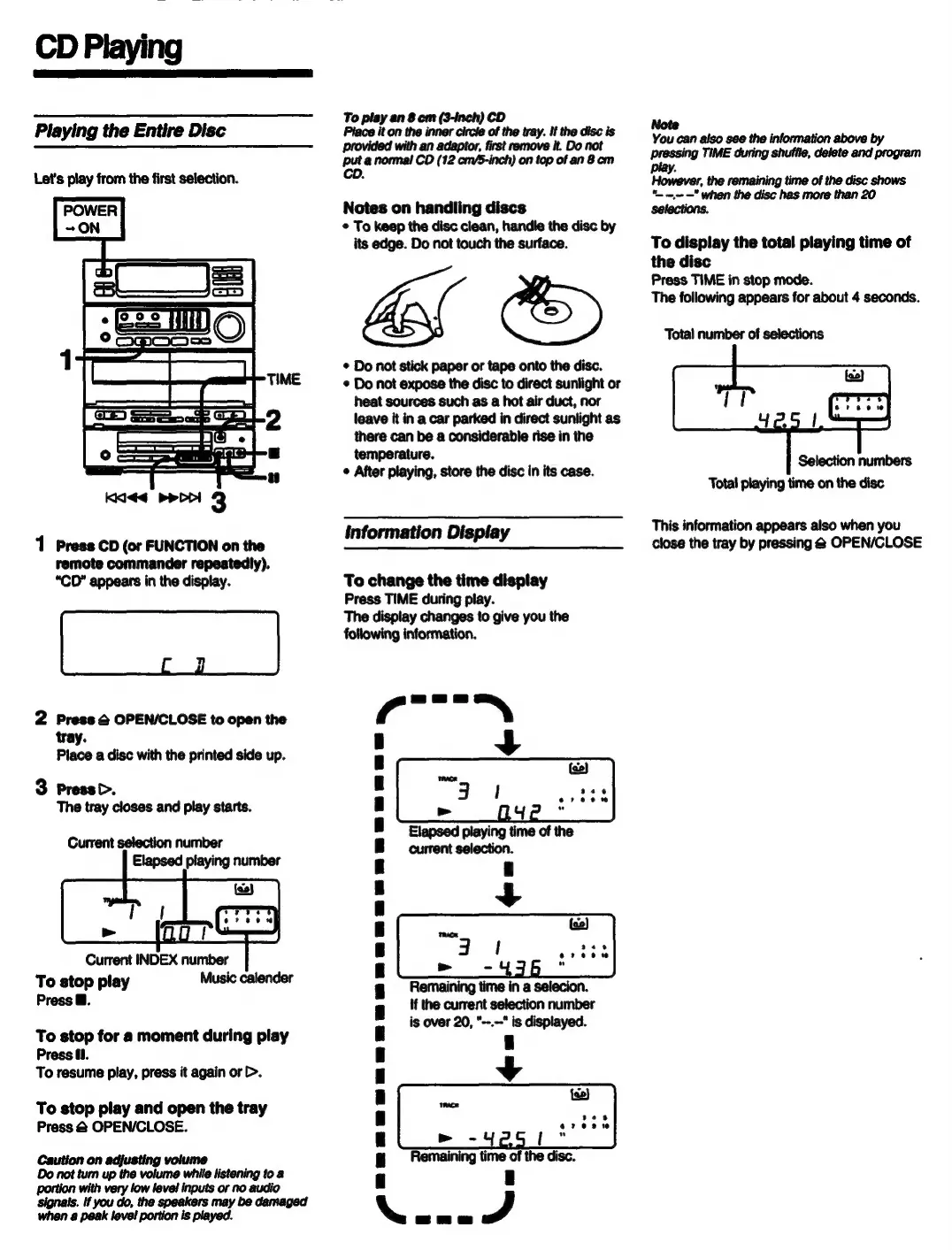
CD
Playing
Playing
the
Entire
Disc
Let's
play
from
the
first
selection.
Kidd
perl
3
1
Press
CD
(or
FUNCTION
on
the
remote
commander
repeatedly).
“CD”
appears
in
the
display.
2
Press
@
OPEN/CLOSE
to
open
the
tray.
Place
a
disc
with
the
printed
side
up.
3
Press
b>.
The
tray
closes
and
play
starts.
Current
selection
number
Elapsed
playing
number
Current
INDEX
number
To
stop
play
Music
calender
Press
B.
To
stop
for
a
moment
during
play
Press
ff.
To
resume
play,
press
it
again
or
>.
To
stop
play
and
open
the
tray
Press
@
OPEN/CLOSE.
Caution
on
adjusting
volume
Do
not
tum
up
the
volume
while
listening
to
a
portion
with
very
low
level
inputs
or
no
audio
To
play
an
8
cm
(3-inch)
CD
Place
it
on
the
inner
circle
of
the
tray.
If
the
disc
is
with
an
,
first
remove
it.
Do
not
Bare
Se
eer
Oe
Sane
Notes
on
handling
discs
©
To
keep
the
disc
clean,
handle
the
disc
by
its
edge.
Do
not
touch
the
surface.
asl
&
¢
Do
not
stick
paper
or
tape
onto
the
disc.
*
Do
not
expose
the
disc
to
direct
sunlight
or
heat
sources
such
as
a
hot air
duct,
nor
leave
it
in
a
car
parked
in
direct
sunlight
as
there
can
be
a
considerable
rise
in
the
temperature.
¢
After
playing,
store
the
disc
in
its
case.
information
Display
To
change
the
time
display
Press
TIME
during
play.
The
display
changes
to
give
you
the
following
information.
ere
+
Remaining
time
in
a
selecion.
if
the
current
selection
number
is
over
20,
*--.--*
is
displayed.
4
N
Note
You
can
also
see the
information
above
by
pressing
TIME
during
shuffle,
delete
and
program
play.
However,
the
remaining
time
of
the
disc
shows
*.
-
—"
when
the
disc
has
more than
20
Selections.
To
display
the
total
playing
time
of
the
disc
Press
TIME
in
stop
mode.
The
following
appears
for
about
4
seconds.
Total
number
of
selections
Selection
numbers
Total
playing
time
on
the
disc
This
information
appears
also
when
you
close
the
tray
by
pressing
@
OPEN/CLOSE

Related product manuals