EasyManua.ls Logo

Sony FH-B500 - Tape Dubbing; Notes on Cassettes

Sony FH-B500
23 pages
Print Icon
To Next Page IconTo Next Page
To Previous Page IconTo Previous Page
Loading...
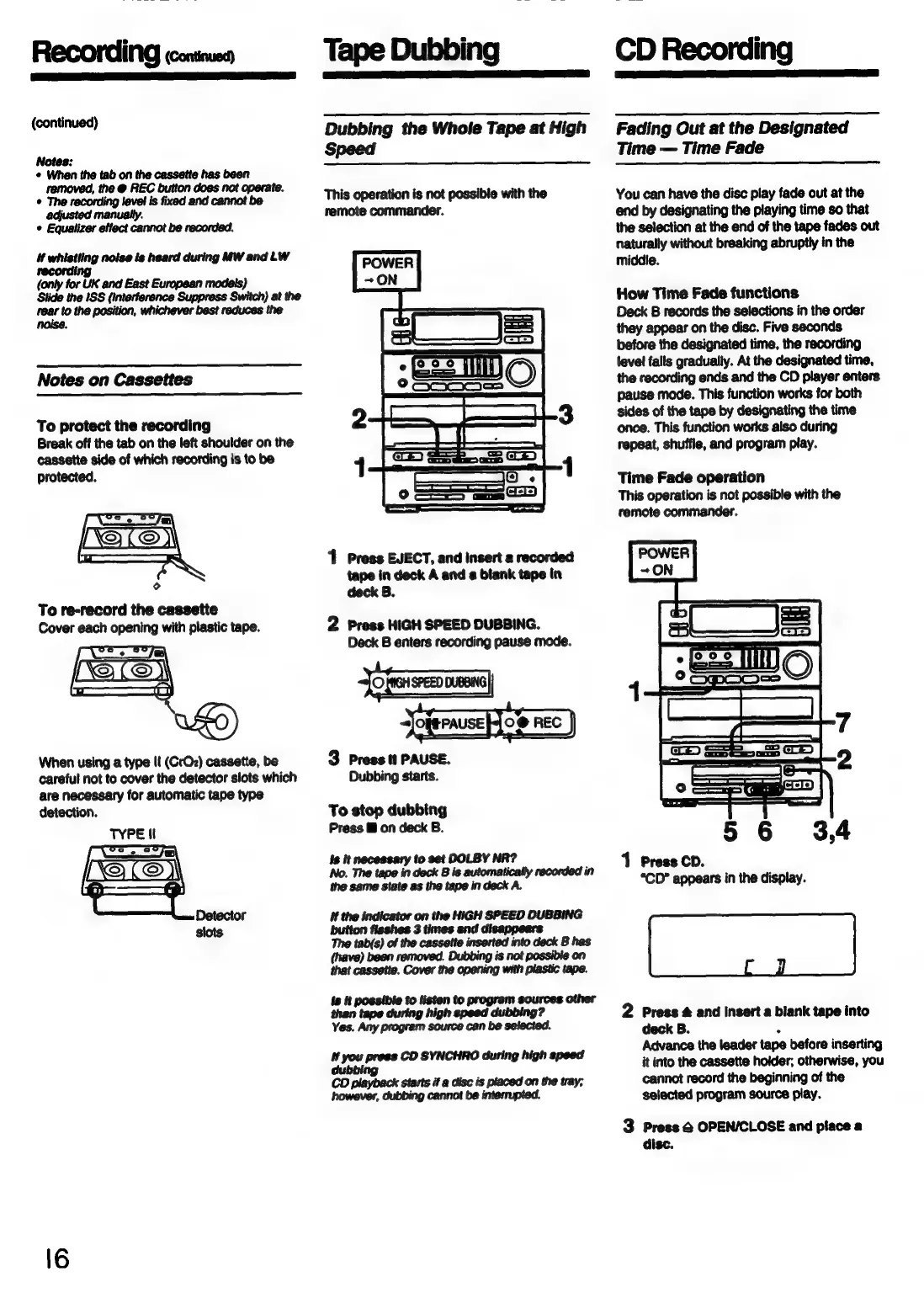
(continued)
Notes:
©
When
the
tab
on
the
cassette
has
been
adjusted
manually.
©
Equalizer
etlect
cannot
be
recorded.
i
whistling
noise
is
heard
during
MW
and
LW
(only
for
UK
and
East
European
models,
}
Stide
the ISS
(interference
Suppress
Switch)
at
the
rear
to
the
position,
whichever
best
reduces
the
Notes
on
Cassettes
To
protect
the
recording
Break
off
the
tab
on
the
left
shoulder
on
the
cassette
side
of
which
recording
is
to
be
protected.
LQ
LO)
To
re-record
the
cassette
Cover
each
opening
with
plastic
tape.
When
using
a
type
Il
(CrO2)
cassette,
be
careful
not
to
cover
the
detector
slots
which
are
necessary
for
automatic
tape
type
detection.
Tape
Dubbing
Dubbing
the
Whole
Tape
at
High
Speed
This
operation
is
not
possible
with
the
remote
commander.
1
Press
EJECT,
and
insert
a
recorded
tape
in
deck
A
and
a
blank
tape
in
deck
B.
2
Press
HIGH
SPEED
DUBBING.
Deck
B
enters
recording
pause
mode.
Jofairannmng
sJoferause
jo
nec
J
3
Press
it
PAUSE.
Dubbing
starts.
To
stop
dubbing
Press
@
on
deck
B.
Is
it
necessary
to
set
DOLBY
NR?
No.
The
tape
in
deck
B
is
automatically
recorded
in
the
same
state
as
the
tape
in
deck
A.
if
the
indicator
on
the
HIGH
SPEED
DUBBING
button
fisshes
3
times
and
disappears
The
tab(s)
of
the
cassette
inserted
into
deck
B
has
(have)
been
removed.
Dubbing
is
not
possible
on
that
cassette.
Cover
the
opening
with
plastic
tape.
ts
it
possible
to
listen
to
program sources
other
than tape
during
high
speed
dubbing?
Yes.
Any
program
source
can
be
selected.
penn
ae
ng
CO
playback
starts
if
a
disc
is
placed
on
the
tray;
however,
dubbing
cannot
be
interrupted.
CD
Recording
Fading
Out
at
the
Designated
Time
Time
Fade
You
can
have
the
disc
play
fade
out
at
the
end
by
designating
the
playing
time
so
that
the
selection
at
the
end
of
the
tape
fades
out
naturally
without
breaking
abruptly
in
the
middie.
How
Time
Fade
functions
Deck
B
records
the
selections
in
the
order
they
appear
on
the
disc.
Five
seconds
before
the
designated
time,
the
recording
level
falls
gradually.
At
the
designated
time,
the
recording
ends
and the
CD
player
enters
pause
mode.
This
function
works
for
both
sides
of
the
tape
by
designating
the
time
once.
This
function
works
also
during
repeat,
shuffle,
and
program
play.
Time
Fade
operation
This
operation
is
not
possible
with
the
remote
commander.
1
Press
CD.
“CD”
appears
in
the
display.
2
Press
&
and
insert
a
blank
tape
into
deck
B.
.
Advance
the
leader
tape
before
inserting
it
into
the
cassette
holder;
otherwise,
you
cannot
record
the
beginning
of
the
selected
program
source
play.
3
Press
&
OPEN/CLOSE
and
place
a
disc.