EasyManua.ls Logo

Sony FH-B500 - Page 18

Sony FH-B500
23 pages
Print Icon
To Next Page IconTo Next Page
To Previous Page IconTo Previous Page
Loading...
CD
Recording
continued
Time
Edit
and
Just
Edit
operations
This
operation
is
not
possible
with
the
remote
commander.
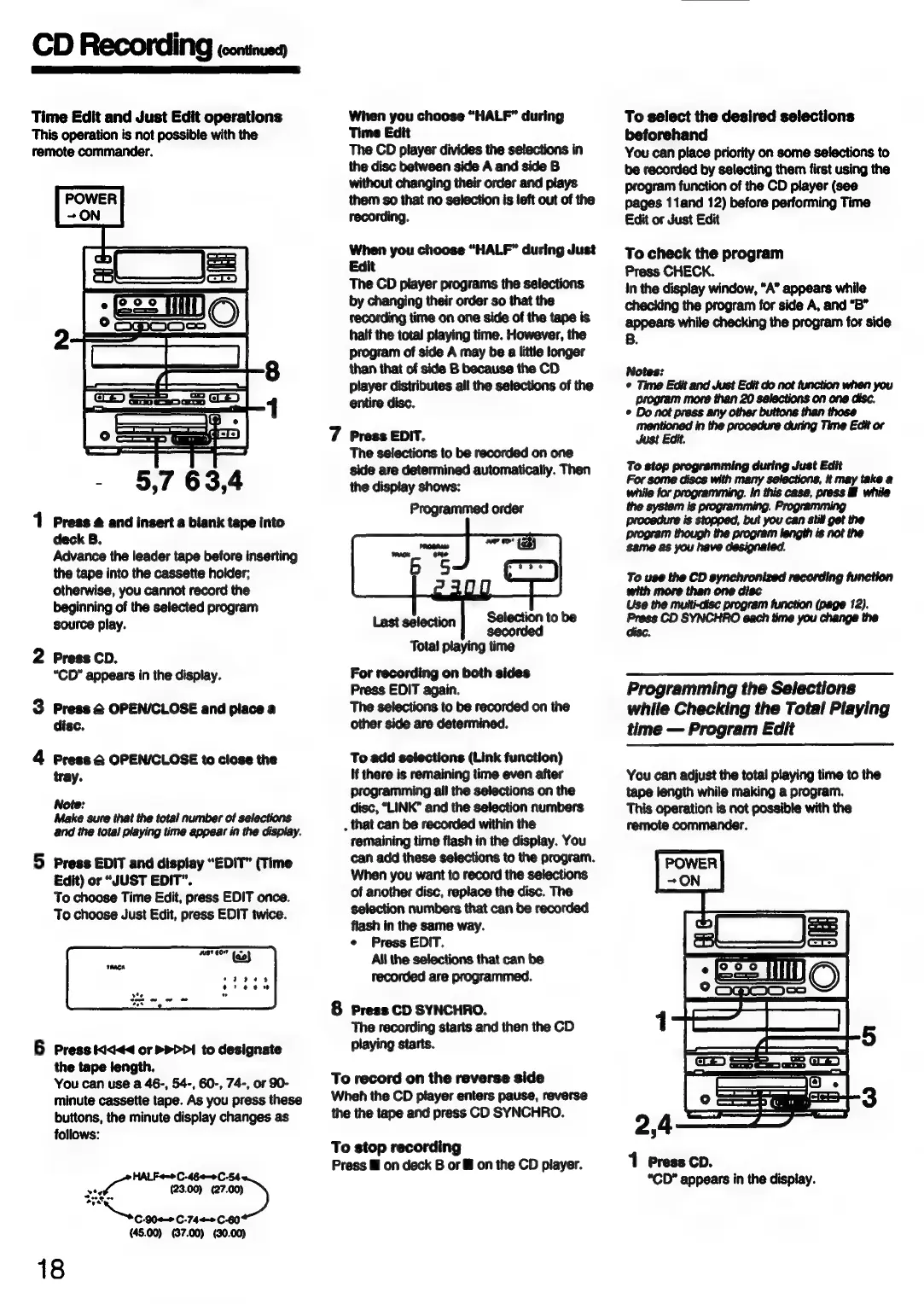
-
5,7
63,4
1
Press
4
and
insert
a
blank
tape
into
deck
B.
Advance
the
leader
tape
before
inserting
the
tape
into
the
cassette
holder;
otherwise,
you
cannot
record
the
beginning
of
the
selected
program
source
play.
2
Press
CD.
“CD”
appears
in
the
display.
3
Press
@
OPEN/CLOSE
and
place
a
disc.
4
Press
&
OPEN/CLOSE
to
close
the
tray.
Note:
Make
sure
that
the
total
number
of
selections
and
the
total
playing
time
appear
in
the
display.
5
Press
EDIT
and
display
“EDIT”
(Time
Edit)
or
“JUST
EDIT”.
To
choose
Time
Edit,
press
EDIT
once.
To
choose
Just
Edit,
press
EDIT
twice.
6
Press
id<<
or
PDD!
to
designate
the
tape
length.
You
can
use
a
46-,
54-,
60-,
74-,
or
90-
minute
cassette
tape.
As
you
press
these
buttons,
the
minute
display
changes
as
follows:
gate
oe
wt
(23.00)
(27.00)
Sse
gies
asaeian
45.00)
(37.00)
(30.00)
18
When
you
choose
“HALF”
during
Time
Edit
The
CD
player
divides the
selections
in
the
disc
between
side
A
and
side
B
without
changing
their
order
and
plays
them
so
that
no
selection
is
left
out
of
the
recording.
When
you
choose
“HALF”
during
Just
Edit
The
CD
player
programs
the
selections
by
changing
their
order
so
that
the
ftecording
time
on
one
side
of
the
tape
is
half
the
total
playing
time.
However,
the
program
of
side
A
may
be
a
little
longer
than
that
of
side
B
because
the
CD
player
distributes
all
the
selections
of
the
entire
disc.
7
Press
EDIT.
The
selections
to
be
recorded
on
one
side
are
determined
automatically.
Then
the
display
shows:
Programmed
order
Selection
to
be
Last
selection
sacctded
Total
playing
time
For
recording
on
both
sides
Press
EDIT
again.
The
selections
to
be
recorded
on
the
other
side
are
determined.
To
add
selections
(Link
function)
If
there
is
remaining
time
even
after
programming
ail
the
selections
on
the
disc,
“LINK”
and
the
selection
numbers
.
that
can
be
recorded
within
the
remaining
time
flash
in
the
display.
You
can
add
these
selections
to
the
program.
When
you
want
to
record
the
selections
of
another
disc,
replace
the
disc.
The
selection
numbers
that
can
be
recorded
flash
in
the
same
way.
¢
Press EDIT.
All
the
selections
that
can
be
recorded
are
programmed.
&
Press
CD
SYNCHRO.
The
recording
starts
and
then
the
CD
playing
starts.
To
record
on
the
reverse
side
Wheh
the
CD
player
enters
pause,
reverse
the
the
tape
and
press
CD
SYNCHRO.
To
stop
recording
Press
i
on
deck
B
or
&
on
the
CD
player.
To
select
the
desired
selections
beforehand
You
can
place
priority
on
some
selections
to
be
recorded
by
selecting
them
first
using
the
program
function
of
the
CD
player
(see
pages
11and
12)
before
performing
Time
Edit
or
Just
Edit
To
check
the
program
Press
CHECK.
in
the
display
window,
“A”
appears
while
checking
the
program
for
side
A,
and
“B”
appears
while
checking
the
program
for
side
B.
Notes:
¢
Time
Edit
and
Just Edit
do
not
function
when
you
Just
Edit.
To
stop
programming
during
Just
Edit
many
same
as
you
have
designated.
To
use the
CD
synchronized
recording
function
program
.
See
OD
Berner
Cocina
tare
Programming
the
Selections
while
Checking
the
Total
Playing
time
Program
Edit
You
can
adjust
the
total
playing
time
to
the
tape
length
while
making
a
program.
This
operation
is
not
possible
with
the
remote
commander.
1
Press
cp.
“CD”
appears
in
the
display.