EasyManua.ls Logo

Sony FH-B500 - Page 4

Sony FH-B500
23 pages
Print Icon
To Next Page IconTo Next Page
To Previous Page IconTo Previous Page
Loading...
Connections
Notes
on
connection
¢
Connect
the
AC
power
cord
fast.
*
Cord
plugs
and
jacks
are
color
coded.
Red
plugs
and
jacks
are
for
the
right
channel!
(R)
and
white
ones
for
the
left
channel
(L).
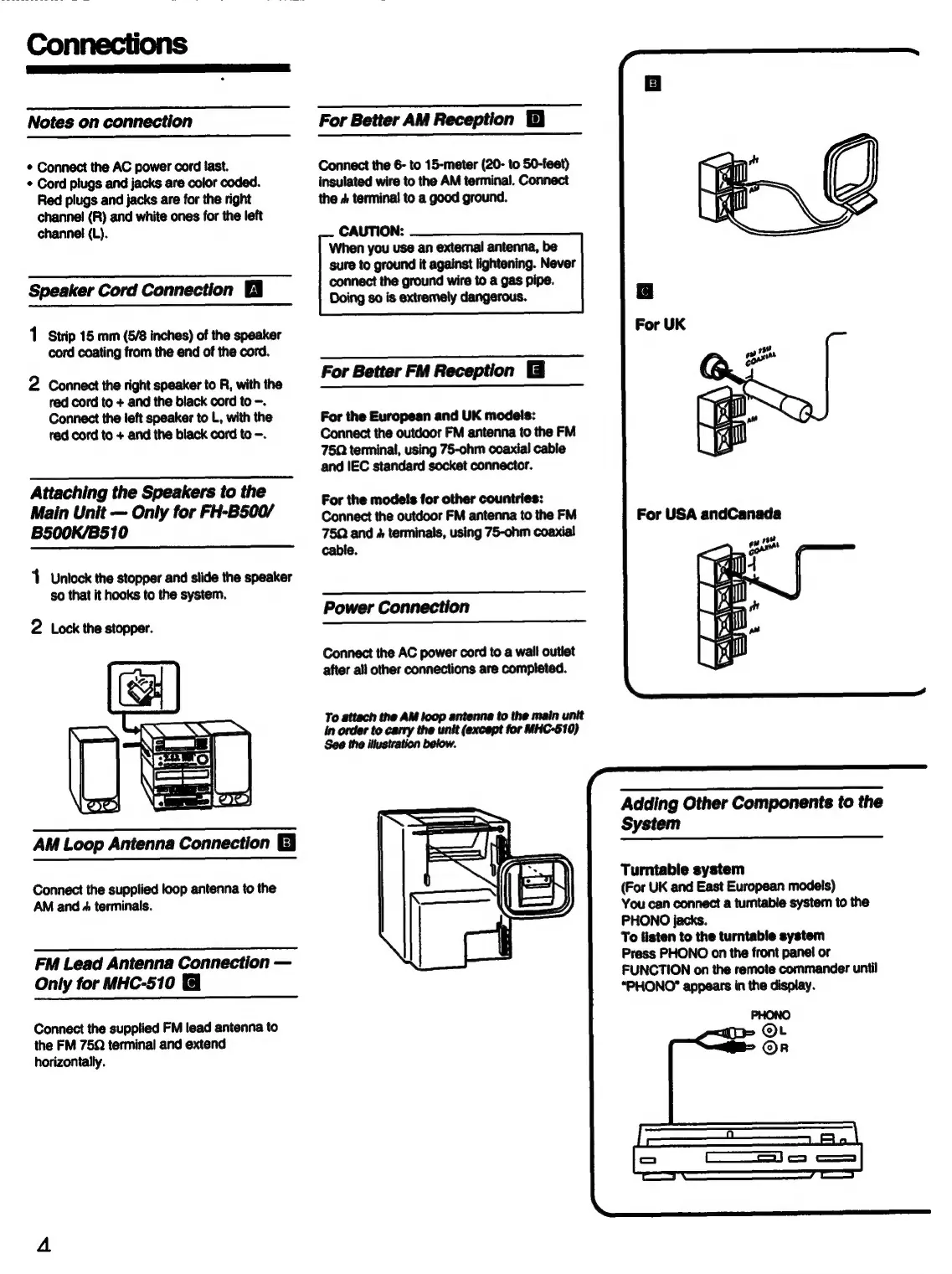
Speaker
Cord
Connection
1
Strip
15
mm
(5/8
inches)
of
the
speaker
cord
coating
from
the
end
of
the
cord.
2
Connect
the
right
speaker
to
R,
with
the
red
cord
to
+
and
the
black
cord
to
-.
Connect
the
left
speaker
to
L,
with
the
red
cord
to
+
and
the
black
cord
to
-.
Attaching
the
Speakers
to
the
Main
Unit
Only
for
FH-B500/
B500K/B510
1
Untock
the
stopper
and
slide
the
speaker
so
that
it
hooks
to
the
system.
2
Lock
the
stopper.
AM
Loop
Antenna
Connection
E
Connect
the
supplied
loop
antenna
to
the
AM
and
+
terminals.
FM
Lead
Antenna
Connection
Only
for
MHC-510
Connect
the
supplied
FM
lead
antenna
to
the
FM
75Q
terminal
and
extend
horizontally.
pS
For
Better
AM
Reception
Connect
the
6-
to
15-meter
(20-
to
50-feet)
insulated
wire
to
the
AM
terminal.
Connect
the
&
terminal
to
a
good
ground.
CAUTION:
When
you
use
an
extemal
antenna,
be
sure
to
ground
it
against
lightening.
Never
connect
the
ground
wire
to
a
gas
pipe.
Doing
so
is
extremely
dangerous.
For
Better
FM
Reception
For
the
European
and
UK
models:
Connect
the
outdoor
FM
antenna
to
the
FM
75Q
terminal,
using
75-ohm
coaxial
cable
and
IEC
standard
socket
connector.
For
the
models
for
other
countries:
Connect
the
outdoor
FM
antenna
to
the
FM
75Q
and
&
terminals,
using
75-ohm
coaxial
cable.
Power
Connection
Connect
the
AC
power
cord
to
a
wall
outlet
after
all
other
connections
are
completed.
To
attach
the
AM
loop
antenna
to
the
main unit
in
order
to
carry
the
unit
(except
for
MHC-510)
See
the
illustration
below.
For
USA
andCanada
Adding
Other
Components
to
the
System
Turntable
system
(For
UK
and
East
European
models)
You
can
connect
a
tumtable
system
to
the
PHONO
jacks.
To
listen
to
the
turntable
system
Press
PHONO
on
the
front
panel
or
FUNCTION
on
the
remote
commander
until
“PHONO”
appears
in
the
display.

Related product manuals