11
GB
NAS-E35HD.GB.3-292-247-11(1)
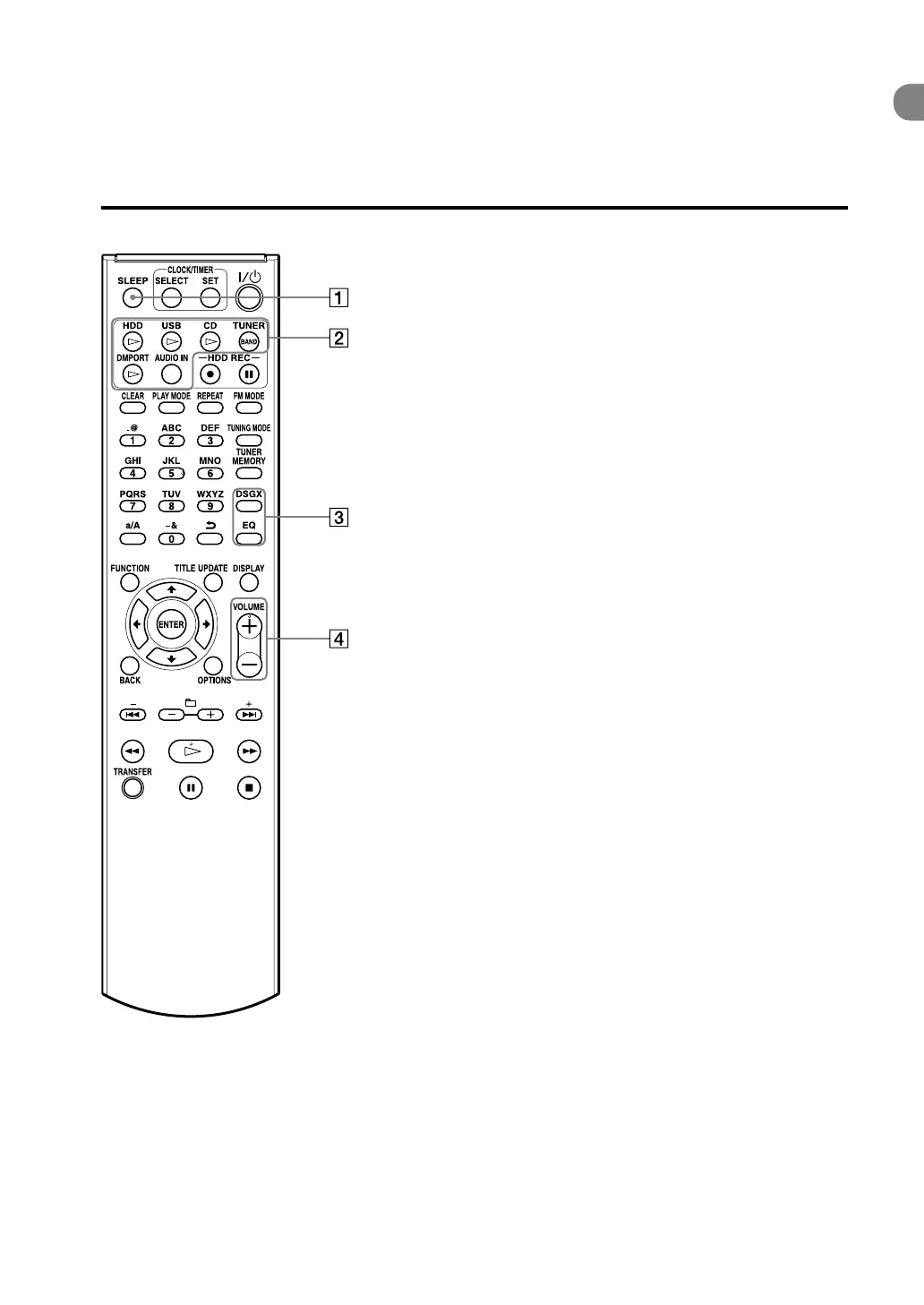
Remote control
Guide to parts and controls
SLEEP button
Use to make or conrm the sleep timer
setting (page 50).
Playback buttons
Use to select the function directly and start
playback at the same time.
HDD button (page 29)
USB button (page 34)
CD button (page 30)
TUNER/BAND button (page 32)
DMPORT button (page 37)
AUDIO IN button (page 36)
DSGX and EQ buttons
DSGX button
Use to generate a more dynamic sound
(Dynamic Sound Generator X-tra).
Each press of the button switches the DSGX
function “ON” or “OFF”. is function is
factory set to “ON”.
EQ (equalizer) button
Use to adjust the bass and treble.
Press this button to display “BASS”, and
then press or to adjust the bass.
Aer adjusting the bass sound, press this
button again to display “TREBLE”, and then
press or to adjust the treble.
VOLUME+* and VOLUME– buttons
Use to adjust the volume.
An asterisk (*) indicates buttons that
have a tactile dot (the VOLUME +
button).



 To Next Page