13
GB
NAS-E35HD.GB.3-292-247-11(1)
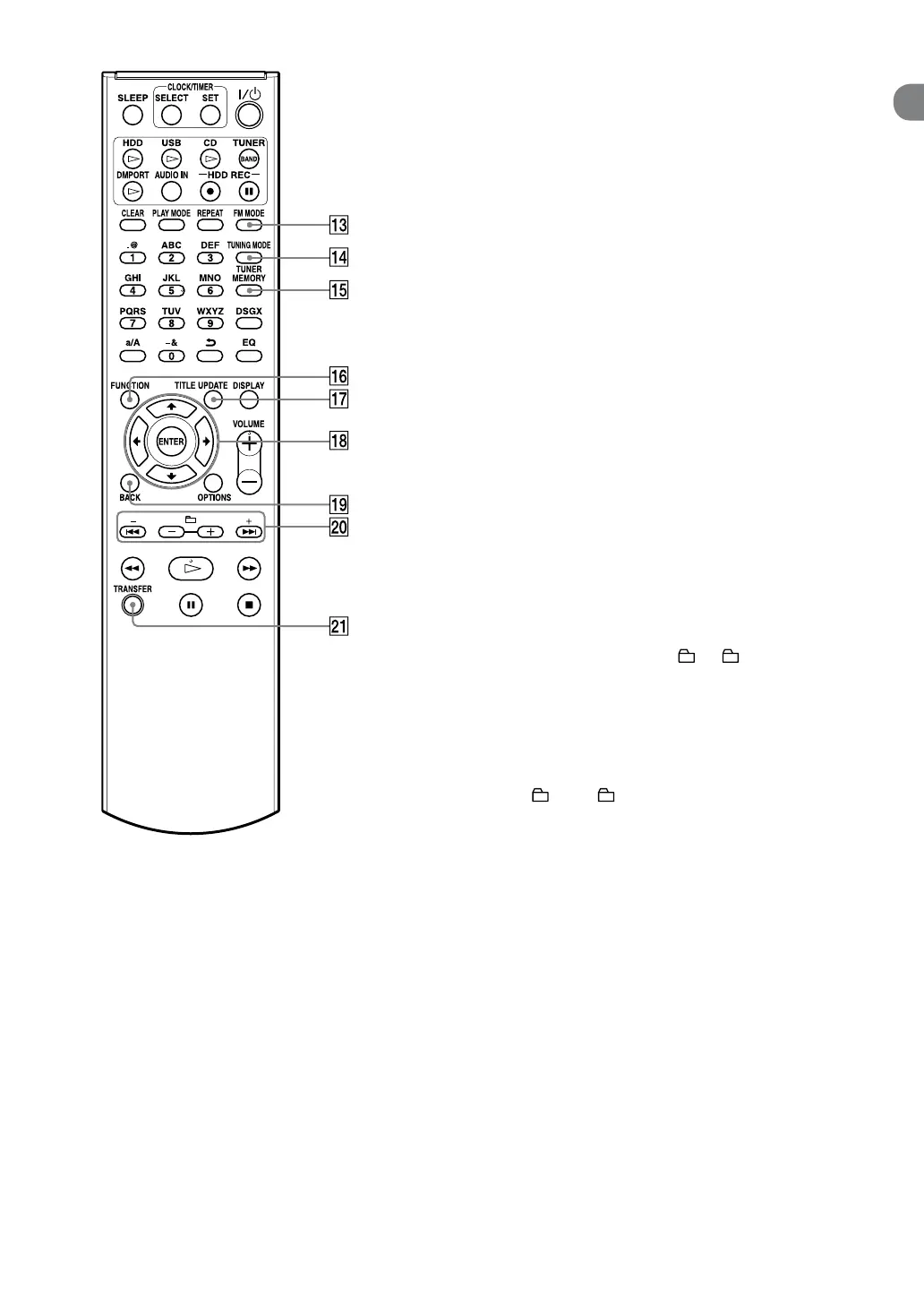
FM MODE button
Use to select stereo or monaural while
listening to an FM broadcast (page 33).
TUNING MODE button
Use to select the tuning mode (page 32).
TUNER MEMORY button
Use to preset a radio station or DAB service
(UK model only) (page 33).
FUNCTION button
Use to select a function (page 17).
TITLE UPDATE button
Use to display the Title Update menu (page
43).
Menu operation buttons
Use to select menu items and enter menu
settings (page 17).
,
,
and
buttons
Use to select a menu item or to change a
setting.
ENTER button
Use to enter a setting.
BACK button
Use to go back to the previous display (page
16).
+ • –, • and + • – buttons
+ and – buttons
Use to adjust the tuning frequency (page
32).
and
buttons
Cues the beginning of a track (page 29).
+ and – buttons
Use to select an album or a folder (page 29).
TRANSFER button
Use to transfer tracks to a USB device (page
26).



 To Next Page