20
Step 5: Inserting a tape or a “Memory Stick
Duo”
You can use mini DV cassettes only
(p. 92).
b Notes
• The recordable time varies depending on [
REC MODE] (p. 58).
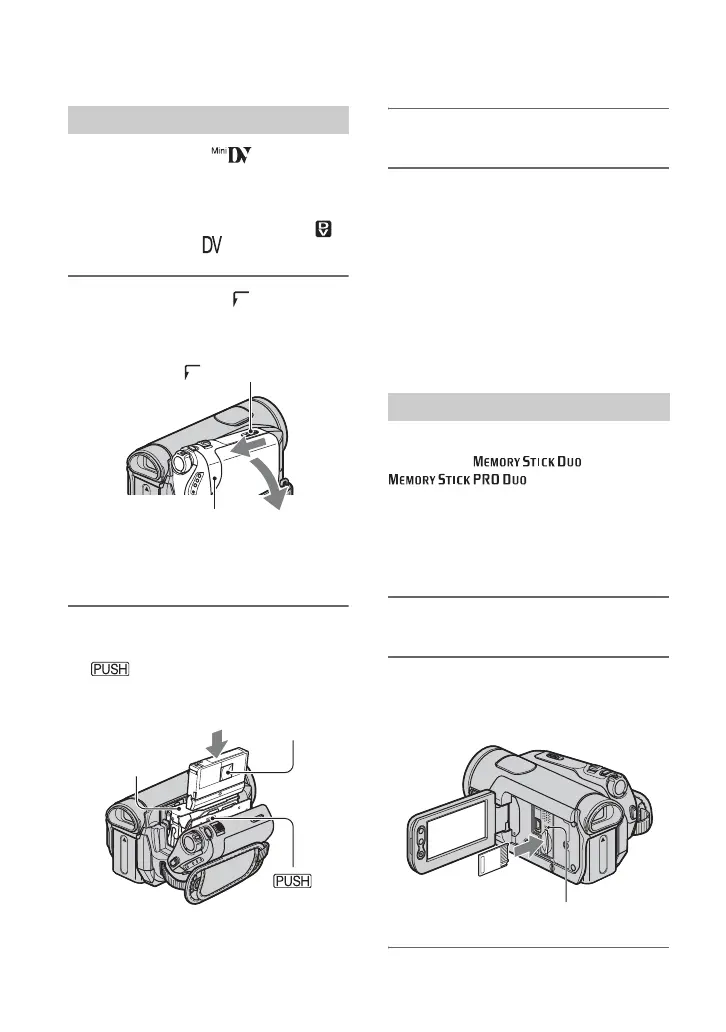
1 Slide and hold the OPEN/
EJECT lever in the direction of the
arrow and open the lid.
The cassette compartment automatically
comes out and opens up.
2 Insert a cassette with its window
facing outwards, then press
.
The cassette compartment
automatically slides back in.
3 Close the lid.
To eject the cassette
Open the lid following the same procedure
as described in step 1 and remove the
cassette.
b Notes
• Do not force the cassette compartment
closed by pressing the portion marked
while it is sliding in. It
may cause a malfunction.
You can use only a “Memory Stick Duo”
marked with or
(p. 93).
z Tips
• The number and time of recordable pictures
vary depending on the image quality or the
image size. For details, see page 50.
1 Open the LCD panel.
2 Insert the “Memory Stick Duo”
into the “Memory Stick Duo” slot
in the right direction until it clicks.
Cassette tape
OPEN/EJECT lever
Lid
Window
Push the center of the back
of the cassette lightly.
Cassette
compartment
“Memory Stick Duo”
Access lamp


 To Next Page