36
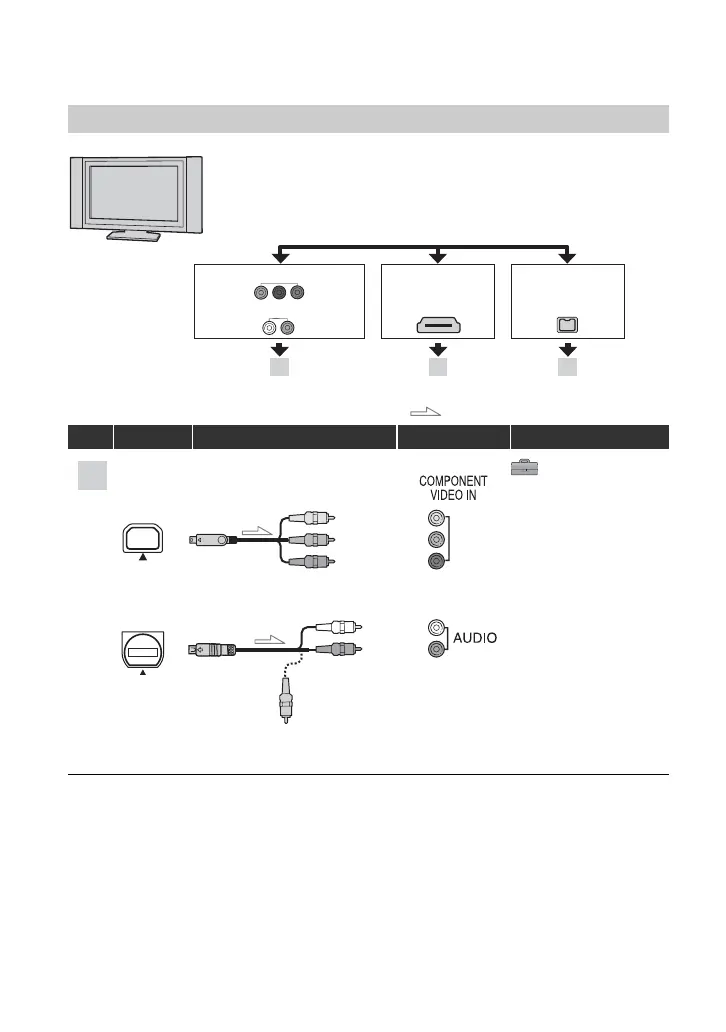
Connecting to a high definition TV
: Signal flow, ( ): Reference pages
Type Camcorder Cable TV Menu Setting
(STANDARD SET)
[VCR HDV/DV] t
[AUTO] (57)
[COMPONENT] t
[1080i/480i] (60)
• An A/V connecting cable is also needed to output audio signals. Connect the white and red plugs of the A/
V connecting cable to the audio input jack of your TV.
B CA
HDMI
i.LINK
COMPONENT IN
AUDIO
(for HDV1080i)
HD (high definition) image quality
• An HDV formatted picture is played back as it is
(HD image quality).
• A DV formatted picture is played back as it is (SD image quality).
1
2
A
Component video cable
(supplied)
A/V connecting cable
(supplied)
(Green) Y
(Blue) P
B
/C
B
(Red) P
R
/C
R
(White)
(Red)
(Yellow)
Playing the picture on a TV (Continued)


 To Next Page