29
Recording/Playback
Playback
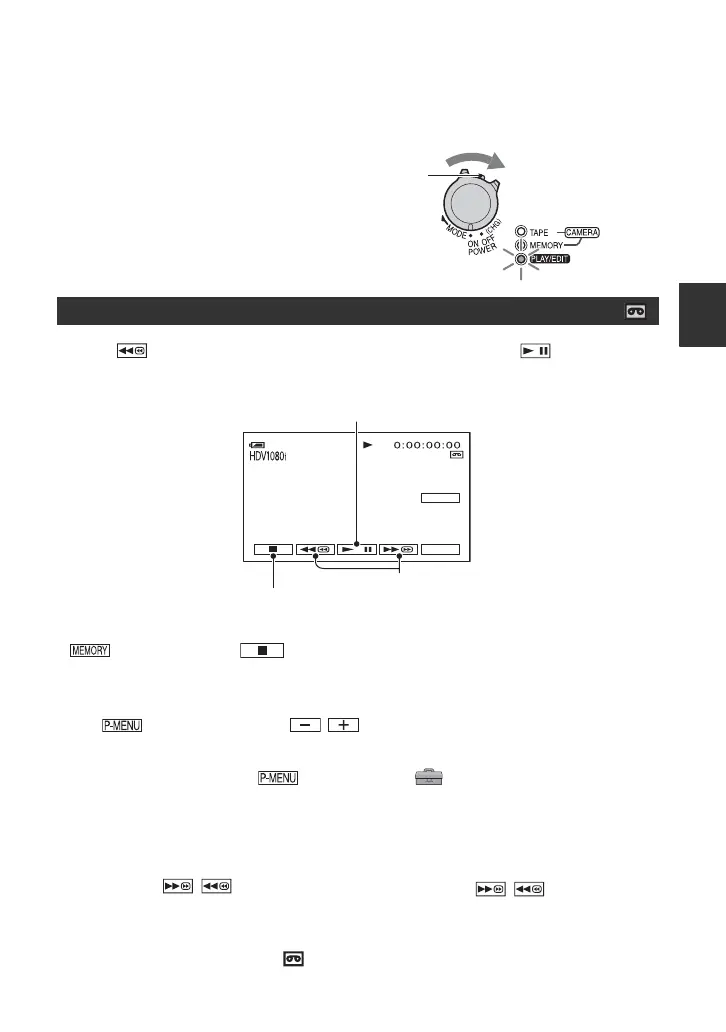
Slide the POWER switch in the direction of the arrow repeatedly to
turn on the PLAY/EDIT lamp.
Touch to rewind to the desired scene, then touch to start
playback.
To adjust the sound volume
Touch t [VOLUME], then / to adjust the volume.
z Tips
• If you cannot find [VOLUME] in , touch [MENU] t (STANDARD SET) t [VOLUME]
(p. 59).
• For HDR-HC7:
You can also adjust the volume with the CAM CTRL dial (p. 27).
To search for a scene during playback
Touch and hold / during playback (Picture Search), or / while fast
forwarding or rewinding the tape (Skip Scan).
z Tips
• You can play back in various modes ([ VAR.SPD PB], p. 56).
Playing movies
* Playback automatically stops if pause is engaged for more than 3 minutes.
** is displayed instead of when a “Memory Stick Duo” with recorded images is inserted and
a tape is not being played.
If the POWER switch is set to OFF (CHG), slide it
while pressing the green button.
P-MENU
60min
60min
GUIDE
Toggles Play or Pause as you touch*
Stop**
Rewind/Fast forward
Continued ,


 To Next Page