25
Recording/Playback
Still images are recorded on the “Memory Stick Duo.”
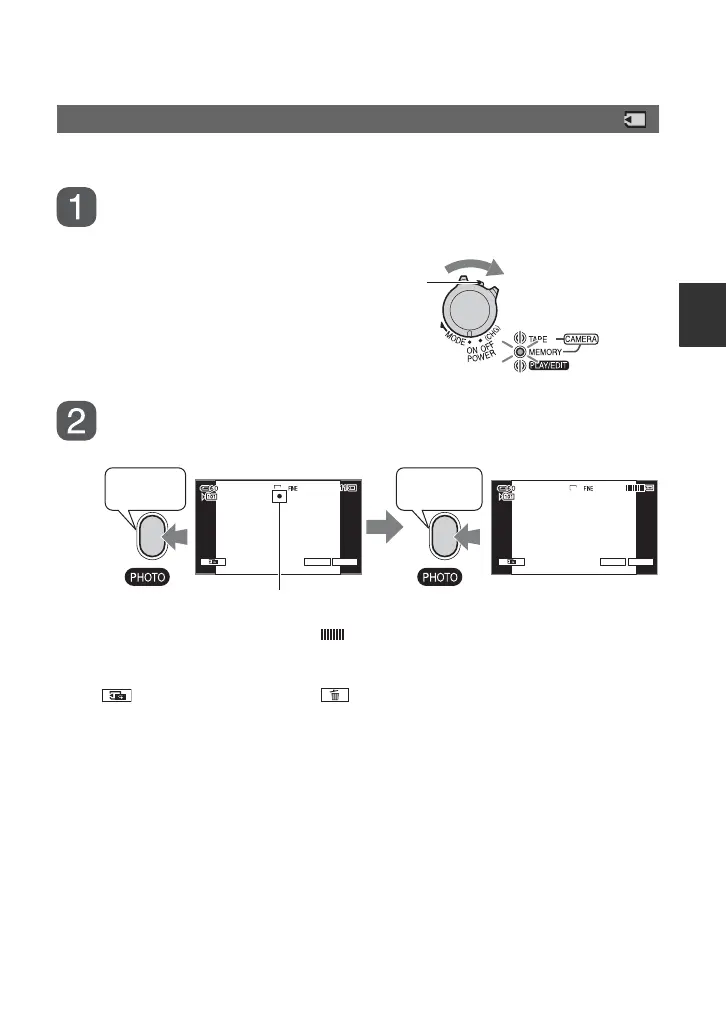
Slide the POWER switch in the direction of the arrow repeatedly
to turn on the CAMERA-MEMORY lamp.
Press and hold PHOTO lightly to adjust the focus, then press it
fully to record.
A shutter sound is heard. When disappears, the image has been recorded.
To check the latest recording on a “Memory Stick Duo”
Touch . To delete the picture, touch t [YES].
z Tips
• See page 50 for the image quality, image size and the number of recordable pictures.
Recording still images
If the POWER switch is set to OFF (CHG), slide it
while pressing the green button.
6.1M 6.1M
P-MENU P-MENUGUIDE GUIDE
min min
Beep
Shutter click
Flashing bLights up
Continued ,


 To Next Page