40
Using the Menu
Using the menu items
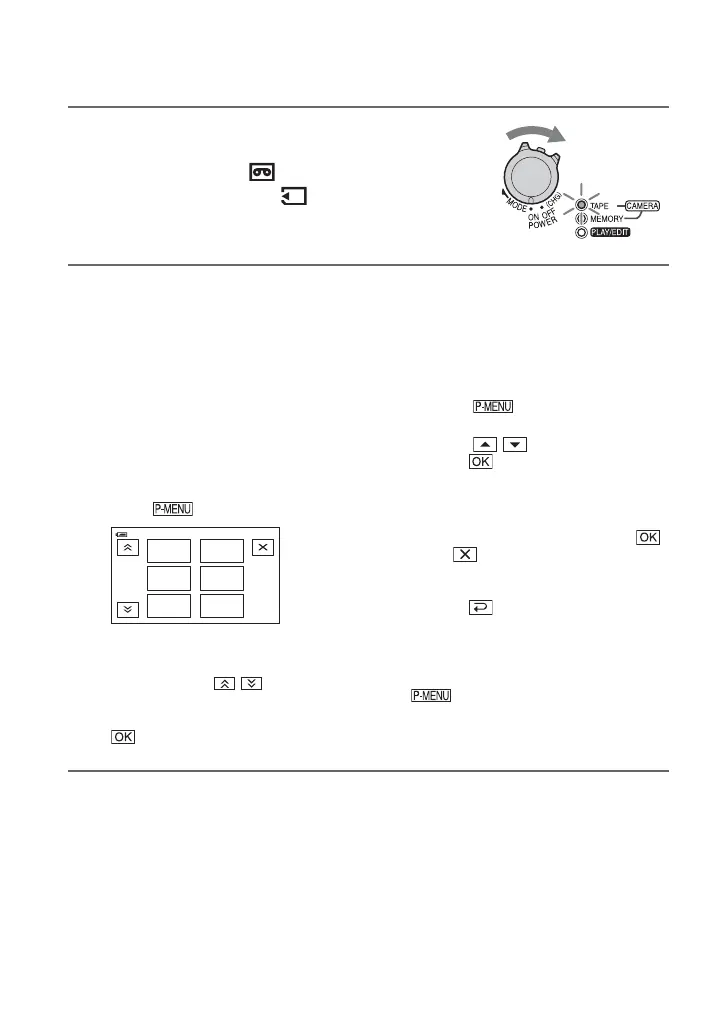
1 Slide the POWER switch in the direction of the arrow
repeatedly to turn on the respective lamp.
CAMERA-TAPE lamp: settings on a tape
CAMERA-MEMORY lamp: settings on a “Memory Stick
Duo”
PLAY/EDIT lamp: settings for viewing/editing
2 Touch the LCD screen to select the menu item.
Unavailable items will be grayed out.
x To use the short-cuts of
Personal Menu
On Personal Menu, short-cuts for
frequently used menu items are added.
z Tips
• You can customize Personal Menu as you
like (p. 63).
1 Touch .
2 Touch the desired item.
If the desired item is not displayed on
the screen, touch / until the item
is displayed.
3 Select the desired setting, then touch
.
x To use menu items
You can customize menu items that are
not added to Personal Menu.
1 Touch t [MENU].
2 Select the desired menu.
Touch / to select the item, then
touch (The process in step 3 is
the same as that in step 2).
3 Select the desired item.
4 Customize the item.
After finishing the settings, touch
t (close) to hide the menu
screen.
If you decide not to change the setting,
touch to return to the previous
screen.
x To use menu items during Easy
Handycam operation
is not displayed during Easy
Handycam operation. Touch [MENU]
to display the menu index screen.
MENU
TELE
MACRO
1/3
0:00:00
60min
SMOOTH
SLWREC
FADE R
SCENE
SELECT
DISP
GUIDE
STBY


 To Next Page