38
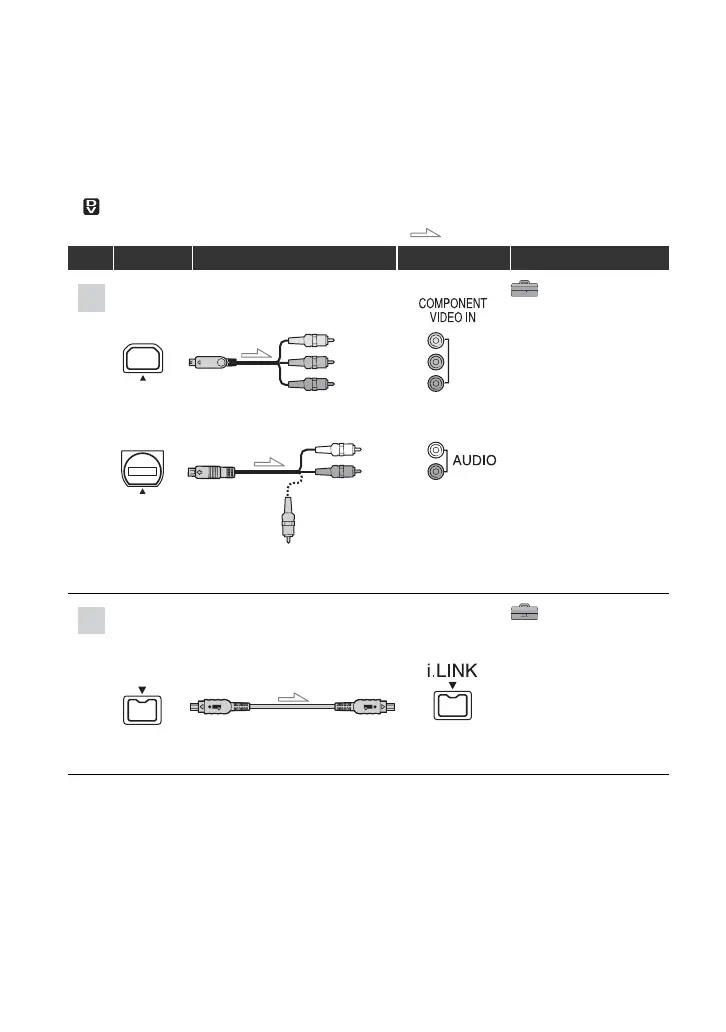
To set the aspect ratio according to the connected TV (16:9/4:3)
Change the [TV TYPE] setting to match your TV (p. 60).
b Notes
• When you play back a tape recorded in the DV format on a 4:3 TV not compatible with the 16:9 signal, set
[ WIDE SELECT] to [4:3] on your camcorder when recording a picture (p. 58).
: Signal flow, ( ): Reference pages
Type Camcorder Cable TV Menu Setting
(STANDARD SET)
[VCR HDV/DV] t
[AUTO] (57)
[COMPONENT] t
[480i] (60)
[TV TYPE] t
[16:9]/[4:3] (60)
• A/V connecting cable is also needed to output audio signals. Connect the white and red plugs of the A/V
connecting cable to the audio input jack of your TV.
(STANDARD SET)
[VCR HDV/DV] t
[AUTO] (57)
[i.LINK CONV] t
[ON HDV t DV] (60)
• The TV needs to be set so that it recognizes that the camcorder is connected. See the instruction manuals
supplied with your TV.
1
2
D
Component video cable
(supplied)
A/V connecting cable
(supplied)
(Green) Y
(Blue) P
B
/C
B
(Red) P
R
/C
R
(White)
(Red)
(Yellow)
4
i.LINK cable (supplied)
Playing the picture on a TV (Continued)


 To Next Page