EasyManua.ls Logo

Sony HCD-241 - Dubbing Tapes (from Deck a to B)

Sony HCD-241
24 pages
Print Icon
To Next Page IconTo Next Page
To Previous Page IconTo Previous Page
Loading...
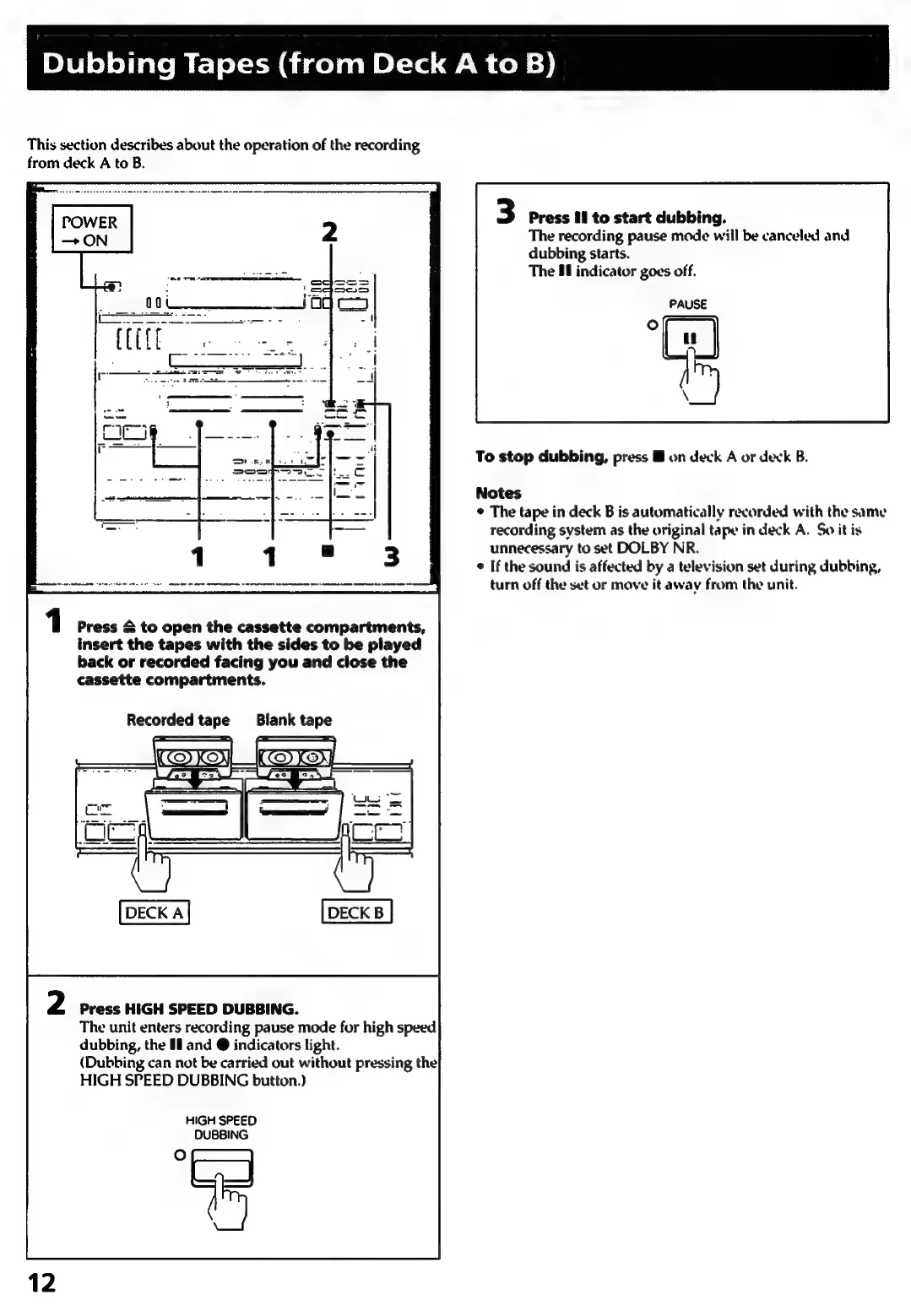
Dubbing
Tapes (from
Deck
A
to
B)
This
section
describes
about
the
operation
of
the
recording
from
deck
A
to
B.
1
Press
&
to
open
the
cassette
compartments,
insert
the
tapes
with
the
sides
to
be
played
back
or
recorded
facing
you
and
close
the
cassette
compartments.
Recorded
tape
Blank
tape
Press
HIGH
SPEED
DUBBING.
The
unit
enters
recording
pause
mode
for
high
speed
dubbing,
the
1
and
@
indicators
light.
(Dubbing
can
not
be
carried
out
without
pressing
the
HIGH
SPEED
DUBBING
button.)
HIGH
SPEED
DUBBING
ce)
3
Press
ill
to
start
dubbing.
The
recording
pause
mode
will
be
canceled
and
dubbing
starts.
The
#8
indicator
goes
off.
PAUSE
To
stop
dubbing,
press
HM
on
deck
A
or
deck
B.
Notes
©
The
tape
in
deck
B
is
automatically
recorded
with
the
same
recording
system
as
the
original
tape
in
deck
A.
So
itis
unnecessary
to
set
DOLBY
NR.
e
If
the
sound
is
affected
by
a
television
set
during
dubbing,
turn
off
the
set
or
move
it
away
from
the
unit.

Related product manuals