EasyManua.ls Logo

Sony HCD-241 - Playing in a Desired Order - Program Play

Sony HCD-241
24 pages
Print Icon
To Next Page IconTo Next Page
To Previous Page IconTo Previous Page
Loading...
Playing
in
a
Desired
Order
—-
Program
Play
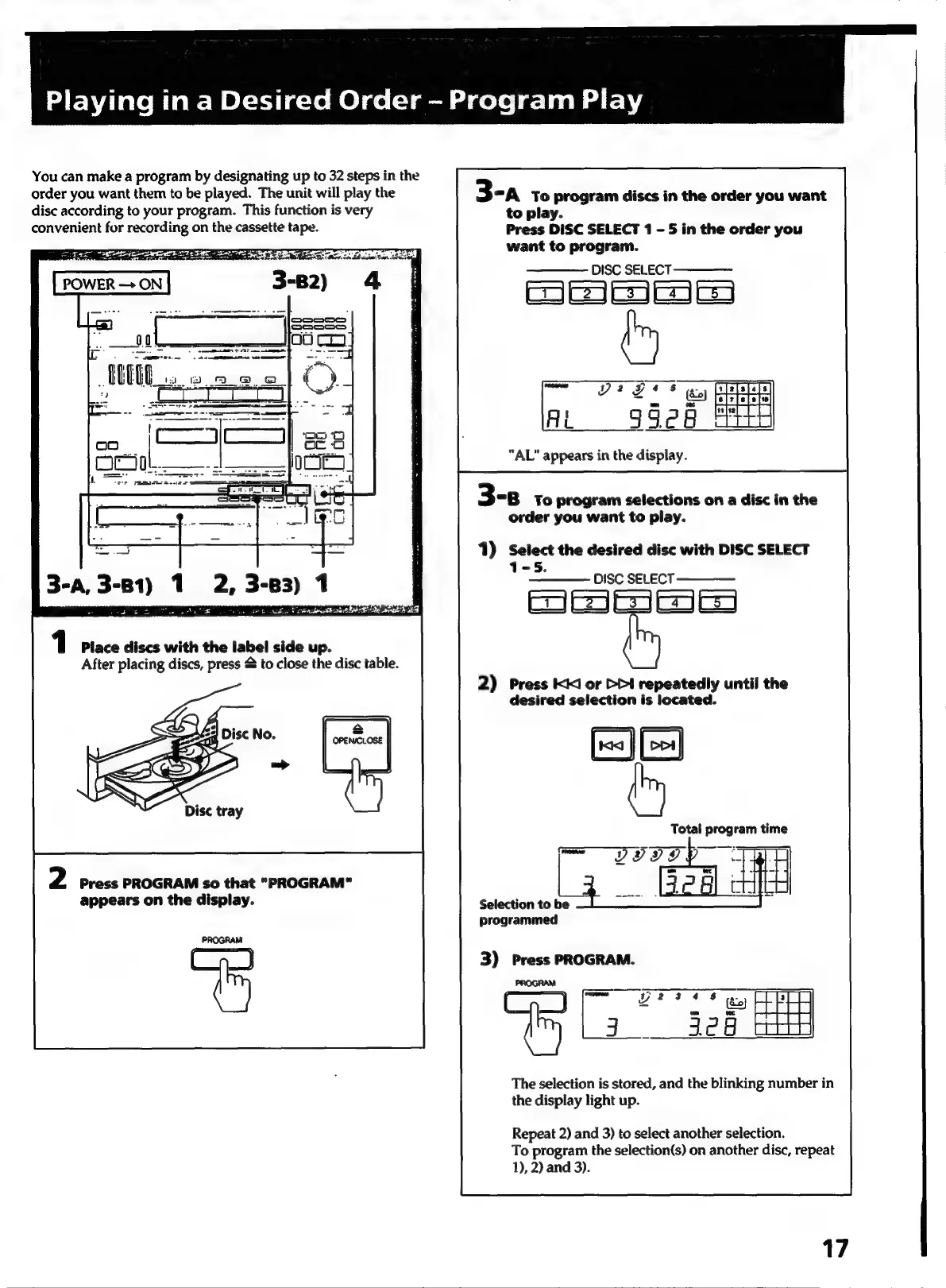
You
can
make
a
program
by
designating
up
to
32
steps
in
the
order
you
want
them
to
be
played.
The
unit
will
play
the
dise
according
to
your
program.
This
function
is
very
convenient
for
recording
on
the
cassette
tape.
-
a
FF
i
amr
aa
we:
22.59
="
B3)
1
ROR
IES
OIA
NES
IDES
36
LENS
1
Place
discs
with
the
label
side
up.
After
placing
discs,
press
&
to
close
the
disc
table.
2
Press
PROGRAM
so
that
“PROGRAM”
appears
on
the
display.
PROGRAM
3-a
To
program
discs
in
the
order
you
want
to
play.
Press
DISC
SELECT
1
-
5
in
the
order
you
want
to
program.
————
DISC
SELECT
———_—
Smee
~
99
o7*
©
ee
AL
99e8
PATH
“AL”
appears
in
the
display.
3-8
To
program
selections
on
a
disc
in
the
order
you
want
to
play.
1)
Select
the
desired
disc
with
DISC
SELECT
5.
————
DISC
SELECT
=
2)
Press
KI
or
>>I
repeatedly
until
the
desired
selection
is
located.
Total
program
time
Selection
to
be
programmed
3)
Press
PROGRAM.
Cty
La
aed
aH
The
selection
is
stored,
and
the
blinking
number
in
the
display
light
up.
Repeat
2)
and
3)
to
select
another
selection.
To
program
the
selection(s)
on
another
disc,
repeat
1),
2)
and
3).
17

Related product manuals