EasyManua.ls Logo

Sony HCD-241 - Page 3

Sony HCD-241
24 pages
Print Icon
To Next Page IconTo Next Page
To Previous Page IconTo Previous Page
Loading...
Precautions
This
unit
is
a
compact
disc
deck
receiver
which
consists
of
an
amplifier,
tuner,
stereo
cassette
deck
and
5-compact
disc
player.
Before
operating
this
unit,
be
careful
about
the
followings.
On
safety
¢
Operate
the
unit
only
on
120
V
AC,
60
Hz.
¢
Should
any
solid
object
or
liquid
fall
into
the
unit,
unplug
it
and
have
it
checked
by
qualified
personne]
before
operating
it
any
further.
©
Unplug
the
unit
from
the
wall
outlet
if
it
is
not
to
be
used
for
an
extended
period
of
time.
To
disconnect
the
cord,
pull
it
out
by
grasping
the
plug.
Never
pull
the
cord
itself.
¢
As
the
laser
beam
used
in
this
compact
disc
player
is
harmful
to
the
eyes,
do
not
attempt
to
disassemble
the
cabinet.
Refer
servicing
to
qualified
personnel
only.
On
installation
¢
Place
the
unit
on
a
level
surface.
¢
Do
not
install
the
unit
in
a
location
near
heat
sources
such
as
radiators
or
air
ducts,
or
in
a
place
subject
to
direct
sunlight,
excessive
dust,
mechanical
vibration
or
shock.
*
Good
air
circulation
is
essential
to
prevent
internal
heat
buildup
in
the
unit.
Place
the
unit
in
a
location
with
adequate
air
circulation.
Do
not
place
the
unit
on
a
soft
surface,
such
as
a
rug
that
would
block
the
ventilation
holes
on
the
bottom.
¢
Do
not
place
anything
on
top
of
the
cabinet.
The
top
ventilation
holes
must
be
unobstructed
for
the
proper
operation
of
the
unit
and
to
prolong
the
life
of
its
components.
On
cleaning
the
cabinet
Clean
the
cabinet,
panel
and
controls
with
a
soft
cloth
lightly
moistened
with
mild
detergent
solution.
Do
not
use
any
type
of
abrasive
pad,
scouring
powder
or
solvent
such
as
alcohol
or
benzine.
On
repacking
Do
not
throw
away
the
carton
and
the
packing
material.
It
makes
an
ideal
container
to
transport
the
unit
in.
On
moisture
condensation
If
the
unit
is
brought
directly
from
a
cold
to
a
warm
location,
or
is
placed
in
a
very
damp
room,
moisture
may
condense
on
the
lens
inside
the
CD
section.
Should
this
occur,
the
CD
section
will
not
operate.
In
this
case,
remove
the
disc
and
leave
the
unit
turned
on
for
about
an
hour
until
the
moisture
evaporates.
If
you
have
any
question
or
problem
concerning
your
unit,
please
consult
your
nearest
Sony
dealer.
For
detailed
precautions,
see
the
leaflet
“IMPORTANT
SAFEGUARDS".
(Model
for
U.S.A.)
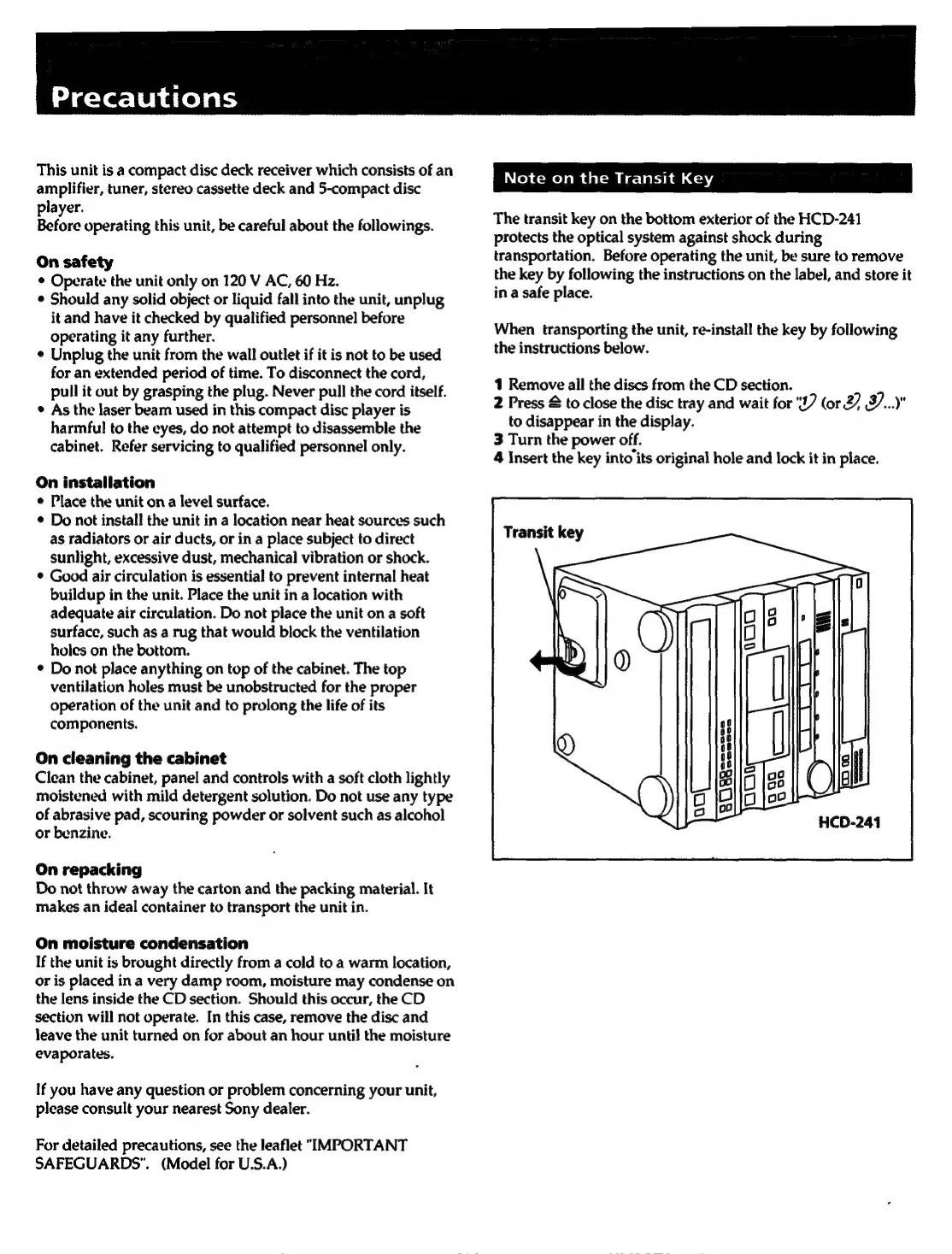
Note
on
the
Transit
Key
The
transit
key
on
the
bottom
exterior
of
the
HCD-241
protects
the
optical
system
against
shock
during
transportation.
Before
operating
the
unit,
be
sure
to
remove
the
key
by
following
the
instructions
on
the
label,
and
store
it
in
a
safe
place.
When
transporting
the
unit,
re-install
the
key
by
following
the
instructions
below.
1
Remove
all
the
discs
from
the
CD
section.
2
Press
&
to
close
the
disc
tray
and
wait
for
"17
(or
27
J..."
to
disappear
in
the
display.
3
Turn
the
power
off.
4
Insert
the
key
into
its
original
hole
and
lock
it
in
place.
Transit
key
oo
D
i=}
i=)
HCD-241

Related product manuals