EasyManua.ls Logo

Sony HCD-541 - Adjusting the Speaker Volume Issue Seavosasussoveseeseates Cooneescontertee

Sony HCD-541
32 pages
Print Icon
To Next Page IconTo Next Page
To Previous Page IconTo Previous Page
Loading...
ef-s
aafalemit-r-leh
ace)
a
Oleliohm-lelacelelalemyelelale|
Adjusting
the
Speaker
Volume
To
enjoy
the
surround
sound
to
the
maximum
on
playing
any
program
sources,
adjust
the
front,
rear,
and
center
(if
connected
)
speakers
to
the
same
volume
level.
The
adjustment
must
be
done
with
a
test
tone
in
the
DOLBY
SURROUND
mode,
but
the
level
once
adjusted
can
be
used
for
all
surround
modes.
You
can
adjust
the
volume
level
from
your
listening
position
by
using
the
remote
commander.
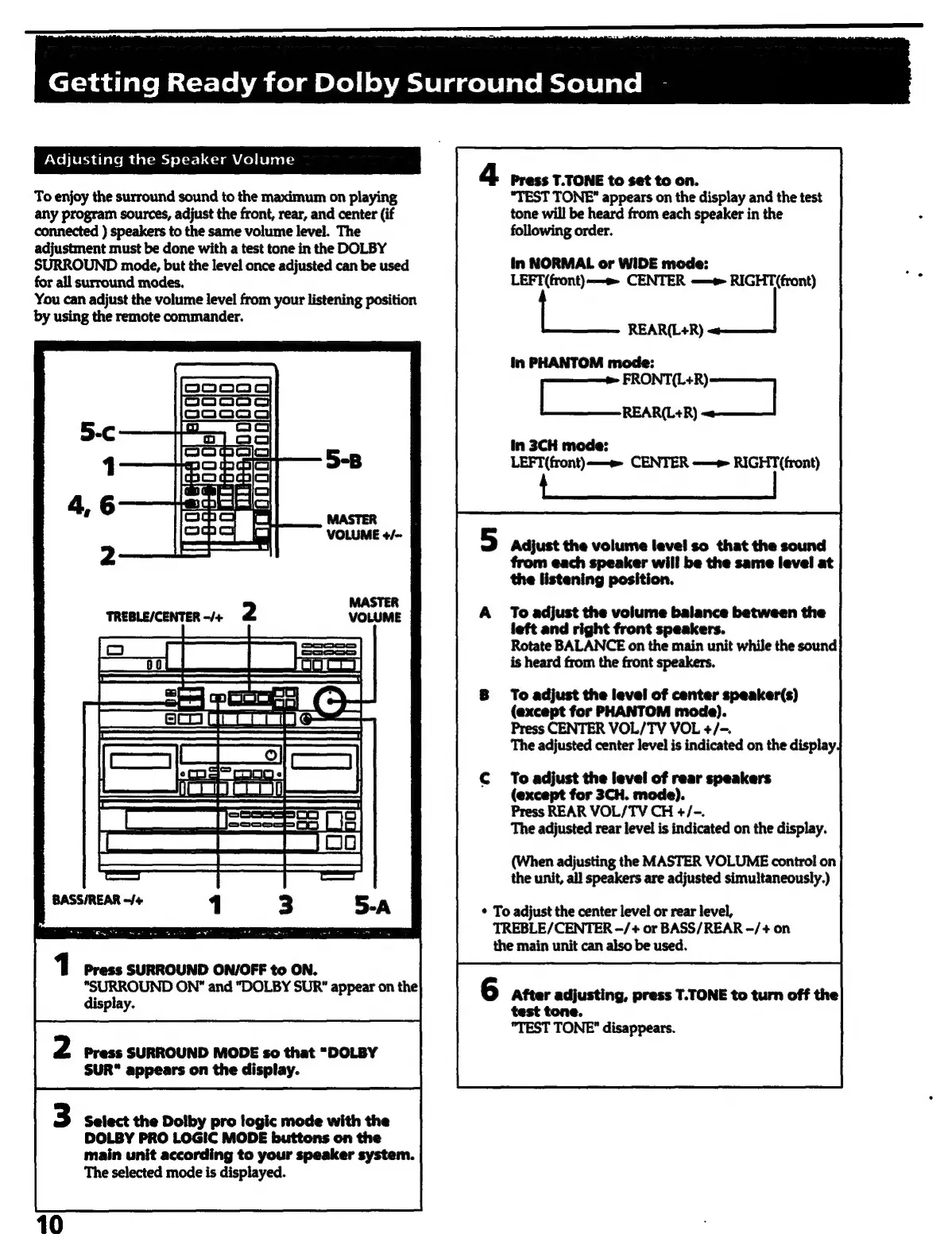
4
Press
T.TONE
to
set
to
on.
“TEST
TONE”
appears
on
the
display
and
the
test
tone
will
be
heard
from
each
speaker
in
the
following
order.
in
NORMAL
or
WIDE
mode:
:
LEFT
(front)
—«
CENTER
—~
RIGHT(front)
REAR(L+R)
in
PHANTOM
mode:
aed
REAR(L+R)
in
3CH
mode:
LEFT(front)-——«
CENTER
~—
RIGHT(front)
Adjust
the
volume
level
so
that
the
sound
from
each
speaker
will
be
the
same
level
at
the
listening
position.
To
adjust
the
volume
balance
between
the
left
and
right
front
speakers.
Rotate
BALANCE
on
the
main
unit
while
the
sound
is
heard
from
the
front
speakers.
To
adjust
the
level
of
center
speaker(s)
see
__f-—_9
REA
INN
MORTAR
(except
for
PHANTOM
mode).
Press
CENTER
VOL/TV
VOL
+/-.
The
adjusted
center
level
is
indicated
on
the
display
To
adjust
the
level
of
rear
speakers
(except
for
3CH.
mode).
Press
REAR
VOL/TV
CH
+/-.
The
adjusted
rear
level
is
indicated
on
the
display.
(When
adjusting
the
MASTER
VOLUME
control
on
the
unit,
all
speakers
are
adjusted
simultaneously.)
To
adjust
the
center
level
or
rear
level,
TREBLE/CENTER
-—/+
or
BASS/REAR
—/+
on
the
main
unit
can
also
be
used.
1
Press
SURROUND
ON/OFF
to
ON.
“SURROUND
ON"
and
“DOLBY
SUR"
appear
on
the
display.
6
After
adjusting,
press
T.TONE
to
turn
off
the
Press
SURROUND
MODE
so
that
“DOLBY
SUR“
appears
on
the
display.
Select
the
Dolby
pro
logic
mode
with
the
DOLBY
PRO
LOGIC
MODE
buttons
on
the
main
unit
according
to
your
speaker
system.
The
selected
mode
is
displayed.
test
tone.
"TEST
TONE”
disappears.

Related product manuals