EasyManua.ls Logo

Sony HCD-541 - Page 19

Sony HCD-541
32 pages
Print Icon
To Next Page IconTo Next Page
To Previous Page IconTo Previous Page
Loading...
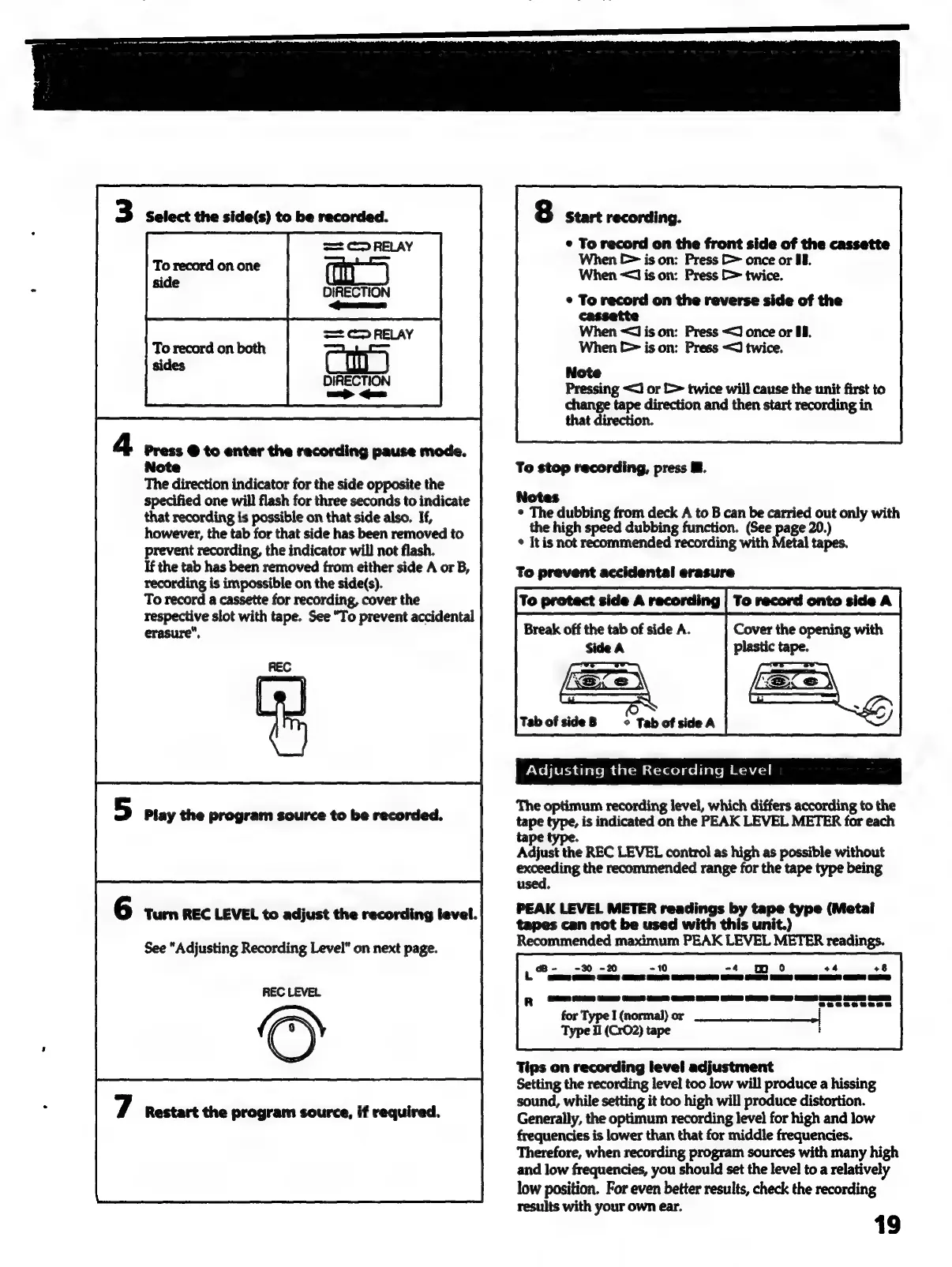
3
Select
the
side(s)
to
be
recorded.
w=
C>
RELAY
To
record
on
one
side
DIRECTION
<oeeee
==
C>
RELAY
DIRECTION
ame
aa
4
Press
@
to
enter
the
recording
pause
mode.
Note
The
direction
indicator
for
the
side
opposite
the
specified
one
will
flash
for
three
seconds
to
indicate
that
recording
is
possible
on
that
side
also.
If,
however,
the tab
for
that
side
has
been
removed
to
prevent
recording,
the
indicator
will
not
flash.
If
the
tab
has
been
removed
from
either
side
A
or
B,
recording
is
impossible
on
the
side(s).
To
record
a
cassette
for
recording,
cover
the
respective
slot
with
tape.
See
"To
prevent
accidental
erasure",
REC
Play
the
program
source
to
be
recorded.
6
Turn
REC
LEVEL
to
adjust
the
recording
level.
See
"Adjusting
Recording
Level"
on
next
page.
REC
LEVEL
7
Restart
the
program
source,
if
required.
:
Start
recording.
¢
To
record
on
the
front
side
of
the
cassette
When
E>
is
on:
Press
&
once
or
U8.
When
<J
is
on:
Press
>
twice.
¢
To
record
on
the
reverse
side
of
the
cassette
When
<J
is
on:
Press
<2)
once
or
08.
When
E>
is
on:
Press
<J
twice.
Note
Pressing
<J
or
&
twice
will
cause
the
unit
first
to
change
tape
direction
and
then
start
recording
in
that
direction.
To
stop
recording,
press
i.
Notes
¢
The
dubbing
from
deck
A
to
B
can
be
carried
out
only
with
the
high
speed
dubbing
function.
(See
page
20.)
*
It
is
not
recommended
recording
with
Metal
tapes.
To
prevent
accidental
erasure
To
protect
side
A
recording
Break
off
the
tab
of
side
A.
Cover
the
opening
with
Side
A
Sx
e
\
“as
vA
)
TabofsideB
©
TabofsideA
Adjusting
the
Recording
Level
:
The
optimum
recording
level,
which
differs
according
to
the
tape
type,
is
indicated
on
the
PEAK
LEVEL
METER
for
each
tape
type.
Adjust
the
REC
LEVEL
control
as
high
as
possible
without
exceeding
the
recommended
range
for
the
tape
type
being
used.
PEAK
LEVEL
METER
readings
by
tape
type
(Metal
tapes
can
not
be
used
with
this
unit.)
Recommended
maximum
PEAK
LEVEL
METER
readings.
B-
-%D
-20
-10
-4
wo
+4
+8
L
GE:
GER
GE,
GS GS
CE
CE
ED
CS
OE)
CE
Ge
a)
GS
for
Type
I
(normal)
or
——_—_—_—_-
Type
Hl
(CrO2)
tape
Tips
on
recording
level
adjustment
Setting
the
recording
level
too
low
will
produce
a
hissing
sound,
while
setting
it
too
high
will
produce
distortion.
Generally,
the
optimum
recording
level
for
high
and
low
frequencies
is
lower
than
that
for
middle
frequencies.
Therefore,
when
recording
program
sources
with
many
high
and
low
frequencies,
you
should
set
the
level
to
a
relatively
low
position.
For
even
better
results,
check
the
recording
results
with
your
own
ear.
19

Related product manuals