— 20 —
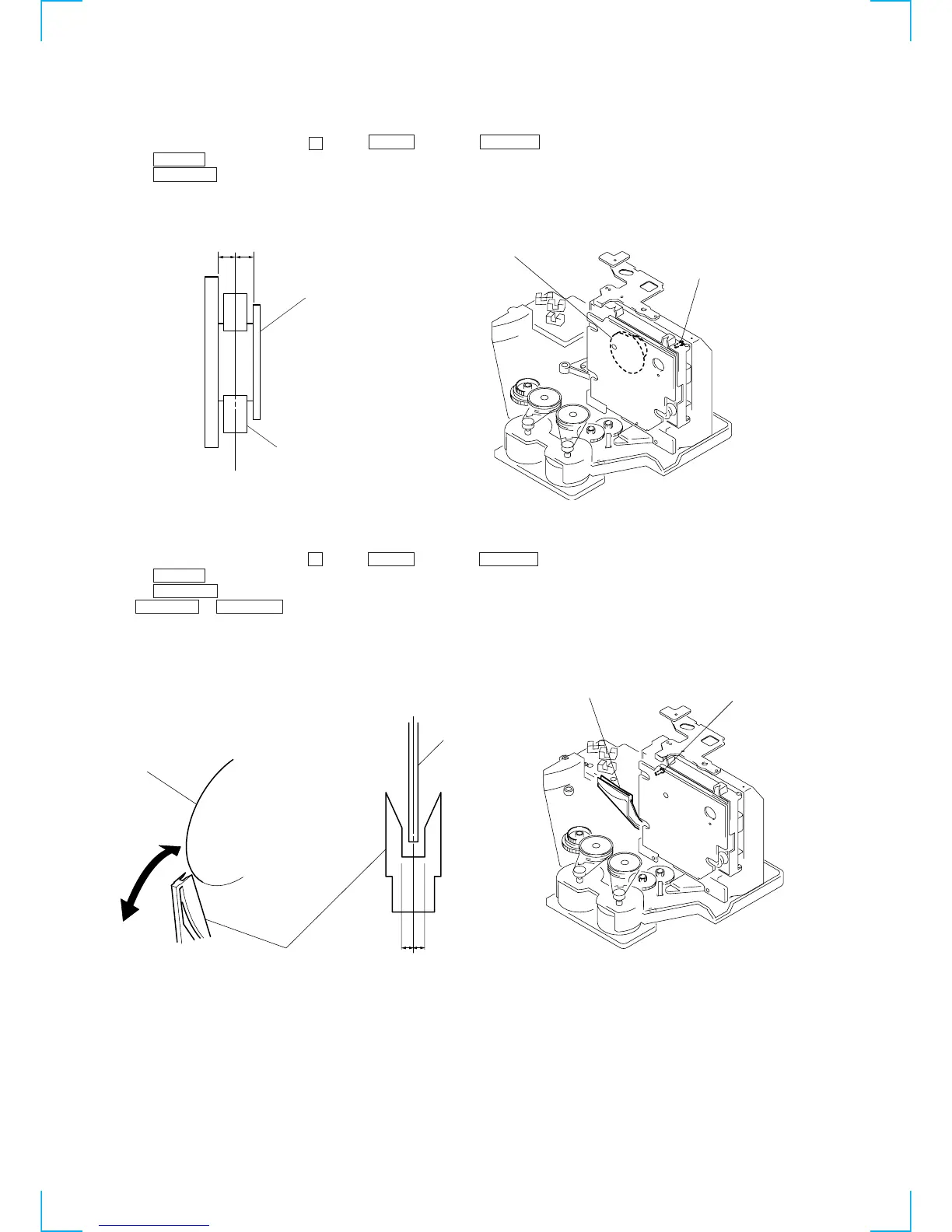
MAGNET ASSY ALIGNMENT
1. Check that there is no disc in the unit and then turn ON the power. Open the door, and set a disc in the PLUS ONE slit.
2. Close the door, and while pressing the p button, ENTER button and GROUP 5 button simultaneously.
3. Press the CHECK button, and set the loading mode.
4. Press the + ‚± button and chuck the disc.
5. Adjust the magnet assembly and magnet holder so that A = B as shown in the figure.
DISC HOLDER A ALIGNMENT
1. Check that there is no disc in the unit and then turn ON the power. Open the door, and set a disc in the PLUS ONE slit.
2. Close the door, and while pressing the p button, ENTER button and GROUP 5 button simultaneously.
3. Press the CHECK button, and set the loading mode.
4. Press the + ‚± button and chuck the disc.
5. Press + ‚± or ≠º – button to stop the disc holder A slightly away from the disc.
6. Rotate and adjust the adjusting screw so that the center of the disc and that of the disc holder coincide.
AB
Magnet ASSY
Magnet holder
Magnet ASSY
Screw (For adjustment








 To Next Page